

Taskwall: Screen Time + To Do
Taskwall: Screen Time + To Do is made and published by OrigamiStudio. AppBrain is an independent app data site and isn't affiliated with OrigamiStudio. The app name, icon, screenshots and description belong to OrigamiStudio and are shown as published on the App Store.
AppBrain's verdict
- Last updated
- March 26, 2026
Rankings
App Store top chartsApp Store Rankings for Taskwall: Screen Time + To Do
Competitors
Similar apps and more from OrigamiStudioAlternatives to Taskwall: Screen Time + To Do


More from OrigamiStudio


Releases
Updates seen on the App Store- Version
- 1.0
- Launched
- March 2026
No changelog data
User feedback
Ratings and reviews on the App StoreComments on Taskwall: Screen Time + To Do for iOS
We don't have enough comments to show example comments. Please check back later.
Technology
Found in the app by AppBrain- Price
- Free
- App size
- 8.44 MB
- Content rating
- Everyone
Technologies used by Taskwall: Screen Time + To Do
About the app and developer
About Taskwall: Screen Time + To Do
Taskwall: Screen Time + To Do is a productivity app developed by OrigamiStudio.
User Ratings
The app has no ratings yet.
App Information
Taskwall: Screen Time + To Do is freely available from the App Store. The app size is 8.44 MB. The latest version available is 1.0. The last update was on March 26, 2026.
Technical Requirements
The app has a content rating of Everyone. The app has been available on the App Store since March 2026.
Developer information for OrigamiStudio
Address:
Frequently asked questions about Taskwall: Screen Time + To Do
Is Taskwall: Screen Time + To Do free?
Yes. Taskwall: Screen Time + To Do is free on the App Store.
Is Taskwall: Screen Time + To Do still available?
Yes. Taskwall: Screen Time + To Do is on the App Store, and the last update we saw was on March 26, 2026.
How large is Taskwall: Screen Time + To Do?
Taskwall: Screen Time + To Do is 8.44 MB.
Is Taskwall: Screen Time + To Do suitable for children?
App Store rates the content of Taskwall: Screen Time + To Do as suitable for everyone.
Who made Taskwall: Screen Time + To Do?
Taskwall: Screen Time + To Do was developed by OrigamiStudio. It is listed in the productivity category on the App Store.
What are the best alternatives to Taskwall: Screen Time + To Do?
People looking at Taskwall: Screen Time + To Do also look at these productivity apps: Elutee, Quizwall: Focus App Blocker, Focusy: Tasks, Habits & AI, Screen Time Detox App - EarnIt, Unplugged: Screen Blocker.
Store listing
By OrigamiStudio, from the App Store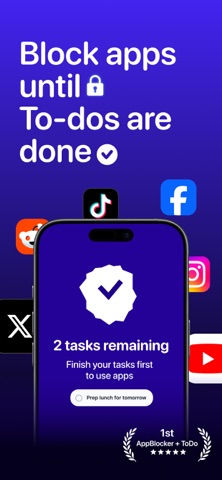


Description by OrigamiStudio Written by the developer, not by AppBrain. Click to read.
We've all been there. You set a time limit, only to hit "Ignore." You try an app that makes you wait 10 seconds, but your brain quickly builds muscle memory, and soon you're mindlessly staring at the delay screen just to get back to doomscrolling. Cold-turkey blockers are too extreme, leaving you frustrated and eventually deleting the app.
It’s time to End the Cycle of Procrastination.
Welcome to the ultimate task-gated app blocker. We don't just lock your phone; we rewire your brain’s reward system. Instead of fighting your dopamine cravings, you will use them to your advantage. Your favorite distracting apps remain firmly locked until you finish your real-world tasks.
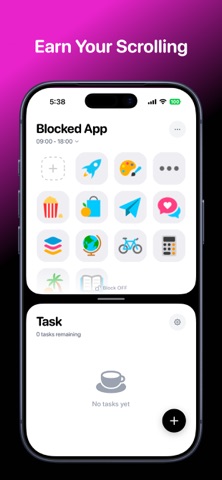
Earn Your Scrolling.
Don’t just wait—take action. Add your daily goals to the built-in To-Do list. Whether it’s "Prep lunch for tomorrow," "Study for 30 minutes," or "Finish the Q3 Marketing Proposal," you must physically check off your tasks to unlock your apps. By turning social media and short-form videos into a well-deserved reward, you transform toxic doomscrolling into extreme productivity.
LIFE-CHANGING FEATURES
- Task-Gated Unblocking (To-Do to Unlock)
The most foolproof way to stop procrastinating. Select the apps you want to block (Instagram, TikTok, Games, Safari) and they will stay locked under a secure shield. The only key to unlocking them? Finishing the tasks on your Today list.
- Seamless Built-in To-Do Manager
No need to link complex third-party apps. Our beautifully designed, minimalist task manager lets you add routines, work tasks, and daily chores in seconds. Supercharge your productivity without the cluttered interface of other productivity tools.
- Unbreakable Strict Mode
Do you struggle with a lack of self-control? Once a task-blocking session begins, you cannot bypass it, change the settings, or delete your way out of it. You have to put in the work to get the reward.
- Perfect for ADHD & Dopamine Detox
Designed with neurodivergent minds in mind. If you suffer from time blindness or executive dysfunction, our app provides the immediate, tangible friction required to snap you out of autopilot and refocus your attention on what truly matters.
- Category & Custom App Selection
Target specifically what distracts you. Block your biggest time-wasters while leaving essential utility apps (like Maps, Phone, or Spotify) completely accessible.
100% PRIVATE & SECURE
Your data belongs to you. We utilize Apple’s official Screen Time API to ensure the highest level of privacy and system stability. All blocking occurs locally on your device. We do not track the websites you visit, nor do we see the content of your apps. No crashes, no bricking, no data harvesting.
WHO IS THIS FOR?
Chronic procrastinators who constantly say "just 5 more minutes."
Students and professionals desperate to reclaim hours of deep focus.
Anyone looking to practice digital minimalism without giving up their favorite apps entirely.
Individuals with ADHD looking for a functional, reward-based habit tracker.
Stop letting your phone control your life. Download now, finish your tasks, and experience the incredible satisfaction of truly earning your screen time!
---------
Payment will be charged to your Apple ID account at the confirmation of purchase. The subscription automatically renews unless it is canceled at least 24 hours before the end of the current period. Your account will be charged for renewal within 24 hours before the end of the current period. You can manage and cancel your subscriptions by going to your App Store account settings after purchase. Cancellation of the current active subscription period is not allowed.
Terms of Use: https://origamistudio.xyz/taskwall/terms-of-service
Privacy Policy: https://origamistudio.xyz/taskwall/privacy-policy