

tcCalc - timecode & frame calc
tcCalc - timecode & frame calc is made and published by RYUICHIROU SHIMONO. AppBrain is an independent app data site and isn't affiliated with RYUICHIROU SHIMONO. The app name, icon, screenshots and description belong to RYUICHIROU SHIMONO and are shown as published on the App Store.
AppBrain's verdict
Established- Rating on App Store
- 4.72
- 78 ratings
- Last updated
- October 1, 2026
It doesn't have enough ratings yet to judge what users think.
Rankings
App Store top chartsApp Store Rankings for tcCalc - timecode & frame calc
Competitors
Similar apps and more from RYUICHIROU SHIMONOAlternatives to tcCalc - timecode & frame calc






More from RYUICHIROU SHIMONO


Releases
Updates seen on the App Store- Version
- 3.8
- Launched
- September 2016
No changelog data
User feedback
Ratings and reviews on the App StoreComments on tcCalc - timecode & frame calc for iOS
We don't have enough comments to show example comments. Please check back later.
Technology
Found in the app by AppBrain- Price
- $1.99
- App size
- 568.0 KB
- Content rating
- Everyone
Technologies used by tcCalc - timecode & frame calc
About the app and developer
About tcCalc - timecode & frame calc
tcCalc - timecode & frame calc is a photo & video app developed by RYUICHIROU SHIMONO.
User Ratings
tcCalc - timecode & frame calc is rated 4.72 out of 5 stars. The rating is based on 78 ratings.
App Information
tcCalc - timecode & frame calc costs $1.99. The app size is 568.00 kB. The latest version available is 3.8. The last update was on October 1, 2026.
Technical Requirements
The app has a content rating of Everyone. The app has been available on the App Store since September 2016.
Developer information for RYUICHIROU SHIMONO
Address:
Frequently asked questions about tcCalc - timecode & frame calc
Is tcCalc - timecode & frame calc free?
No. tcCalc - timecode & frame calc costs $1.99 on the App Store.
Is tcCalc - timecode & frame calc still available?
Yes. tcCalc - timecode & frame calc is on the App Store, and the last update we saw was on October 1, 2026.
How large is tcCalc - timecode & frame calc?
tcCalc - timecode & frame calc is 568.00 kB.
Is tcCalc - timecode & frame calc suitable for children?
App Store rates the content of tcCalc - timecode & frame calc as suitable for everyone.
How do people rate tcCalc - timecode & frame calc?
tcCalc - timecode & frame calc scores 4.72 out of 5 stars, from 78 ratings on the App Store.
Who made tcCalc - timecode & frame calc?
tcCalc - timecode & frame calc was developed by RYUICHIROU SHIMONO. It is listed in the photo & video category on the App Store.
What are the best alternatives to tcCalc - timecode & frame calc?
People looking at tcCalc - timecode & frame calc also look at these photo & video apps: RZ Timecode Calculator, Timecode, Evercast Studio, Tentacle Timebar, Catchin' Sync.
Store listing
By RYUICHIROU SHIMONO, from the App Store



Description by RYUICHIROU SHIMONO Written by the developer, not by AppBrain. Click to read.
Time bases
23.98 / 24 / 25 / 29.97 / 30 / 50 / 59.94 / 60 fps, plus hh:mm:ss for working without frames. Drop frame is applied automatically at 29.97 and 59.94 fps.
Features
- Add and subtract timecode
- One-tap switching between timecode and frame count (seconds in hh:mm:ss mode)
- Automatic drop frame handling (29.97 / 59.94 fps)
- Constant calculation: press = again to repeat the last operation
- Memory: add, subtract, recall, and clear
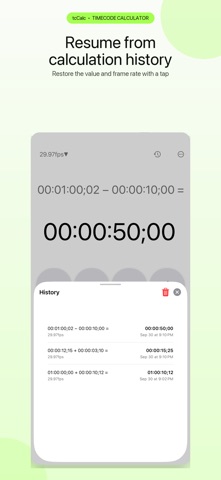
- Calculation history: up to 20 entries with frame rate and date; tap to restore, swipe to delete
- Open history with the clock button or by swiping up on the display
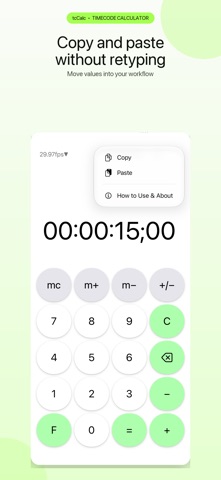
- Copy and paste from the ••• menu or by touching and holding the result
- Built-in How to Use guide
Easy to read
- Large keys, color-coded by role
- Dark mode
- iPhone and iPad, in all four orientations
- Dynamic Type and VoiceOver support
Simple by design
- No ads
- No in-app purchases
- No account or sign-in
- The app itself makes no network connections and works offline
- No analytics and no tracking
Whether you are timing a shoot, finding an edit point, or adding up the length of your footage, tcCalc keeps the math out of your way.