
TCG Manager is made and published by Taichi Sasaki. AppBrain is an independent app data site and isn't affiliated with Taichi Sasaki. The app name, icon, screenshots and description belong to Taichi Sasaki and are shown as published on the App Store.
AppBrain's verdict
- Rating on App Store
- 4.00
- 5 ratings
- Last updated
- April 20, 2024
It doesn't have enough ratings yet to judge what users think.
Rankings
App Store top chartsApp Store Rankings for TCG Manager
Competitors
Similar apps and more from Taichi SasakiAlternatives to TCG Manager







More from Taichi Sasaki


Releases
Updates seen on the App Store- Version
- 2.2.2
- Launched
- February 2022
No changelog data
User feedback
Ratings and reviews on the App StoreComments on TCG Manager for iOS
We don't have enough comments to show example comments. Please check back later.
Technology
Found in the app by AppBrain- Price
- Free
- App size
- 90.8 MB
- Content rating
- Everyone
Technologies used by TCG Manager
About the app and developer
About TCG Manager
TCG Manager is an utilities app developed by Taichi Sasaki.
User Ratings
TCG Manager is rated 4.00 out of 5 stars. The rating is based on 5 ratings.
App Information
TCG Manager is freely available from the App Store. The app size is 90.82 MB. The latest version available is 2.2.2. The last update was on April 20, 2024.
Technical Requirements
The app has a content rating of Everyone. The app has been available on the App Store since February 2022.
Developer information for Taichi Sasaki
Address:
Frequently asked questions about TCG Manager
Is TCG Manager free?
Yes. TCG Manager is free on the App Store.
Is TCG Manager still available?
Yes. TCG Manager is on the App Store, and the last update we saw was on April 20, 2024.
How large is TCG Manager?
TCG Manager is 90.82 MB.
Is TCG Manager suitable for children?
App Store rates the content of TCG Manager as suitable for everyone.
How do people rate TCG Manager?
TCG Manager scores 4.00 out of 5 stars, from 5 ratings on the App Store.
Who made TCG Manager?
TCG Manager was developed by Taichi Sasaki. It is listed in the utilities category on the App Store.
What are the best alternatives to TCG Manager?
People looking at TCG Manager also look at these utilities apps: Ocrenger, Countermon - for Digimon TCG, EasyLifeCalculator, T-Calc-Lite, Intiface Central.
Store listing
By Taichi Sasaki, from the App Store



Description by Taichi Sasaki Written by the developer, not by AppBrain. Click to read.
Enter the results of your games, and keep track of them to figure out what you need to do to win!
Due to the nature of card games, it is not possible to manage the results automatically, and it is necessary to manage the results by yourself.
Some people use spreadsheets to manage their results in detail, while others have only an idea of what they are doing, such as "I think this deck has a win rate of about 60% against a certain deck. Some people use spreadsheets to keep track of their own personal records, while others just have an idea of the deck's win rate (e.g., "I think this deck has a win rate of about 60% against a certain deck.
Knowing the detailed results is a big advantage when selecting decks to use and prioritizing deck countermeasures. However, managing with a spreadsheet application is a hurdle, such as cumbersome settings, which makes it impossible to record continuously, or the introduction of the application breaks your heart in the first place.... There are many such people, aren't there?
By using this "Tremendous Money," you can easily manage your war records by simply entering deck names and wins/losses.
You may notice something you didn't notice before.
If there are any features you would like to see added, please mention them in the review or contact form and we will consider them. Let's make this app better together!
- Features
- Entering match results
- After a match, you can enter the results of the match into the following fields.
- Deck name
- Name of opponent's deck
- Date
- First/second attack
- Victory or defeat
- Tag (optional)
- Notes (optional)
- Game Result List
- From this screen, you can edit or delete results.
- You can filter records by time period, tags, etc. to view only the records you need.
- Game Result Chart
- You can view a table of the results of the games you have played in the past.
- You can view the following items for each deck used.
- Number of games
- Number of wins and losses
- Total wins, first-round wins, and second-round wins
- Results for each deck
- You can filter records by time period, tags, etc. to view only the records you need.
- You can view the following items for each opponent deck that the target deck has played against.
- Number of matches
- Number of wins and losses
- Total wins, first-round wins, and second-round wins
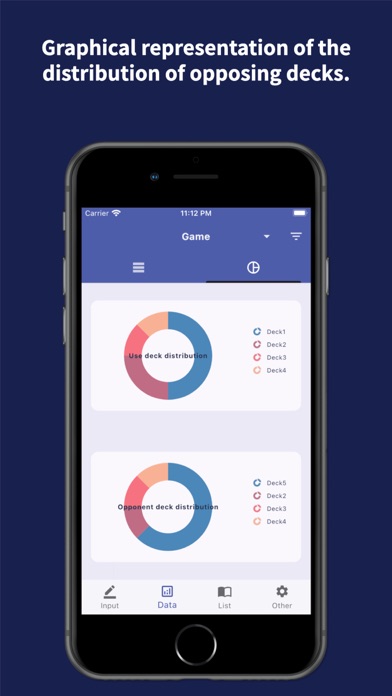
- Distribution of decks used and opponents
- You can filter records by time period, tags, etc., and view a pie chart showing the distribution of the required records.