



AppBrain's verdict
- Rating on App Store
- 5.00
- 2 ratings
- Last updated
- November 5, 2026
- Size
- 92.3 MB
It doesn't have enough ratings yet to judge what users think.
User feedback
Ratings and reviews on the App StoreComments on TeamStreamer for iOS
We don't have enough comments to show example comments. Please check back later.
Store listing
By Erwin Ocampo, from the App StoreDescription by Erwin Ocampo Written by the developer, not by AppBrain. Click to read.
Whether you're a parent capturing every point for family at home, or a player who wants your league matches and tournaments on camera, TeamStreamer makes it happen with no complicated gear and no technical headaches.
No separate scorekeeping app. No separate sports camera app. Just TeamStreamer — one screen for the score and the stream.
[ KEY PLAYS & CONDENSED GAMES ] Relive the match in minutes. TeamStreamer turns your match recording into Key Plays: lead changes, scoring runs, saved set points and winning points, plus moments you tagged, in about 4 minutes. Or watch the condensed game: every scoring play, back to back. Save the reel as one video to share with the team. Included with Pro.
[ SCORE 16 SPORTS, THE RIGHT WAY ] Every sport uses its real rules — not a generic counter:
- Volleyball (indoor & beach) — sets, rally scoring, win by 2
- Basketball — 1/2/3-point buckets by quarter
- Soccer — goals by half, draws allowed
- Baseball & Softball — innings, runs, walk-offs
- Flag Football — TDs, PATs, 2-pt, safeties, field goals
- Wrestling — points by period, pins & tech falls
- Tennis, Pickleball, Table Tennis, Squash & Badminton — proper game & tiebreak logic
- Ice Hockey, Field Hockey & Lacrosse — goals by period; Cricket — runs, wickets & overs
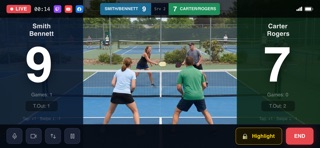
[ LIVE SCORING OVERLAYS ] A clean, readable scoreboard rides on your stream wherever you want it: drag it anywhere and pinch to resize, and viewers see it right there. Tap once to award a point. The overlay updates instantly. Viewers at home see every point as it happens - no more texting "what's the score?"
Point-by-point history shows how each set, inning, quarter, or period unfolded, color-coded by team.
[ STREAM EVERYWHERE ] Stream to YouTube Live, Facebook Live, and Twitch - all managed from one screen.
- Twitch - sign in once with your Twitch account, no stream key needed
- YouTube Live - paste your stream key from YouTube Studio, guided step by step
- Facebook Live - paste your stream key from Facebook
Keys are entered once and stored securely on your device, ready for every match after that.
[ THE FASTEST SETUP ] No coaching software. No team accounts. No encoder settings to configure.
Open TeamStreamer -> Pick your sport -> Enter team names -> Pick your platform -> Tap Go Live.
That's it. You'll be live before the ref blows the first whistle.
[ BUILT FOR PLAYERS & PARENTS ]
- Save multiple team presets for different leagues, rosters, or seasons
- Auto-reconnect when your connection drops mid-match
- Film on your phone and pair a second phone as a bench remote to score from the sideline
- Or film on a GoPro (HERO9–HERO13) for sideline-quality video, scoring on your phone
[ PRICING ] TeamStreamer is free to download and use. Small ads appear between sets and periods. Exporting your match history without a subscription plays one optional rewarded video. Go Pro to remove ads, unlock Key Plays and the condensed game, and use external cameras — $1.99/month or $19.99/year per sport, or the $49.99 All Sports Bundle for every sport, forever. Existing $3.99 purchasers keep everything at no extra cost.
Terms of Use (EULA): https://www.apple.com/legal/internet-services/itunes/dev/stdeula/
Privacy Policy: https://syllableapps.com/teamstreamer/privacy/
Safety and technology
Found in the app by AppBrain- Price
- Free
- App size
- 92.3 MB
- Content rating
- Medium
Technologies used by TeamStreamer
Releases
Updates seen on the App Store- Version
- 1.1.99
- Launched
- July 2026
No changelog data
Alternatives
Similar apps and more from Erwin OcampoAlternatives to TeamStreamer


More from Erwin Ocampo

Rankings
App Store top chartsApp Store Rankings for TeamStreamer
About the app and developer
About TeamStreamer
TeamStreamer is a sports app developed by Erwin Ocampo.
What is the rating of TeamStreamer?
TeamStreamer is rated 5.00 out of 5 stars, based on 2 ratings.
Is TeamStreamer free?
TeamStreamer is free. The app size is 92.29 MB. The latest version available is 1.1.99. The last update was on November 5, 2026.
What are the requirements for TeamStreamer?
The app has a content rating of Medium Maturity. The app has been available on the App Store since July 2026.
TeamStreamer is made and published by Erwin Ocampo. AppBrain is an independent app data site and isn't affiliated with Erwin Ocampo. The app name, icon, screenshots and description belong to Erwin Ocampo and are shown as published on the App Store.
Developer information for Erwin Ocampo
Address:
Frequently asked questions about TeamStreamer
Is TeamStreamer free?
Yes. TeamStreamer is free on the App Store.
Is TeamStreamer still available?
Yes. TeamStreamer is on the App Store, and the last update we saw was on November 5, 2026.
How large is TeamStreamer?
TeamStreamer is 92.29 MB.
Is TeamStreamer suitable for children?
App Store gives TeamStreamer a medium maturity rating, so it is not meant for young children.
How do people rate TeamStreamer?
TeamStreamer scores 5.00 out of 5 stars, from 2 ratings on the App Store.
Who made TeamStreamer?
TeamStreamer was developed by Erwin Ocampo. It is listed in the sports category on the App Store.
What are the best alternatives to TeamStreamer?
People looking at TeamStreamer also look at these sports apps: EasySportStream, LiveLink Sports, SportCam - Video & Scoreboard, Virtual Scoreboard: Keep Score.