

TeaTeaAvatar - Group Avatar
TeaTeaAvatar - Group Avatar is made and published by 东景 梁. AppBrain is an independent app data site and isn't affiliated with 东景 梁. The app name, icon, screenshots and description belong to 东景 梁 and are shown as published on the App Store.
AppBrain's verdict
Established- Rating on App Store
- 3.00
- 2 ratings
- Last updated
- September 16, 2025
- Size
- 55.2 MB
It doesn't have enough ratings yet to judge what users think.
User feedback
Ratings and reviews on the App StoreComments on TeaTeaAvatar - Group Avatar for iOS
We don't have enough comments to show example comments. Please check back later.
Store listing
By 东景 梁, from the App Store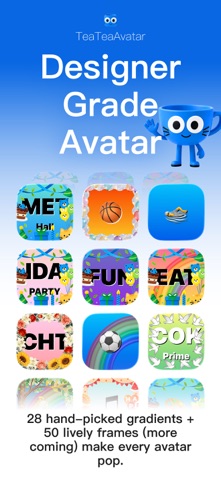


Description by 东景 梁 Written by the developer, not by AppBrain. Click to read.
Are the avatars all look the same, or the images don't match the text, making them hard to distinguish?
Use TeaTeaAvatar to create a set of group avatars!
Utilizes carefully selected gradient color schemes
Combines with emojis
Creates more fun text-based avatars
1. What is this app used for?
Creating avatars featuring a gradient background, capable of displaying one or two lines of theme text or emojis. Generally, these avatars are suitable for instant messaging platforms (such as QQ, WeChat, etc.), and are particularly well-suited for groups with distinct themes (like QQ groups).
2. How is it better than other apps?
It makes it easier to create beautiful and clear avatars. You can combine nearly 30 types of carefully selected gradient backgrounds (which are constantly being added), combined with easily readable text styles and emojis, allowing you to quickly create avatar files specifically optimized for instant messaging platforms, suitable for display on mobile or computer screens.
3. Can I use it?
If you can install it from the app store, that means you can use it.
To save the avatars you create, you need to allow the app's photos access permission.
You do not need to allow any other permissions.
4. How do I use it?
Avatar creation can be roughly divided into the following steps: Enter text, design text color, design background color, and save.
To use the Pride feature, you can tap the Pride button in the top right corner of the screen at any time to add a rainbow pattern to the avatar.
5. What should I do if I encounter problems while using it?
The app's functionality is relatively simple, and the developer has tested it thoroughly to the best of their ability to ensure stability and effectiveness.
If you experience system errors or software glitches while using it, you can contact the developer using the provided contact information on the app's "Instructions" page to resolve the issue.
6. How is my personal data (privacy) protected?
The app places paramount importance on protecting your personal data.
The app requests only one permission from the system: "Add Photos to Album." The first time you save an avatar, the system (iOS or iPadOS) will prompt you to grant this permission to the app; you can choose according to your needs. If you choose not to grant it, you can still obtain the avatar you created by taking screenshots.
The app has no online features, no notifications, does not collect or upload any of your information, and will not display any notifications to you.
The text you enter into the app is part of the design material you voluntarily input. The app will display the text you entered during your last session when it closes or switches whenever you restart the app. Please take personal responsibility for protecting the privacy of this information.
----
Legal
Privacy Policy: See our privacy policy (https://lilac-amaryllis-3d5.notion.site/TeeTeeAvatar-Privacy-Policy-26fd2e9ceeb380309578ddcba70df52f)
Terms of Use: This app uses the Standard Apple Media Services Terms and Conditions.(https://www.apple.com/legal/internet-services/itunes/dev/stdeula/)
Safety and technology
Found in the app by AppBrain- Price
- Free
- App size
- 55.2 MB
- Content rating
- Everyone
Technologies used by TeaTeaAvatar - Group Avatar
Releases
Updates seen on the App Store- Version
- 2.1
- Launched
- July 2021
No changelog data
Alternatives
Similar apps and more from 东景 梁Alternatives to TeaTeaAvatar - Group Avatar




More from 东景 梁








Rankings
App Store top chartsApp Store Rankings for TeaTeaAvatar - Group Avatar
About the app and developer
About TeaTeaAvatar - Group Avatar
TeaTeaAvatar - Group Avatar is an utilities app developed by 东景 梁.
What is the rating of TeaTeaAvatar - Group Avatar?
TeaTeaAvatar - Group Avatar is rated 3.00 out of 5 stars, based on 2 ratings.
Is TeaTeaAvatar - Group Avatar free?
TeaTeaAvatar - Group Avatar is free. The app size is 55.18 MB. The latest version available is 2.1. The last update was on September 16, 2025.
What are the requirements for TeaTeaAvatar - Group Avatar?
The app has a content rating of Everyone. The app has been available on the App Store since July 2021.
Developer information for 东景 梁
Address:
Frequently asked questions about TeaTeaAvatar - Group Avatar
Is TeaTeaAvatar - Group Avatar free?
Yes. TeaTeaAvatar - Group Avatar is free on the App Store.
Is TeaTeaAvatar - Group Avatar still available?
Yes. TeaTeaAvatar - Group Avatar is on the App Store, and the last update we saw was on September 16, 2025.
How large is TeaTeaAvatar - Group Avatar?
TeaTeaAvatar - Group Avatar is 55.18 MB.
Is TeaTeaAvatar - Group Avatar suitable for children?
App Store rates the content of TeaTeaAvatar - Group Avatar as suitable for everyone.
How do people rate TeaTeaAvatar - Group Avatar?
TeaTeaAvatar - Group Avatar scores 3.00 out of 5 stars, from 2 ratings on the App Store.
Who made TeaTeaAvatar - Group Avatar?
TeaTeaAvatar - Group Avatar was developed by 东景 梁. It is listed in the utilities category on the App Store.
What are the best alternatives to TeaTeaAvatar - Group Avatar?
People looking at TeaTeaAvatar - Group Avatar also look at these utilities apps: Daily Planner Todo list - Revo, Mehssages, Chatometer, ZeroClock零时钟, Auto Web Refresher Pro.