

TecHGV is made and published by TecHGV. AppBrain is an independent app data site and isn't affiliated with TecHGV. The app name, icon, screenshots and description belong to TecHGV and are shown as published on the App Store.
AppBrain's verdict
- Last updated
- October 29, 2026
Rankings
App Store top chartsApp Store Rankings for TecHGV
This app is not ranked
Competitors
Similar apps and more from TecHGVAlternatives to TecHGV


Also available on Google Play

Releases
Updates seen on the App Store- Version
- 12.9.46
- Launched
- September 2021
No changelog data
User feedback
Ratings and reviews on the App StoreComments on TecHGV for iOS
We don't have enough comments to show example comments. Please check back later.
Technology
Found in the app by AppBrain- Price
- Free
- App size
- 160.1 MB
- Content rating
- Everyone
Technologies used by TecHGV
About the app and developer
About TecHGV
TecHGV is a business app developed by TecHGV.
User Ratings
The app has no ratings yet.
App Information
TecHGV is freely available from the App Store. The app size is 160.11 MB. The latest version available is 12.9.46. The last update was on October 29, 2026.
Technical Requirements
The app has a content rating of Everyone. The app has been available on the App Store since September 2021.
Developer information for TecHGV
Address:
Store listing
By TecHGV, from the App Store

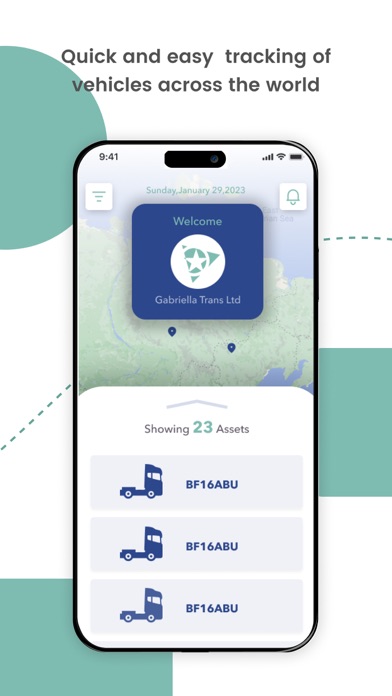


Screenshots by TecHGV, from the the App Store listing
Description by TecHGV Written by the developer, not by AppBrain. Click to read.
TecHGV is a Dual Language mobile app designed to let drivers perform vehicle checks, MOT checks, record fuel and AdBlue usage and report accidents using their iOS device. The idea of this app is to reduce a company’s paper trail while giving company’s the option to print reports when they want them. By storing reports in the cloud, you are freeing up valuable storage room which can be used for other things.
Your drivers will fill in a report at the start of shift, end of shift, trailer pick-up and drop-off using an iOS device. They will be given the chance to select a specific type of vehicles assigned to them. They will then answer a series of questions with Yes, No, NA, you will be able to view the report using our web based dashboard.
With TecHGV, you can:
Ensure your fleet is properly maintained – Daily vehicle inspections mean you can highlight any issues quickly, allowing you to plan around required workshop time.
Receive inspection results direct to you Web Dashboard – Seamless integration with Web Dashboard for full visibility.
Configure custom checks relevant to your fleet requirements – Customise questions that appear on drivers’ checklists through our dynamic forms.
Receive email notifications - Once a driver has completed a vehicle checklist, receive email notifications of any outstanding issues.
Complete thorough vehicle checks before commencing jobs – Drivers can work through the user-friendly check list, assigning colour-coded pass/fail grades against each element tested on their vehicle.
Store completed daily checklist on their mobile device – Drivers can produce inspection documentation on demand if asked for by police or authorities, even without internet signal.
Save completed checklists back to TecHGV web dashboard – Integration to TecHGV web dashboard enables drivers to share checklist results quickly and easily.
Add image attachments to checklists – Drivers can illustrate faults or issues with their vehicles using the camera on their mobile device.
AND MUCH MORE...
Your drivers will fill in a report at the start of shift, end of shift, trailer pick-up and drop-off using an iOS device. They will be given the chance to select a specific type of vehicles assigned to them. They will then answer a series of questions with Yes, No, NA, you will be able to view the report using our web based dashboard.
With TecHGV, you can:
Ensure your fleet is properly maintained – Daily vehicle inspections mean you can highlight any issues quickly, allowing you to plan around required workshop time.
Receive inspection results direct to you Web Dashboard – Seamless integration with Web Dashboard for full visibility.
Configure custom checks relevant to your fleet requirements – Customise questions that appear on drivers’ checklists through our dynamic forms.
Receive email notifications - Once a driver has completed a vehicle checklist, receive email notifications of any outstanding issues.
Complete thorough vehicle checks before commencing jobs – Drivers can work through the user-friendly check list, assigning colour-coded pass/fail grades against each element tested on their vehicle.
Store completed daily checklist on their mobile device – Drivers can produce inspection documentation on demand if asked for by police or authorities, even without internet signal.
Save completed checklists back to TecHGV web dashboard – Integration to TecHGV web dashboard enables drivers to share checklist results quickly and easily.
Add image attachments to checklists – Drivers can illustrate faults or issues with their vehicles using the camera on their mobile device.
AND MUCH MORE...