TelePad: TV Remote Control is an overall app developed by Henan Yimai Computer Technology Co., Ltd..
Download Statistics
User Ratings
TelePad: TV Remote Control is rated 5.00 out of 5 stars. The rating is based on one rating ratings.
App Information
TelePad: TV Remote Control is FREE to download. The APK download size is 43.73 MB. The latest version available is 1.4.15. The last update was on June 8, 2026.
Technical Requirements
The app has a content rating of Everyone. The app has been available on Google Play 5 weeks ago.
Description
Say goodbye to lost plastic remotes and the clutter on your coffee table! TelePad turns your iPhone into a powerful, universal Smart TV remote control. Whether you want to control your TV over WiFi, navigate using a smooth touchpad, or cast your local photos and videos to the big screen, TelePad has got you covered.
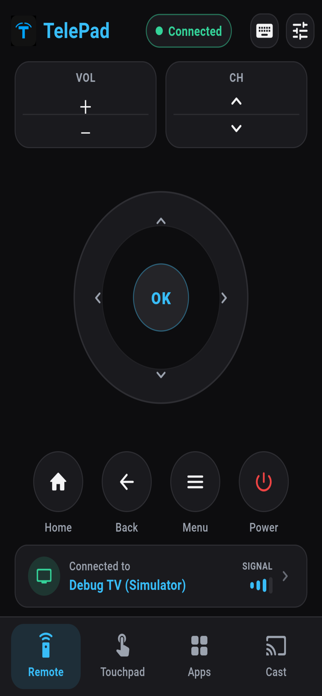
KEY FEATURES - Universal Compatibility: Works seamlessly with leading global Smart TV brands including Samsung, LG, Roku, Sony, Fire TV, Vizio, TCL, Hisense, and many more. - Smart Connection: Automatically detects and connects to your Smart TV or streaming device within the same local Wi-Fi network. - Advanced Touchpad Mode: Navigate your TV interface with absolute ease! Move the cursor, swipe, scroll, and tap with fluid gesture controls. - TV App Launcher: Browse and launch installed TV applications like Netflix, YouTube, Prime Video, Disney+, and more, directly from your phone screen. - Media Casting (Cast): Instantly stream high-quality local photos and HD videos from your device gallery straight to the TV screen to share with friends and family. - Essential Controls: Full simulation of a physical remote including Power ON/OFF, volume adjustments (+/-), channel switching, mute, menu, back, and home navigation.
WHY CHOOSE TELEPAD? - Zero Configuration: Open the app, scan via Wi-Fi, and connect. No complex setups or pairing codes are required. - Ultra-Low Latency: High-speed transmission within the local network ensures real-time command execution without freezes or lag. - All-in-One Tool: Combines classic directional keys, an intelligent touchpad, a TV app hub, and a screen casting tool into one modern interface. - Elegant Dark UI: Designed with a premium dark interface that reduces eye strain, optimized for late-night usage in the living room.
HOW TO USE 1. Ensure your iPhone and Smart TV / streaming device are connected to the exact same Wi-Fi network. 2. Open TelePad and allow access to detect devices on your local network. 3. Select your TV from the list of discovered devices to establish a connection. 4. Enjoy full touch and button control over your entertainment system!
PRIVACY AND COMPLIANCE TelePad strictly respects user privacy. The local network permission is requested by iOS only to perform a local Wi-Fi scan and discover nearby smart devices. We do not track, collect, or share your personal data or network history with third parties.
Download TelePad today and experience the most modern and convenient way to control your home theater!
Each subscription will automatically renew 3 days before the expiration date for
the same time period. Subscriptions can be cancelled at any time before the renewal.