

Teleprompter - InCue
Teleprompter - InCue is made and published by Ori Meir. AppBrain is an independent app data site and isn't affiliated with Ori Meir. The app name, icon, screenshots and description belong to Ori Meir and are shown as published on the App Store.
AppBrain's verdict
Loved by users- Rating on App Store
- 4.74
- 101 ratings
- Last updated
- December 12, 2025
Users love it: 4.7 stars from 101 ratings.
Rankings
App Store top chartsApp Store Rankings for Teleprompter - InCue
Competitors
Similar apps and more from Ori MeirAlternatives to Teleprompter - InCue





More from Ori Meir


Releases
Updates seen on the App Store- Version
- 1.1.1
- Launched
- March 2025
No changelog data
User feedback
Ratings and reviews on the App StoreComments on Teleprompter - InCue for iOS
We don't have enough comments to show example comments. Please check back later.
Technology
Found in the app by AppBrain- Price
- Free
- App size
- 18.0 MB
- Content rating
- Everyone
Technologies used by Teleprompter - InCue
About the app and developer
About Teleprompter - InCue
Teleprompter - InCue is a productivity app developed by Ori Meir.
What is the rating of Teleprompter - InCue?
Teleprompter - InCue is rated 4.74 out of 5 stars, based on 100 ratings.
Is Teleprompter - InCue free?
Teleprompter - InCue is free. The app size is 18.01 MB. The latest version available is 1.1.1. The last update was on December 12, 2025.
What are the requirements for Teleprompter - InCue?
The app has a content rating of Everyone. The app has been available on the App Store since March 2025.
Developer information for Ori Meir
Address:
Store listing
By Ori Meir, from the App Store




Description by Ori Meir Written by the developer, not by AppBrain. Click to read.
■ Key Features
- Record While You Read – Read your script and record your video at the same time
- Text Mirroring – Flip or reverse the text for use with physical teleprompter rigs
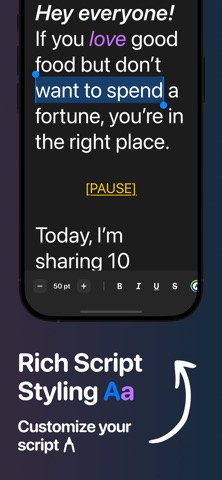
- Rich Text Editing – Style your scripts with bold, italic, underline, colors, font sizes and more
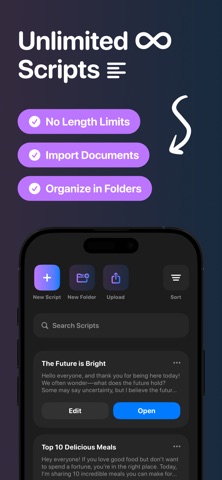
- Import Files – Upload .txt, .pdf, .docx and more — your formatting stays intact
- Unlimited Scripts – No limits on how many scripts you can have or how long they can be
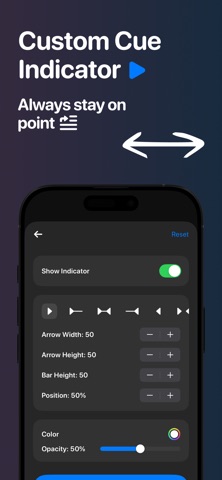
- Custom Cue Indicator – Add a visual guide to help stay on track
- Fully Customizable Teleprompter – Adjust size, speed, margins, colors, layout and more
- Apple Watch Support – Control the teleprompter right from your wrist
- Cloud Sync – Automatically back up and sync scripts across devices
- Offline Mode - Use InCue without an internet connection, so you can perform anywhere
■ Why Use InCue
- Simple and intuitive — no confusing setup or learning curve
- Helps you speak naturally and stay focused
- Perfect for creators, speakers, educators, streamers, and anyone who uses a script
- Saves time and reduces stress when filming or presenting
- Clean, modern design that works great on both iPhone and iPad
■ How Does It Work?
- Write or import your script
- Customize the look — font, size, color, layout, and more
- Open your script, hit play, and start reading. You can also record your video directly in the app
- Use your device or Apple Watch to control the teleprompter
- Keep your scripts organized, synced, and ready to use anytime
■ Get Started Today!
Join a growing community of users and download InCue today!
■ You Matter to Us
We’d love to hear your honest feedback. It helps us improve InCue and make your experience even better. Thank you!
■ Questions?
If you have any questions or suggestions, feel free to reach out and send us an email at contact.incue@gmail.com.
Legal Jargon:
Eula: https://bit.ly/43Qyv3k
Privacy Policy: https://bit.ly/3FDqUep
Disclaimer: https://bit.ly/4hx8YQ4