

Teleprompter Master - Video
Teleprompter Master - Video is made and published by 艳 罗. AppBrain is an independent app data site and isn't affiliated with 艳 罗. The app name, icon, screenshots and description belong to 艳 罗 and are shown as published on the App Store.
AppBrain's verdict
- Last updated
- August 5, 2026
Rankings
App Store top chartsApp Store Rankings for Teleprompter Master - Video
Competitors
Similar apps and more from 艳 罗Alternatives to Teleprompter Master - Video


More from 艳 罗


Releases
Updates seen on the App Store- Version
- 1.0.1
- Launched
- July 2026
No changelog data
User feedback
Ratings and reviews on the App StoreComments on Teleprompter Master - Video for iOS
We don't have enough comments to show example comments. Please check back later.
Technology
Found in the app by AppBrain- Price
- Free
- App size
- 152.8 MB
- Content rating
- Everyone
Technologies used by Teleprompter Master - Video
About the app and developer
About Teleprompter Master - Video
Teleprompter Master - Video is a photo & video app developed by 艳 罗.
What is the rating of Teleprompter Master - Video?
Teleprompter Master - Video has no ratings yet.
Is Teleprompter Master - Video free?
Teleprompter Master - Video is free. The app size is 152.81 MB. The latest version available is 1.0.1. The last update was on August 5, 2026.
What are the requirements for Teleprompter Master - Video?
The app has a content rating of Everyone. The app has been available on the App Store since July 2026.
Developer information for 艳 罗
Address:
Store listing
By 艳 罗, from the App Store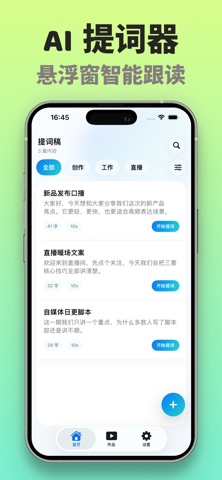


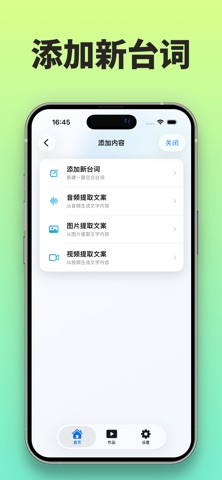

Description by 艳 罗 Written by the developer, not by AppBrain. Click to read.
Use it when you are preparing short videos, livestream talking points, product introductions, online lessons, hosting notes, interviews, or presentations. Instead of looking down at notes or restarting every time you forget a line, you can keep your words moving at a comfortable pace.
What you can do:
- type or paste scripts, speeches, and creator notes
- extract script text from images, videos, and audio
- use floating teleprompter mode over other apps
- record with camera prompting for video shoots
- read in full-screen mode for speeches and practice
- adjust text size, scroll speed, and reading rhythm
Useful for:
- short video scripts, vlogs, and product demos
- livestreams, creator talking points, and online classes
- speeches, hosting notes, meetings, and rehearsals
- content scripts, interview outlines, and recording cues
Teleprompter Expert keeps the workflow focused: bring in your script, choose the prompt mode that fits the moment, and read with a cleaner pace while you record, stream, or speak.
Privacy:
- Privacy Policy: https://my.feishu.cn/wiki/MfXFw1eMJiCBggkTzfacWMRLnCf
- Terms of Use: https://www.apple.com/legal/internet-services/itunes/dev/stdeula/