

Tempo Training
Tempo Training is made and published by Marco Sowa-Israel. AppBrain is an independent app data site and isn't affiliated with Marco Sowa-Israel. The app name, icon, screenshots and description belong to Marco Sowa-Israel and are shown as published on the App Store.
AppBrain's verdict
Established- Rating on App Store
- 1.00
- 1 ratings
- Last updated
- January 19, 2021
It doesn't have enough ratings yet to judge what users think.
Rankings
App Store top chartsApp Store Rankings for Tempo Training
Competitors
Similar apps and more from Marco Sowa-IsraelAlternatives to Tempo Training





More from Marco Sowa-Israel


Releases
Updates seen on the App Store- Version
- 1.0.2
- Launched
- December 2020
No changelog data
User feedback
Ratings and reviews on the App StoreComments on Tempo Training for iOS
We don't have enough comments to show example comments. Please check back later.
Technology
Found in the app by AppBrain- Price
- $1.99
- App size
- 71.4 MB
- Content rating
- Everyone
Technologies used by Tempo Training
About the app and developer
About Tempo Training
Tempo Training is a sports app developed by Marco Sowa-Israel.
User Ratings
Tempo Training is rated 1.00 out of 5 stars. The rating is based on one rating ratings.
App Information
Tempo Training costs $1.99. The app size is 71.39 MB. The latest version available is 1.0.2. The last update was on January 19, 2021.
Technical Requirements
The app has a content rating of Everyone. The app has been available on the App Store since December 2020.
Developer information for Marco Sowa-Israel
Address:
Store listing
By Marco Sowa-Israel, from the App Store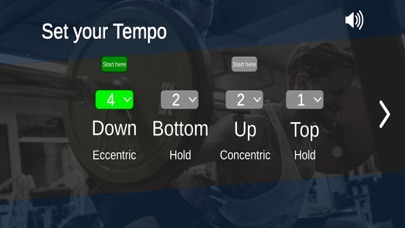
Description by Marco Sowa-Israel Written by the developer, not by AppBrain. Click to read.
How to:
First: Set your Tempo.
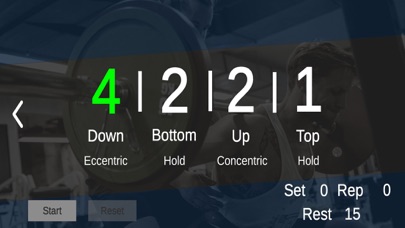
You have four numbers/counts. They are always in the same order.
1. Eccentric/DOWN - you lowering the weight e.g. Squat from standing to the bottom.
2. Bottom/HOLD - you pausing at your lowest position.
3. Concentric/UP - you standing up with the weight.
4. Top/HOLD - you fully extended/standing with the weight.
Second: Set where you want to start the movement.
In a Squat or a Bench Press you start from a standing or extended position.
Therefore your counts will start with the „DOWN" command.
In a Deadlift or Pull up you have to lift the weight or pull yourself up first!
Therefore your counts will start with the „UP" command.
The starting phase number will be highlighted in green.
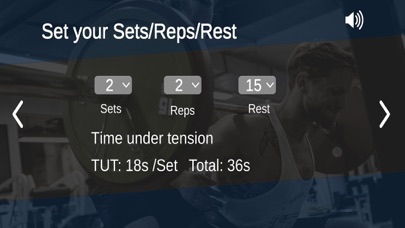
Third: Set your Sets/Reps/Rest
Here you will see the time under tension for each set and for the total workout.
That’s it! Easy peasy lemon squeezy!
Pro Tips:
„SKIP“
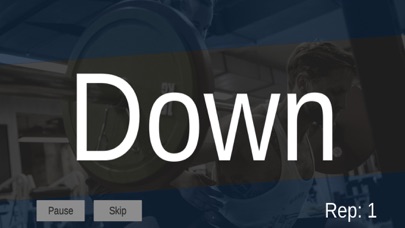
if you don’t manage to fulfill your reps in a set, just hit „SKIP“ and the set ist done. The „Rest Time“ you set before will automatically start after hitting „SKIP“. On the Pause screen you will see your actual set and reps.
Varying Reps in a workout
Let’s say you don’t want to do the classic 5 x 12 Reps.
Something more fancy like 7 - 11 - 15 - 11- 7 Reps.
Just set your Reps to „15“ your highest rep number of the workout and then just „SKIP“ every set after you did your target reps.
Acoustic and optic output:
Mute or don’t mute ;-)
You will hear the commands like this:
DOWN and UP with up to three seconds will be seen or heard as DOWN-DOWN-DOWN or UP-UP-UP.
From a four second count it will be like this:
DONW - 2 - 3 - 4 or UP - 2 - 3 - 4
The „HOLDs“ either BOTTOM or TOP will always be just seen or heard as „HOLD“ no matter how long you want to hold.