AppBrain
AppBrain
  • Apps
  • Apps being viewed right now Trending apps today Most popular apps All-time most installed apps Top rated apps iPhone and iPad apps
  • Intelligence ▾
    Intelligence overview → Track any Android app or your whole market
    Track & analyze
    Keyword Tracker & OptimizerTrack & improve Play rankings App Performance ReportOne-off PDF for any app StatisticsFree Android & Play market stats
    Promote your app
    Featured Apps App Links
  • Intelligence
  • Pricing
  • Dashboard
  • Sign up
  • Log in
App Store Apps > Productivity > Tempoa: Doomscroll Control
Tempoa: Doomscroll Control icon

Tempoa: Doomscroll Control

1.1
Tio Spicar
0.00
0 reviews
Free

Tempoa: Doomscroll Control Screenshot 1 of 5
Tempoa: Doomscroll Control Screenshot 2 of 5
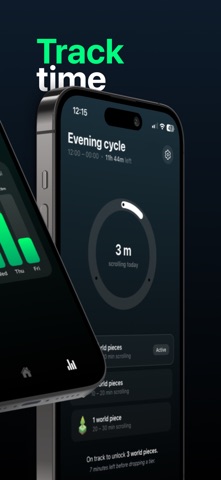
Tempoa: Doomscroll Control Screenshot 3 of 5
Tempoa: Doomscroll Control Screenshot 4 of 5
Tempoa: Doomscroll Control Screenshot 5 of 5
Screenshots by Tio Spicar, from the the App Store listing
View on the App Store

AppBrain's verdict

Last updated
March 12, 2026
Size
67.7 MB
Official page on the App Store

User feedback

Ratings and reviews on the App Store

Comments on Tempoa: Doomscroll Control for iOS

We don't have enough comments to show example comments. Please check back later.

Store listing

By Tio Spicar, from the App Store
Description by Tio Spicar Written by the developer, not by AppBrain. Click to read.
Tempoa helps you take control of social media use without quitting it.

Select the apps you want to track. Set daily limits. Get notified before scrolling turns into hours. When you stay within your limits, you earn world pieces and grow your own evolving world.

Less mindless scrolling. More intentional time.


HOW TEMPOA WORKS

1. Track What Matters
Choose the social media apps you want to monitor. Tempoa tracks daily usage and gives you a clear picture of where your time goes.

2. Smart Usage Notifications
Receive gentle alerts as you approach your limit. No guilt. No shaming. Just awareness when you need it most.

3. Earn World Pieces
Stay within your daily threshold and unlock a new piece of your world. Build landscapes, grow environments, and watch your planet evolve with every focused day.

4. Visualize Your Habits
See your usage through clean block timelines and charts. Identify patterns. Spot improvement. Make better decisions tomorrow.


WHY TEMPOA IS DIFFERENT

Most screen time apps focus on restriction.
Tempoa focuses on growth.

Instead of locking you out, Tempoa rewards consistency. Instead of punishing excess, it helps you build something meaningful.

Your progress becomes visible. Your discipline becomes creative. Your focus becomes a world.


FEATURES

• App-specific time tracking
• Threshold-based reminders
• Daily rewards system
• Visual usage blocks and charts
• Weekly progress insights


You don’t need to delete social media.
You just need better balance.

Build your world. Reduce the scroll.

Safety and technology

Found in the app by AppBrain
Price
Free
App size
67.7 MB
Content rating
High

Technologies used by Tempoa: Doomscroll Control

Releases

Updates seen on the App Store
Version
1.1
Launched
March 2026

No changelog data

Alternatives

Similar apps and more from Tio Spicar

Alternatives to Tempoa: Doomscroll Control

ScrollKiller: Be in Control icon ScrollKiller: Be in Control
Samuel Kulik
3.7
Free
3 ratings
Ellydee icon Ellydee
No Demographic, LLC
3.4
Free
20 ratings
MyLine - Your Acting Companion icon MyLine - Your Acting Companion
Brian Caspe
3.8
Free
16 ratings
Luvu: Screen Time Control icon Luvu: Screen Time Control
Luvu
4.6
Free
324 ratings
MP Manage icon MP Manage
QSC Audio Products, LLC
2.4
Free
25 ratings
Days Without: Break Bad Habits icon Days Without: Break Bad Habits
Field Collective
5.0
Free
6 ratings
Pomodoro Time Tracker: Balance icon Pomodoro Time Tracker: Balance
Ufuk Cetinkaya
4.6
Free
37 ratings
Ringtone Maker ‣ icon Ringtone Maker ‣
Companjen Apps B.V.
4.6
Free
696 ratings

Rankings

App Store top charts

App Store Rankings for Tempoa: Doomscroll Control

This app is not ranked

About the app and developer

About Tempoa: Doomscroll Control

Tempoa: Doomscroll Control is a productivity app developed by Tio Spicar.

User Ratings

The app has no ratings yet.

App Information

Tempoa: Doomscroll Control is freely available from the App Store. The app size is 67.67 MB. The latest version available is 1.1. The last update was on March 12, 2026.

Technical Requirements

The app has a content rating of High Maturity. The app has been available on the App Store since March 2026.

Tempoa: Doomscroll Control is made and published by Tio Spicar. AppBrain is an independent app data site and isn't affiliated with Tio Spicar. The app name, icon, screenshots and description belong to Tio Spicar and are shown as published on the App Store.

Developer information for Tio Spicar

Tio Spicar

Address:

Frequently asked questions about Tempoa: Doomscroll Control

Is Tempoa: Doomscroll Control free?

Yes. Tempoa: Doomscroll Control is free on the App Store.

Is Tempoa: Doomscroll Control still available?

Yes. Tempoa: Doomscroll Control is on the App Store, and the last update we saw was on March 12, 2026.

How large is Tempoa: Doomscroll Control?

Tempoa: Doomscroll Control is 67.67 MB.

Is Tempoa: Doomscroll Control suitable for children?

App Store gives Tempoa: Doomscroll Control a high maturity rating. It is meant for adults.

Who made Tempoa: Doomscroll Control?

Tempoa: Doomscroll Control was developed by Tio Spicar. It is listed in the productivity category on the App Store.

What are the best alternatives to Tempoa: Doomscroll Control?

People looking at Tempoa: Doomscroll Control also look at these productivity apps: ScrollKiller: Be in Control, Ellydee, MyLine - Your Acting Companion, Luvu: Screen Time Control, MP Manage.

Share Tempoa: Doomscroll Control

Apps other people are watching Price drops on Google Play Popular Productivity Apps Top new apps Today's trending apps
ScrollKiller: Be in Control icon ScrollKiller: Be in Control
Ellydee icon Ellydee
MyLine - Your Acting Companion icon MyLine - Your Acting Companion
Luvu: Screen Time Control icon Luvu: Screen Time Control
MP Manage icon MP Manage
Days Without: Break Bad Habits icon Days Without: Break Bad Habits
Pomodoro Time Tracker: Balance icon Pomodoro Time Tracker: Balance
Ringtone Maker ‣ icon Ringtone Maker ‣
Overview Alternatives Reviews Rankings Technology
AppBrain Intelligence premium content

Subscribe now to get full and unlimited access to AppBrain Intelligence. You'll have access to:

  • App Intelligence dashboard (performance timeline, competitor comparison, country rankings, insight cards)
  • Detailed ranking data per app
  • Full timeline per developer
  • Device market shares data per country
  • Unlimited keyword tracking
  • AI assistant access via MCP (Claude, Cursor or any MCP client)
1 Month

$75/mo
(billed every month)

SAVE 0%
Subscribe
3 Months

$65/mo
($195 billed every 3 months)

SAVE 13%
Subscribe
1 Year

$57.50/mo
($690 billed every year)

SAVE 23%
Subscribe
Each subscription will automatically renew 3 days before the expiration date for the same time period. Subscriptions can be cancelled at any time before the renewal.

AppBrain is an app data site, we track rankings, ratings, installs for all apps and games on Google Play and the App Store. AppBrain doesn't host app files or APKs, all install links go directly to the official store. All trademarks are owned by their respective owners.

More apps

  • Top Android apps being viewed
  • View XrayOn: Scan Filter Effect
  • Lithuanian - English
  • View VN: Photo & Video Editor

App statistics

  • Android statistics
  • Google Play Developer stats
  • Trending Android Apps
  • Trending iOS apps
  • Top popular Apps
  • Buy the best Android phone
  • Buy & sell app businesses

About AppBrain

  • Contact
  • Privacy
  • Documentation
  • DMCA takedowns
  • Blog
  • Discover Android apps
© 2010-2026 - AppBrain