




AppBrain's verdict
- Last updated
- October 3, 2026
- Size
- 9.86 MB
User feedback
Ratings and reviews on the App StoreComments on TempoMate: Run Cadence BPM for iOS
We don't have enough comments to show example comments. Please check back later.
Store listing
By 丽婷 谭, from the App StoreDescription by 丽婷 谭 Written by the developer, not by AppBrain. Click to read.
After a while you notice that exercise has a rhythm. When your stride goes, your breathing goes with it, and the run falls apart; hold your stride at a steady rate and your body lasts longer. Lifting is the same — lower over three counts, pause at the top for one, and the movement comes out clean.
So I started using a metronome. And I found that none of them are made for someone who is actually moving. Most are built for musicians: rows of knobs, a vocabulary of their own, and you have to stop, stand still and stare at the screen to change anything. But when you're running you can't look at a screen, and when you're lifting your hands are full. Plug in headphones and the click fights your music. And a watch has a screen that is always right there, and nobody had put a metronome on it.
What I wanted was simple: I start running and it knows how fast I'm going; I move on to the next set and it knows the count has changed; and when the phone isn't on me, I don't have to look at anything — a tap on the wrist tells me the beat is still there.
There wasn't one, so I built it. My family uses it and so do I, and I keep changing it — every time something feels wrong on the track, I come back and fix it.
———
■ The easiest way to use it: a remote on your wrist
Set everything up on the phone first — tempo, scene, whether to record it in Health — and after that the phone can stay in your pocket.
· Put a complication on your watch face, or keep it in the Smart Stack: one tap and the app is up, no hunting for an icon
· While the phone is playing, the watch is the remote: tap to start or stop, turn the crown for tempo, swipe to change scene — without taking the phone out
· When the phone is out of reach, it plays the click itself and taps the beat on your wrist, so you keep time without looking
· All three setups work: phone on its own / watch on its own / both together. Move from one to the other mid-run and the beat carries on — nothing to restart
■ You don't have to log it afterwards
From the moment you start, the session is being written into the Health app: duration, heart rate, active energy (and speed for the activities that have one). Want a heart-rate check mid-run? Raise your wrist.
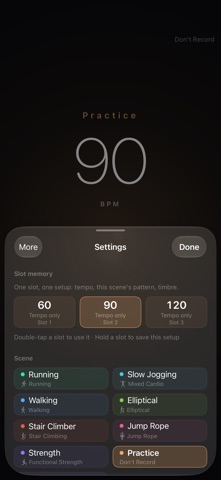
No need to open Apple's Fitness app, and no switching between apps. You decide what each scene counts as: Run as running, Slow Jog as mixed cardio, Practice as nothing at all.
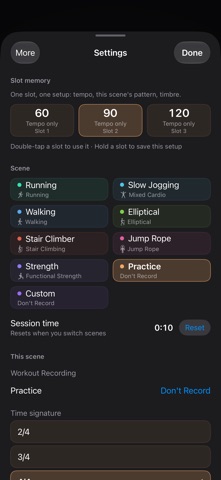
■ Nine scenes, each with its own setup
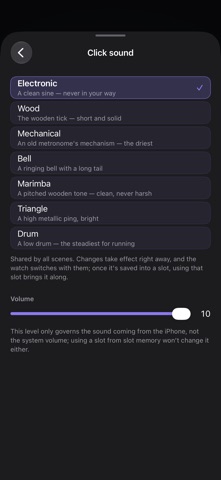
Run, Slow Jog, Walk, Jump Rope, Strength, Elliptical, Stair Climber, Practice and Custom. Each scene remembers its own tempo, pattern and timbre.
· Run: breathing rhythm over 4 or 5 steps (2:2 / 3:2) — run with your breath
· Slow Jog: slower than walking without feeling wrong. Counts as mixed cardio in
Health — logged as a run, the pace column would look odd
· Walk: steady, for holding a pace
· Jump Rope: intervals — jump some bars, rest some bars; through the rest the watch
(when it plays on its own) still taps once a bar
· Strength: tempo prescriptions like 3-1-1-0 and 2-0-2-0, where every count is fixed
· Elliptical / Stair Climber: neither moves you forward, so cadence matching reads
wrong — tap tempo only
· Practice: 2/4, 3/4, 4/4 and 6/8 time signatures, eighth-note, triplet and sixteenth-note subdivisions, and a one-bar count-in
· Custom: pick the tempo range and what it counts as
■ Works without looking — VoiceOver too
Double-tap to start or stop, swipe up or down for tempo, swipe left or right for
scene. Turn VoiceOver on and the whole watch face reads as one sentence — scene,
tempo, which beat, and who is playing — and each of those has its own action.■ On privacy
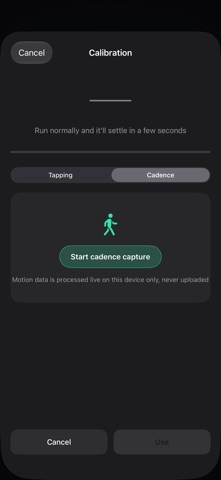
Nothing is collected. No account, no ads, no analytics, no network connections at all. Cadence is processed on-device in real time and is never stored or uploaded. Your settings live in your own iCloud, where I cannot see them.
Safety and technology
Found in the app by AppBrain- Price
- Free
- App size
- 9.86 MB
- Content rating
- Everyone
Technologies used by TempoMate: Run Cadence BPM
Releases
Updates seen on the App Store- Version
- 1.6.0
- Launched
- September 2026
No changelog data
Alternatives
Similar apps and more from 丽婷 谭Alternatives to TempoMate: Run Cadence BPM


More from 丽婷 谭


Rankings
App Store top chartsApp Store Rankings for TempoMate: Run Cadence BPM
About the app and developer
About TempoMate: Run Cadence BPM
TempoMate: Run Cadence BPM is a health & fitness app developed by 丽婷 谭.
What is the rating of TempoMate: Run Cadence BPM?
TempoMate: Run Cadence BPM has no ratings yet.
Is TempoMate: Run Cadence BPM free?
TempoMate: Run Cadence BPM is free. The app size is 9.86 MB. The latest version available is 1.6.0. The last update was on October 3, 2026.
What are the requirements for TempoMate: Run Cadence BPM?
The app has a content rating of Everyone. The app has been available on the App Store since September 2026.
TempoMate: Run Cadence BPM is made and published by 丽婷 谭. AppBrain is an independent app data site and isn't affiliated with 丽婷 谭. The app name, icon, screenshots and description belong to 丽婷 谭 and are shown as published on the App Store.
Developer information for 丽婷 谭
Address:
Frequently asked questions about TempoMate: Run Cadence BPM
Is TempoMate: Run Cadence BPM free?
Yes. TempoMate: Run Cadence BPM is free on the App Store.
Is TempoMate: Run Cadence BPM still available?
Yes. TempoMate: Run Cadence BPM is on the App Store, and the last update we saw was on October 3, 2026.
How large is TempoMate: Run Cadence BPM?
TempoMate: Run Cadence BPM is 9.86 MB.
Is TempoMate: Run Cadence BPM suitable for children?
App Store rates the content of TempoMate: Run Cadence BPM as suitable for everyone.
Who made TempoMate: Run Cadence BPM?
TempoMate: Run Cadence BPM was developed by 丽婷 谭. It is listed in the health & fitness category on the App Store.
What are the best alternatives to TempoMate: Run Cadence BPM?
People looking at TempoMate: Run Cadence BPM also look at these health & fitness apps: Tact: Walking Pace Coach, RuckZone: Rucking Tracker, 慢慢跑 Slowest Running, Cadence Intervals, Impermanence.