Tenki26 is an utilities app developed by Jaime Poseley.
User Ratings
The app has no ratings yet.
App Information
Tenki26 is freely available from the App Store. The app size is 3.55 MB. The latest version available is 1.0.1. The last update was on October 18, 2026.
Technical Requirements
The app has a content rating of Everyone. The app has been available on the App Store since October 2026.
Tenki26 is made and published by
Jaime Poseley.
AppBrain is an independent app data site and isn't affiliated with Jaime Poseley.
The app name, icon, screenshots and description belong to Jaime Poseley and are shown as published on the App Store.
Description by Jaime Poseley(from the App Store)
GET THE FREE MAC COMPANION
Tenki requires TenkiMac on your computer running macOS. Download it at: https://cposeley2.github.io/tenki-support/#download
Open the link on your computer, or tap App Support on this listing for the download and setup instructions.
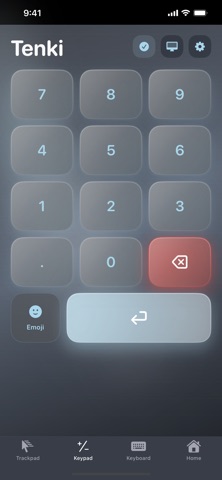
Tenki turns the iPhone or iPad beside you into a tactile wireless numpad for your computer. Choose a classic ten-key layout or switch to the spreadsheet layout for quick access to Tab, equals, clear, operators, and Enter.
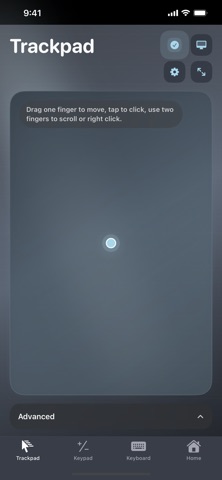
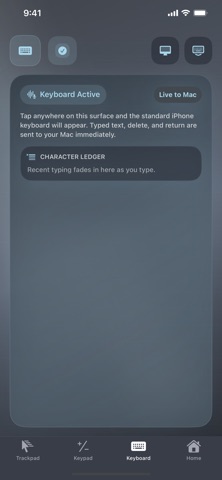
Tenki is more than a number pad. Move the computer pointer with a full trackpad, scroll with two fingers, click or right-click, and type remotely using the iOS keyboard or dictation.
BUILT FOR FAST INPUT
- Classic ten-key and spreadsheet-first layouts - Portrait and landscape controls - Haptic feedback for confident key presses - Selectable modern and vintage key sounds - Full trackpad with pointing, clicking, dragging, and scrolling - Remote keyboard and dictation input - Multiple visual themes with synchronized MacOS and iOS styling
LOCAL BY DESIGN
Tenki connects your devices over the local network. It requires no account and uses no ads, analytics, tracking, cloud sync, or cloud service.
HOW IT WORKS
1. Download the free TenkiMac companion at https://cposeley2.github.io/tenki-support/#download. Move it to Applications and open it on your Mac. 2. Allow Accessibility access so TenkiMac can send the input you request. 3. Keep both devices on the same Wi-Fi network. Allow Local Network access on your iPhone or iPad, then open Tenki and choose your Mac. 4. Start entering numbers, moving the pointer, or typing.
Tenki requires a computer running MacOS and an iPhone or iPad on the same local network.
Each subscription will automatically renew 3 days before the expiration date for
the same time period. Subscriptions can be cancelled at any time before the renewal.