

Tereni is made and published by PELICANOS DOO. AppBrain is an independent app data site and isn't affiliated with PELICANOS DOO. The app name, icon, screenshots and description belong to PELICANOS DOO and are shown as published on the App Store.
AppBrain's verdict
- Last updated
- July 7, 2026
Rankings
App Store top chartsApp Store Rankings for Tereni
Competitors
Similar apps and more from PELICANOS DOO


Releases
Updates seen on the App Store- Version
- 1.4.2
- Launched
- November 2025
No changelog data
User feedback
Ratings and reviews on the App StoreComments on Tereni for iOS
We don't have enough comments to show example comments. Please check back later.
Technology
Found in the app by AppBrain- Price
- Free
- App size
- 35.0 MB
- Content rating
- Everyone
Technologies used by Tereni
About the app and developer
About Tereni
Tereni is a business app developed by PELICANOS DOO.
User Ratings
The app has no ratings yet.
App Information
Tereni is freely available from the App Store. The app size is 35.01 MB. The latest version available is 1.4.2. The last update was on July 7, 2026.
Technical Requirements
The app has a content rating of Everyone. The app has been available on the App Store since November 2025.
Developer information for PELICANOS DOO
Address:
Frequently asked questions about Tereni
Is Tereni free?
Yes. Tereni is free on the App Store.
Is Tereni still available?
Yes. Tereni is on the App Store, and the last update we saw was on July 7, 2026.
How large is Tereni?
Tereni is 35.01 MB.
Is Tereni suitable for children?
App Store rates the content of Tereni as suitable for everyone.
Who made Tereni?
Tereni was developed by PELICANOS DOO. It is listed in the business category on the App Store.
What are the best alternatives to Tereni?
People looking at Tereni also look at these business apps: Membara, ArenaPro: Court Manager, DailyDo - Track Daily Habits, JaSam, UCB M-Bank.
Store listing
By PELICANOS DOO, from the App Store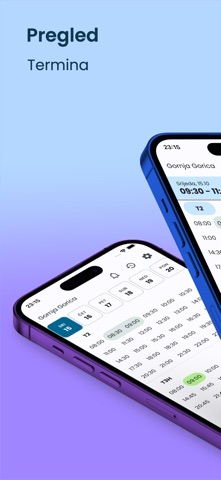

Description by PELICANOS DOO Written by the developer, not by AppBrain. Click to read.
- Switch between multiple sports facilities/locations
- View location-specific data and bookings
- Manage different sports types (tennis, football, basketball, etc.)
- Configure court availability and pricing per location
2. Real-Time Booking Dashboard
- Home Screen: Interactive grid/table view of daily court schedules
- Layout Options: Toggle between grid and table layouts for schedule visualization
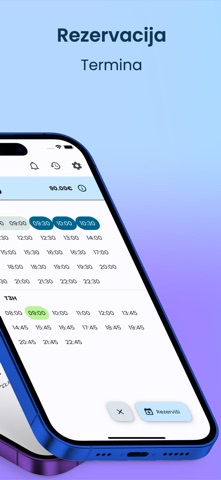
- Time Slot Management: Visual representation of hourly booking slots
- Status Indicators: Color-coded slots showing booked, available, and reserved states
- Quick Actions: Tap slots for instant booking, cancellation, or modification
- Date Navigation: Calendar picker for viewing schedules across different dates
3. Booking Management
- Create Bookings: Select court, time slots, and customer details
- Modify Reservations: Update existing bookings with notes and discounts
- Apply Discounts: Add percentage or fixed-amount discounts to reservations
- Add Notes: Attach administrative notes to bookings for internal reference
- Price Calculation: Automatic price calculation with discount application
- Customer Information: Store user names, phone numbers, and emails
4. Permanent Slots (Recurring Reservations)
- Weekly Schedules: Set up recurring bookings for regular customers
- Day-Based Organization: Permanent slots grouped by weekday (Monday-Sunday)
- Sport Field Grouping: View slots organized by court/field
- Period Management: Define start and end dates for permanent reservations
- Discount Support: Apply recurring discounts to permanent slots
- Flexible Updates: Modify or remove time limits on permanent bookings
- User Association: Link permanent slots to specific customers
- Status Control: Enable/disable permanent slots as needed
5. Booking History
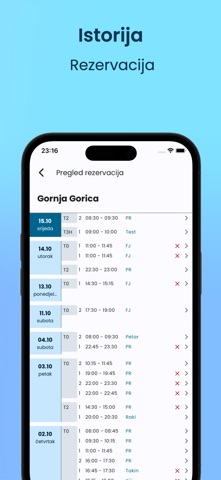
- Complete Transaction Log: View all past and upcoming reservations
- Date Filtering: Browse history by specific dates
- Detailed Information: Access comprehensive booking details including:
- Customer contact information
- Payment status and amounts
- Booking timestamps
- Administrative notes
- Discount applications
- Court-Based Grouping: History organized by sport field for easy tracking
6. Cancellation System
- Flexible Cancellation: Remove bookings from schedule
- Automated Refunds: Process refunds for cancelled paid reservations
- Reason Tracking: Document cancellation reasons
- Customer Notifications: Automated push notifications for cancellations
- History Preservation: Maintain records of cancelled bookings
7. Push Notification System
- Notification Types:
- New booking confirmations
- Cancellation alerts
- Payment notifications
- System announcements
- Action Buttons: Direct links from notifications to relevant screens
- Notification History: Archive of all received notifications
8. Court Management
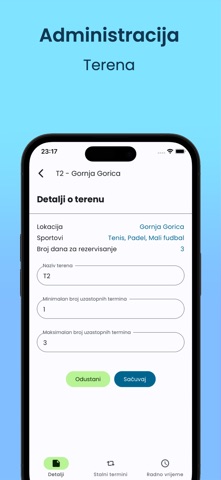
- Court Configuration: Set up individual courts/fields within locations
- Operating Hours: Define daily opening and closing times
- Part Division: Split courts into multiple bookable sections
- Pricing Rules: Configure hourly rates per court
- Sport Types: Assign specific sports to each court
- Status Control: Enable/disable courts as needed
9. Complex User Management
- Authorized Users: Maintain list of users allowed to book at the facility
- Phone-Based Access: Add users by phone number
- Quick Removal: One-tap user removal from authorized list
- User Details: Display names, nicknames, and contact information
10. Authentication & Security
- Secure Login: Phone/email-based authentication
- Device Identification: Unique UUID per app installation
- Session Persistence: MMKV storage for offline authentication state
- Account Management: Profile viewing and password changes
- Multi-Device Support: Same account accessible across devices