

Texie
Texie is made and published by Blue Vine Solutions, LLC. AppBrain is an independent app data site and isn't affiliated with Blue Vine Solutions, LLC. The app name, icon, screenshots and description belong to Blue Vine Solutions, LLC and are shown as published on the App Store.
AppBrain's verdict
- Last updated
- March 17, 2026
Rankings
App Store top chartsApp Store Rankings for Texie
Competitors
Similar apps and more from Blue Vine Solutions, LLCAlternatives to Texie




More from Blue Vine Solutions, LLC



Releases
Updates seen on the App Store- Version
- 8.1
- Launched
- October 2017
No changelog data
User feedback
Ratings and reviews on the App StoreComments on Texie for iOS
We don't have enough comments to show example comments. Please check back later.
Technology
Found in the app by AppBrain- Price
- Free
- App size
- 5.84 MB
- Content rating
- Everyone
Technologies used by Texie
About the app and developer
About Texie
Texie is a productivity app developed by Blue Vine Solutions, LLC.
What is the rating of Texie?
Texie has no ratings yet.
Is Texie free?
Texie is free. The app size is 5.84 MB. The latest version available is 8.1. The last update was on March 17, 2026.
What are the requirements for Texie?
The app has a content rating of Everyone. The app has been available on the App Store since October 2017.
Developer information for Blue Vine Solutions, LLC
Address:
Frequently asked questions about Texie
Is Texie free?
Yes. Texie is free on the App Store.
Is Texie still available?
Yes. Texie is on the App Store, and the last update we saw was on March 17, 2026.
How large is Texie?
Texie is 5.84 MB.
Is Texie suitable for children?
App Store rates the content of Texie as suitable for everyone.
Who made Texie?
Texie was developed by Blue Vine Solutions, LLC. It is listed in the productivity category on the App Store.
What are the best alternatives to Texie?
People looking at Texie also look at these productivity apps: Mach Write, PDF Converter - PDF to Word •, Mapboard GIS, Arabic - English : Translator, PulseQSO.
Store listing
By Blue Vine Solutions, LLC, from the App Store




Description by Blue Vine Solutions, LLC Written by the developer, not by AppBrain. Click to read.
It immediately appends each scan to the same page or to the following page based on the options selected, making it easy to scan multiple regions or pages at a time.
Point your camera at printed text, images, signs, labels, or handwritten notes to have Texie immediately recognize, convert to text, and optionally speak it within seconds For a quick scan followed by speaking, select the "Single" page option in Settings. If you'd like to bypass speaking, or wish to bulk scan, select the "Multiple" page option in Settings. Each scan is automatically saved in the TextView tab, which can save up to 10 scanned pages at a time.
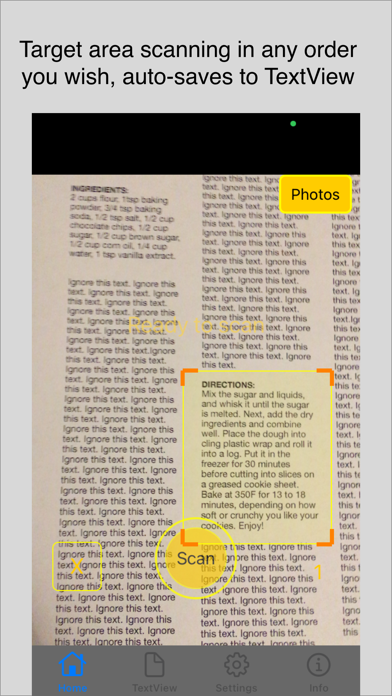
Texie supports both full screen and target area scanning. Click the "+" button on the Camera tab to enable our custom movable and resizable focus rectangle, which will precisely define a target area for scanning. (Available for iOS 15 +)
To reuse a page, select the "Append scans to current page" option in Settings. The TextView tab supports other functions, such as Speak (with read along highlights), Share, page navigation, text search, magnification, and Parts of Speech display for the English language. Texie supports landscape and portrait orientations. To switch between them, rotate your device until you see the tab bar buttons aligned to the bottom of the screen before performing a scan. Texie performs all functions locally on your device, without the need for internet connectivity. Buttons are labeled to optimize usability for visually impaired users.
Text recognition is supported in the following languages: English, Chinese, French, German, Italian, Japanese, Korean, Portuguese, Russian, Spanish, and Ukrainian.
Since the TextView pages are editable, you may also type, or copy and paste text into the text area, instead of using the Scan function.
Speech is enabled for the following languages: English, Chinese, Danish, Dutch, Finnish, French, German, Hebrew, Hindi, Hungarian, Indonesian, Italian, Japanese, Korean, Norwegian, Polish, Portuguese, Romanian, Russian, Slovakian, Spanish, Swedish, Thai, Turkish, and Ukrainian.
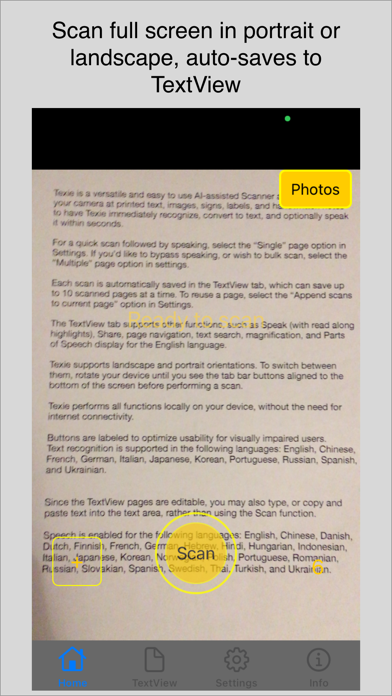
[ Aim camera at printed text, pull back to focus and adjust as needed before clicking the scan button. ]
Overview:
- simple and intuitive User Interface
- fast scanning and text extraction
- flexible scanning (use + button to define a resizable, rectangular scan area. Touch and drag the inside corner of the rectangle to resize, or touch and drag the center to move it around the camera screen)
- extract text from images or documents in any format, and in any order, using our custom focus rectangle
- full screen scanning (click on the "x" to remove the rectangular scan area)
- editable text area
- share feature
- use in portrait or landscape orientation
- variable speech rate slider
- variable text size slider in Text View
- highlights for currently spoken word
- background execution enabled
- internet connectivity not needed
- no logins or Ads
- private (no tracking)
- iOS14 +, iPhone 6s and above
- requires camera permission to detect and recognize text
- requires photo library permission to recognize user selected photos
- made in USA
For best results with other languages, select the targeted "RECOGNITION LANGUAGE" in the Settings tab before performing a scan.
+ text recognition accuracy is not guaranteed, and by using this app, you agree to assume all risks from any errors generated by this app.
French app localization credit goes to Sof!
If you would like Texie to be localized to another language, please contact us: support@bluevinesolutions.com
For FAQs and updates, please follow the app page at Facebook.com/TextAI