

TeXitor is made and published by Markus Woski. AppBrain is an independent app data site and isn't affiliated with Markus Woski. The app name, icon, screenshots and description belong to Markus Woski and are shown as published on the App Store.
AppBrain's verdict
- Last updated
- September 30, 2026
Rankings
App Store top chartsApp Store Rankings for TeXitor
Competitors
Similar apps and more from Markus WoskiAlternatives to TeXitor


Releases
Updates seen on the App Store- Version
- 2.2.1
- Launched
- February 2026
No changelog data
User feedback
Ratings and reviews on the App StoreComments on TeXitor for iOS
We don't have enough comments to show example comments. Please check back later.
Technology
Found in the app by AppBrain- Price
- Free
- App size
- 47.6 MB
- Content rating
- Everyone
Technologies used by TeXitor
About the app and developer
About TeXitor
TeXitor is an education app developed by Markus Woski.
User Ratings
The app has no ratings yet.
App Information
TeXitor is freely available from the App Store. The app size is 47.60 MB. The latest version available is 2.2.1. The last update was on September 30, 2026.
Technical Requirements
The app has a content rating of Everyone. The app has been available on the App Store since February 2026.
Developer information for Markus Woski
Address:
Store listing
By Markus Woski, from the App Store




Description by Markus Woski Written by the developer, not by AppBrain. Click to read.
Built with classrooms in mind, TeXitor lets you type LaTeX or Typst code and see your formula rendered instantly — no compiling, no waiting, no prior LaTeX experience required. Whether you're a chemistry teacher writing reaction equations, a student typesetting an exam solution, or a researcher preparing a paper, TeXitor gives you professional-grade scientific typography in a tool as simple as a notes app.
KEY FEATURES FOR EDUCATION
• Live formula preview — see your math and chemistry notation rendered as you type, powered by the industry-standard KaTeX (LaTeX) and Typst engines.
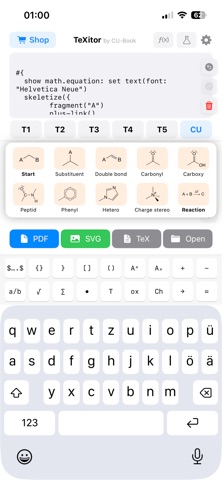
• Chemistry made easy — full support for mhchem/Alchemist syntax. Write \ce{H2SO4} or ce("H2SO4") and get correctly formatted chemical formulas, reaction arrows, and equilibrium notation.
• Custom keyboard toolbar — dedicated keys for fractions, roots, superscripts/subscripts, chemistry arrows, and common symbols mean less hunting for characters and more focus on content.
• Templates & snippets — save frequently used formulas (reaction schemes, skeletal structures, common expressions) as one-tap templates, perfect for building a personal formula library over a semester.
• Export anywhere — turn any formula into a PDF, scalable SVG, or plain .tex/.typ file for worksheets, slides, lab reports, or your school's LMS.
• Undo/redo, including shake-to-undo — mistake-proof editing that feels natural for students working under time pressure.
• Works with CU-Book — a seamless companion to the Worlddidac Award-winning CU-Book STEM learning system, used in classrooms to teach computer skills, data visualization, and scientific writing.
BUILT FOR SCHOOLS, NOT JUST USERS
TeXitor was designed from the ground up with data protection in mind — a rare feature in educational software:
• No accounts, no sign-up, no login — students open the app and start writing immediately.
• No personal data collected — no analytics, no tracking, no advertising IDs, no crash reporting.
• Everything stays on the device — formulas, templates, and settings are stored locally; nothing is uploaded to a server.
• GDPR-compliant by design — because no personal data is processed, TeXitor can be deployed on school devices without parental consent forms or data-protection sign-off.
• Curated, whitelist-only web access — the few in-app help links open only in a locked-down in-app browser. No open web browsing, no unexpected content.
• Safe for all ages, including young learners — no social features, no chat, no ads.
Whether you're outfitting a school's device fleet, teaching a chemistry unit, or just need to typeset a formula for tomorrow's worksheet, TeXitor makes rigorous scientific notation approachable — without ever compromising on privacy.