AppBrain
AppBrain
  • Apps
  • Apps being viewed right now Trending apps today Most popular apps All-time most installed apps Top rated apps iPhone and iPad apps
  • Intelligence ▾
    Intelligence overview → Track any Android app or your whole market
    Track & analyze
    Keyword Tracker & OptimizerTrack & improve Play rankings App Performance ReportOne-off PDF for any app StatisticsFree Android & Play market stats
    Promote your app
    Featured Apps App Links
  • Intelligence
  • Pricing
  • Dashboard
  • Sign up
  • Log in
App Store Apps > Utilities > Text Cleaner: Case Converter
Text Cleaner: Case Converter icon

Text Cleaner: Case Converter

1.2
Pixelated Development
4.75
32 reviews
Free

Text Cleaner: Case Converter Screenshot 1 of 10
Text Cleaner: Case Converter Screenshot 2 of 10
Text Cleaner: Case Converter Screenshot 3 of 10
Text Cleaner: Case Converter Screenshot 4 of 10
Text Cleaner: Case Converter Screenshot 5 of 10
Text Cleaner: Case Converter Screenshot 6 of 10
Text Cleaner: Case Converter Screenshot 7 of 10
Text Cleaner: Case Converter Screenshot 8 of 10
Text Cleaner: Case Converter Screenshot 9 of 10
Text Cleaner: Case Converter Screenshot 10 of 10
Screenshots by Pixelated Development, from the the App Store listing
View on the App Store

About Text Cleaner: Case Converter

Text Cleaner: Case Converter is an utilities app developed by Pixelated Development.

User Ratings

Text Cleaner: Case Converter is rated 4.75 out of 5 stars. The rating is based on 32 ratings.

App Information

Text Cleaner: Case Converter is freely available from the App Store. The app size is 4.29 MB. The latest version available is 1.2. The last update was on October 4, 2026.

Technical Requirements

The app has a content rating of Everyone. The app has been available on the App Store since August 2023.

Description by Pixelated Development (from the App Store)
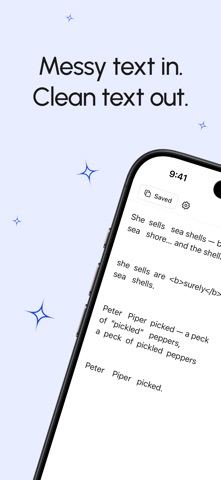
Paste messy text. Get clean text.

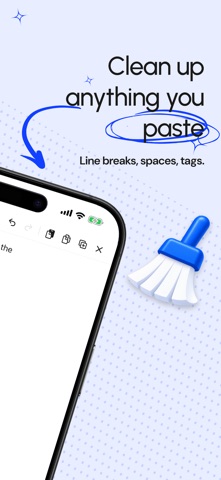
Text Cleaner fixes the text that Word, PDFs, web pages and chat apps quietly break — the double spaces, stray line breaks, curly quotes, odd dashes, HTML tags and invisible characters you cannot see but every editor can. One tap on Clean pasted text does the whole job.

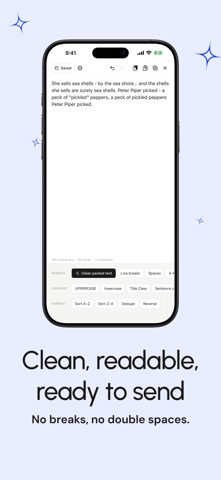
30 TRANSFORMS, ONE SCREEN
No menus to dig through. Every tool sits on a single screen.

REMOVE
• Clean pasted text — the one-tap fix
• Line breaks, blank lines, trailing whitespace
• Double and extra spaces
• Accents and diacritics (é → e)
• HTML tags and Markdown
• Punctuation, emoji, invisible characters
• Curly quotes and em dashes

CONVERT CASE
• UPPERCASE and lowercase
• Title Case and Sentence case
• camelCase, PascalCase, snake_case
• CONSTANT_CASE and aLtErNaTiNg

FORMAT
• Sort A–Z or Z–A
• Remove duplicate lines
• Reverse

LIVE COUNTS
Characters, words and sentences update as you type — useful for posts, abstracts and anything with a limit.

SAVED TEXTS
Keep the snippets you reuse and paste them back in a tap.

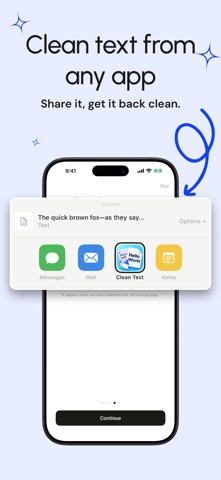
CLEAN FROM ANY APP
Select text in Safari, Mail or Notes, share it to Text Cleaner, and the tidy version comes straight back.

PRIVATE BY DESIGN
Every transform runs on your device. No account, no network, no tracking. Your text never leaves your iPhone.
Show more Show less

More data about Text Cleaner: Case Converter

Price Free
Rating 4.75 based on 32 ratings
Ranking Not ranked
Version 1.2
App size 4.29 MB
Suitable for Everyone

Alternatives to Text Cleaner: Case Converter

SwifDoo PDF: Read & Edit PDFs icon SwifDoo PDF: Read & Edit PDFs
Chengdu Aishang Office Technology Co., Ltd.
1.0
Free
1 ratings
FindText icon FindText
Thach Nguyen Trong
3.7
Free
3 ratings
CrocBLOCK - Safari Ad-Blocker icon CrocBLOCK - Safari Ad-Blocker
Grant Nicholson
3.9
Free
7 ratings
Convert Text - Format Text icon Convert Text - Format Text
Ottorino Bruni
4.4
Free
42 ratings
Paste Keyboard for iPhone icon Paste Keyboard for iPhone
Beijing Free Calculator Technology Co., Ltd.
4.2
Free
58 ratings
Time Intersect - World Clock icon Time Intersect - World Clock
Jose Santos
4.7
Free
488 ratings

More from Pixelated Development

Detective Sudoku icon Detective Sudoku
Pixelated Development
4.9
Free
9 ratings
Hygrometer - Humidity Meter icon Hygrometer - Humidity Meter
Pixelated Development
5.0
Free
4 ratings
Timezone: World Clock Widget icon Timezone: World Clock Widget
Pixelated Development
5.0
Free
2 ratings
Batch HEIC to JPG Converter icon Batch HEIC to JPG Converter
Pixelated Development
5.0
Free
1 ratings
Thermometer – Weather Temp icon Thermometer – Weather Temp
Pixelated Development
5.0
Free
1 ratings
Heat Index & Wet Bulb Monitor icon Heat Index & Wet Bulb Monitor
Pixelated Development
5.0
Free
1 ratings
Water Eject – Dry Speaker icon Water Eject – Dry Speaker
Pixelated Development
0.0
Free

Changelog of Text Cleaner: Case Converter

No changelog data

Developer information for Pixelated Development

Pixelated Development

Address:

Share Text Cleaner: Case Converter

Comments on Text Cleaner: Case Converter for iOS

We don't have enough comments to show example comments. Please check back later.

App Store Rankings for Text Cleaner: Case Converter

This app is not ranked

Technologies used by Text Cleaner: Case Converter

Frequently asked questions about Text Cleaner: Case Converter

Is Text Cleaner: Case Converter free?

Yes. Text Cleaner: Case Converter is free on the App Store.

Is Text Cleaner: Case Converter still available?

Yes. Text Cleaner: Case Converter is on the App Store, and the last update we saw was on October 4, 2026.

How large is Text Cleaner: Case Converter?

Text Cleaner: Case Converter is 4.29 MB.

Is Text Cleaner: Case Converter suitable for children?

App Store rates the content of Text Cleaner: Case Converter as suitable for everyone.

How do people rate Text Cleaner: Case Converter?

Text Cleaner: Case Converter scores 4.75 out of 5 stars, from 32 ratings on the App Store.

Who made Text Cleaner: Case Converter?

Text Cleaner: Case Converter was developed by Pixelated Development. It is listed in the utilities category on the App Store.

What are the best alternatives to Text Cleaner: Case Converter?

People looking at Text Cleaner: Case Converter also look at these utilities apps: SwifDoo PDF: Read & Edit PDFs, FindText, CrocBLOCK - Safari Ad-Blocker, Convert Text - Format Text, Paste Keyboard for iPhone.

Today's trending apps Top new apps Apps other people are watching Popular Utilities Apps Price drops on Google Play
SwifDoo PDF: Read & Edit PDFs icon SwifDoo PDF: Read & Edit PDFs
FindText icon FindText
CrocBLOCK - Safari Ad-Blocker icon CrocBLOCK - Safari Ad-Blocker
Convert Text - Format Text icon Convert Text - Format Text
Paste Keyboard for iPhone icon Paste Keyboard for iPhone
Time Intersect - World Clock icon Time Intersect - World Clock
AppBrain Intelligence premium content

Subscribe now to get full and unlimited access to AppBrain Intelligence. You'll have access to:

  • App Intelligence dashboard (performance timeline, competitor comparison, country rankings, insight cards)
  • Detailed ranking data per app
  • Full timeline per developer
  • Device market shares data per country
  • Unlimited keyword tracking
1 Month

$75/mo
(billed every month)

SAVE 0%
Subscribe
3 Months

$65/mo
($195 billed every 3 months)

SAVE 13%
Subscribe
1 Year

$57.50/mo
($690 billed every year)

SAVE 23%
Subscribe
Each subscription will automatically renew 3 days before the expiration date for the same time period. Subscriptions can be cancelled at any time before the renewal.

AppBrain is an app data site, we track rankings, ratings, installs for all apps and games on Google Play and the App Store. AppBrain doesn't host app files or APKs, all install links go directly to the official store. All trademarks are owned by their respective owners.

More apps

  • Top Android apps being viewed
  • REON POCKET
  • View Omezy
  • Cafe Antonio's

App statistics

  • Android statistics
  • Google Play Developer stats
  • Trending Android Apps
  • Trending iOS apps
  • Top popular Apps
  • Buy the best Android phone
  • Buy & sell app businesses

About AppBrain

  • Contact
  • Privacy
  • Documentation
  • DMCA takedowns
  • Blog
  • Free App-Ads.Txt Validation
© 2010-2026 - AppBrain