




AppBrain's verdict
- Last updated
- October 30, 2026
- Size
- 165.5 MB
User feedback
Ratings and reviews on the App StoreComments on Text Editor: PWEditor Next for iOS
We don't have enough comments to show example comments. Please check back later.
Store listing
By Masatsugu Futamata, from the App StoreDescription by Masatsugu Futamata Written by the developer, not by AppBrain. Click to read.
Based on the original PWEditor app, PWEditor Next has been redesigned for the latest iOS and iPadOS environments.
・Supports 10 storage types
Supports local files, five cloud storage services (iCloud Drive, Google Drive, Dropbox, OneDrive, and Box), and four server types (FTP, SFTP, SMB, and WebDAV).
- SFTP supports username and password authentication.
- WebDAV supports username and password authentication and connects over HTTP or HTTPS.
・Previews 16 file formats
- Dedicated previews: PDF and images
- Document formats: HTML, Markdown, and AsciiDoc
- Diagram and chart formats: Mermaid, PlantUML, Graphviz, D2, and Pikchr
- Tree formats: JSON, YAML, XML, and PropertyList
- Table formats: CSV and TSV
The 14 formats other than PDF and images also support real-time previews.
For CSV and TSV, you can configure whether the file has a header row and choose the delimiter.
・Advanced editor features
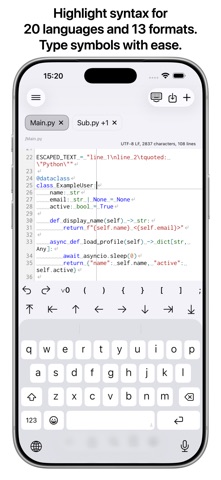
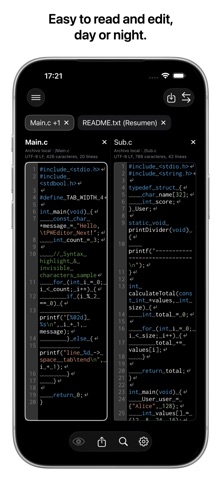
- Syntax highlighting
- 20 languages: Arduino、Bash/Shell、C、C++、C#、Dart、GO、Java、JavaScript、Kotlin、Lua、Objective-C、PHP、Python、R、Ruby、Rust、SQL、Swift、TypeScript
- 13 formats: AsciiDoc, CSS, D2, Graphviz, HTML, JSON, Markdown, Mermaid, Pikchr, PropertyList, PlantUML, XML, and YAML
- Display of invisible characters (half-width spaces, full-width spaces, tabs, and line breaks)
- Status information (character encoding, line endings, character count, and line count)
- File path display
- Line numbers
- Horizontal and vertical guide lines
- Auto-indentation
- Symbol input, including Undo and Redo
- Cursor movement
- Character encoding and line ending conversion
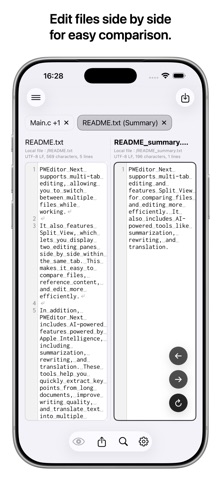
・Multiple tabs and split-screen view
Open and edit multiple files at the same time in tabs. The free plan supports up to two tabs; the Pro plan removes the tab limit.
In split-screen view, you can display two files or a file and its preview side by side within a single tab. Split-screen view is available on the free plan for local files and iCloud Drive. The Pro plan is required for all other storage services.
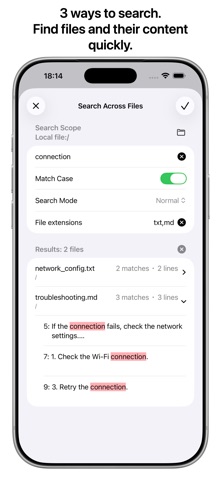
・Three types of search
- Find and replace within a file
- Search for file and directory names
- Search across multiple files
・File manager features
- File list
- Rename, copy, move, and delete files and directories
- Export files
- Recently opened files
- Favorites
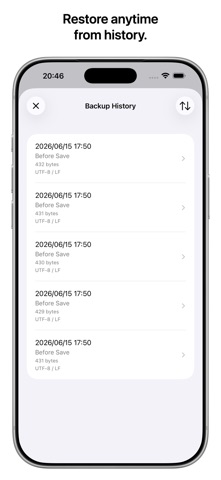
・Backup history
Files are backed up before saving, before converting character encoding or line endings, and before restoring from backup history. You can use the history to restore an earlier version of a file.
・AI features
Use Apple Intelligence to summarize, rephrase, and translate text.
・Other features
- Switch the display language (Japanese, English, Spanish, or Chinese)
- Switch between light and dark themes
- Support for cloud storage sharing links
- Support for files shared from other apps
・Free plan and Pro plan
Basic features are available for free. The following features require the Pro plan:
- More than two tabs across all storage services
- Split-screen view, AI features, copy, move, and export for storage services other than local files and iCloud Drive
- Search within subdirectories and search filters for some storage services
・Terms of Use (Apple’s Standard EULA):
https://www.apple.com/legal/internet-services/itunes/dev/stdeula/
Safety and technology
Found in the app by AppBrain- Price
- Free
- App size
- 165.5 MB
- Content rating
- Everyone
Technologies used by Text Editor: PWEditor Next
Releases
Updates seen on the App Store- Version
- 3.22.0
- Launched
- May 2024
No changelog data
Alternatives
Similar apps and more from Masatsugu FutamataAlternatives to Text Editor: PWEditor Next




More from Masatsugu Futamata


Rankings
App Store top chartsApp Store Rankings for Text Editor: PWEditor Next
About the app and developer
About Text Editor: PWEditor Next
Text Editor: PWEditor Next is an overall app developed by Masatsugu Futamata.
What is the rating of Text Editor: PWEditor Next?
Text Editor: PWEditor Next has no ratings yet.
Is Text Editor: PWEditor Next free?
Text Editor: PWEditor Next is free. The app size is 165.47 MB. The latest version available is 3.22.0. The last update was on October 30, 2026.
What are the requirements for Text Editor: PWEditor Next?
The app has a content rating of Everyone. The app has been available on the App Store since May 2024.
Text Editor: PWEditor Next is made and published by Masatsugu Futamata. AppBrain is an independent app data site and isn't affiliated with Masatsugu Futamata. The app name, icon, screenshots and description belong to Masatsugu Futamata and are shown as published on the App Store.
Developer information for Masatsugu Futamata
Address: