

Text to PDF -A Batch Converter
Text to PDF -A Batch Converter is made and published by RootRise Technologies Pvt. Ltd. AppBrain is an independent app data site and isn't affiliated with RootRise Technologies Pvt. Ltd. The app name, icon, screenshots and description belong to RootRise Technologies Pvt. Ltd. and are shown as published on the App Store.
AppBrain's verdict
- Last updated
- January 24, 2026
Rankings
App Store top chartsApp Store Rankings for Text to PDF -A Batch Converter
Competitors
Similar apps and more from RootRise Technologies Pvt. Ltd.More from RootRise Technologies Pvt. Ltd.


Releases
Updates seen on the App Store- Version
- 4.0
- Launched
- October 2013
No changelog data
User feedback
Ratings and reviews on the App StoreComments on Text to PDF -A Batch Converter for iOS
We don't have enough comments to show example comments. Please check back later.
Technology
Found in the app by AppBrain- Price
- $4.99
- App size
- 3.38 MB
- Content rating
- Everyone
Technologies used by Text to PDF -A Batch Converter
About the app and developer
About Text to PDF -A Batch Converter
Text to PDF -A Batch Converter is a business app developed by RootRise Technologies Pvt. Ltd.
What is the rating of Text to PDF -A Batch Converter?
Text to PDF -A Batch Converter has no ratings yet.
Is Text to PDF -A Batch Converter free?
Text to PDF -A Batch Converter costs $4.99. The app size is 3.38 MB. The latest version available is 4.0. The last update was on January 24, 2026.
What are the requirements for Text to PDF -A Batch Converter?
The app has a content rating of Everyone. The app has been available on the App Store since October 2013.
Developer information for RootRise Technologies Pvt. Ltd.
RootRise Technologies Pvt. Ltd.
Address:
Store listing
By RootRise Technologies Pvt. Ltd., from the App Store
Description by RootRise Technologies Pvt. Ltd. Written by the developer, not by AppBrain. Click to read.
FEATURES:
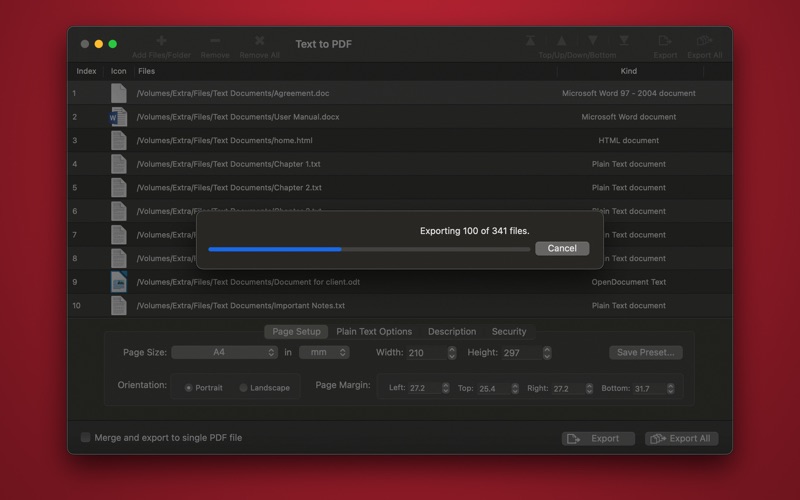
◆ Batch processing. Text to PDF for each file or merge them into single PDF document.
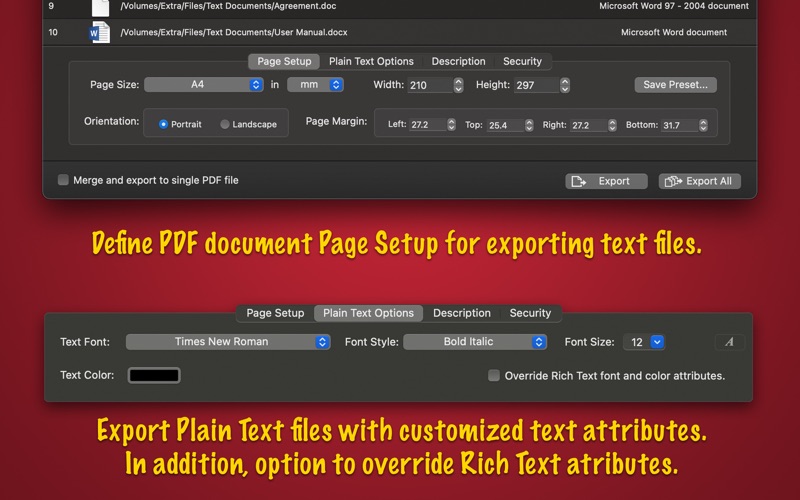
◆ Options to set output PDF page size. Use default Page Setup options or customize page size, margin and orientation.
◆ Extensive Text Export Options: Customize your PDF output by applying font, size and color as new set of text attributes for plain text input source files. Advance option to override text attributes of even Rich Text Formatted text documents.
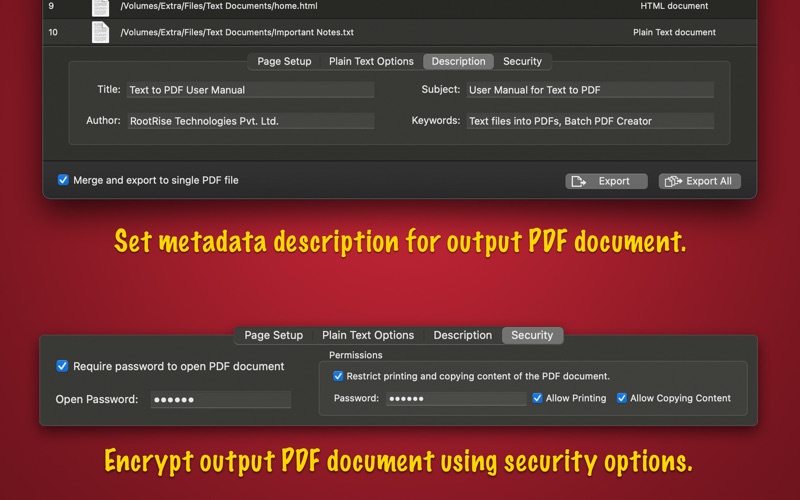
◆ Assign metadata description of PDF document. Set Title, Author, Subject, and Keywords properties.
◆ Set security options to encrypt output PDF. Set option to require Open Password to open and view PDF and even restrict created PDF documents from printing and copying contents without owner password.
◆ Very flexible options to add files. Simply Drag & Drop into list or Right click Open With in Finder or Drop on "Text to PDF" application to add files for export beside direct Add File/Folder buttons.
◆ You can arrange and shuffle files into conversion list and get same sequential pages in PDF.
HIDDEN FEATURES:
◆ Batch add or remove PDF document metadata description and security settings.
SUPPORTED TEXT FORMATS:
Most of all popular formats are supported. Like doc, docx, rtf, rtfd, odt, html, text and all Mac OS supported plain text formats i.e. txt, source and header code files, log files, apple console report files and many more.
NOTE: Text to PDF do not export vector graphics and raster images from layout document formats like Word, Open Text Document and others.