

Text to Speech – AI Voiceover
Text to Speech – AI Voiceover is made and published by 鹏飞 周. AppBrain is an independent app data site and isn't affiliated with 鹏飞 周. The app name, icon, screenshots and description belong to 鹏飞 周 and are shown as published on the App Store.
AppBrain's verdict
- Rating on App Store
- 4.75
- 4 ratings
- Last updated
- July 19, 2026
It doesn't have enough ratings yet to judge what users think.
Rankings
App Store top chartsApp Store Rankings for Text to Speech – AI Voiceover
Competitors
Similar apps and more from 鹏飞 周Alternatives to Text to Speech – AI Voiceover


More from 鹏飞 周




Releases
Updates seen on the App Store- Version
- 1.2.13
- Launched
- August 2023
No changelog data
User feedback
Ratings and reviews on the App StoreComments on Text to Speech – AI Voiceover for iOS
We don't have enough comments to show example comments. Please check back later.
Technology
Found in the app by AppBrain- Price
- Free
- App size
- 102.0 MB
- Content rating
- Everyone
Technologies used by Text to Speech – AI Voiceover
About the app and developer
About Text to Speech – AI Voiceover
Text to Speech – AI Voiceover is an utilities app developed by 鹏飞 周.
User Ratings
Text to Speech – AI Voiceover is rated 4.75 out of 5 stars. The rating is based on 4 ratings.
App Information
Text to Speech – AI Voiceover is freely available from the App Store. The app size is 101.97 MB. The latest version available is 1.2.13. The last update was on July 19, 2026.
Technical Requirements
The app has a content rating of Everyone. The app has been available on the App Store since August 2023.
Developer information for 鹏飞 周
Address:
Frequently asked questions about Text to Speech – AI Voiceover
Is Text to Speech – AI Voiceover free?
Yes. Text to Speech – AI Voiceover is free on the App Store.
Is Text to Speech – AI Voiceover still available?
Yes. Text to Speech – AI Voiceover is on the App Store, and the last update we saw was on July 19, 2026.
How large is Text to Speech – AI Voiceover?
Text to Speech – AI Voiceover is 101.97 MB.
Is Text to Speech – AI Voiceover suitable for children?
App Store rates the content of Text to Speech – AI Voiceover as suitable for everyone.
How do people rate Text to Speech – AI Voiceover?
Text to Speech – AI Voiceover scores 4.75 out of 5 stars, from 4 ratings on the App Store.
Who made Text to Speech – AI Voiceover?
Text to Speech – AI Voiceover was developed by 鹏飞 周. It is listed in the utilities category on the App Store.
What are the best alternatives to Text to Speech – AI Voiceover?
People looking at Text to Speech – AI Voiceover also look at these utilities apps: 文本转语音, 文本转语音-文字视频字幕配音一键导出, Chat Plus Bot -AI hub合集, 光染, Talk AI助手.
Store listing
By 鹏飞 周, from the App Store



Description by 鹏飞 周 Written by the developer, not by AppBrain. Click to read.
Looking for pro-level voiceovers without complex settings?
Text to Speech – Your Smart Voiceover Assistant makes voice creation easier and more efficient than ever!
Powerful Features, Fully Customizable
Insert pauses, choose speaker emotions, adjust style intensity, switch tone for different roles.
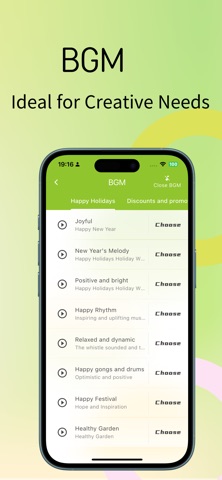
Customize volume, speed, and pitch. Add background music with fade-in/out. Every detail is in your control.
Ready-Made Templates, Zero Learning Curve
Not familiar with voiceover settings? No problem!
We offer scene-based templates for mall promos, ad scripts, short videos, storybooks, announcements, poems, dialect narration, and more. Just pick a template, enter your text, and get a professional-quality voiceover instantly—no setup hassle!
Multiple Voices & Multilingual Support
Supports Mandarin, English, Japanese, Korean, and 100+ global languages.
Includes Chinese dialects like Sichuanese, Northeastern Mandarin, Cantonese, Taiwanese, and more.
Easily match voice styles to different use cases.
Fast Input, Voice from Anywhere
Paste text to generate audio instantly.
Supports OCR image-to-text conversion for one-scan reading.
Edit long scripts on desktop for better productivity. Create voiceovers in one streamlined workflow.
Organize with Collections
Manage your creations with custom collections.
Group your voiceovers by topic for better organization, easy review, and sharing.
Multi-Format Download & One-Tap Share
Download in MP3, MP4, WAV, and other formats to meet diverse content needs like background audio for videos.
Easily share your work on WeChat, Moments, and other platforms to spread your creativity effortlessly.
Download “Text to Speech Voiceover Tool” now and start your voice creation journey!
Whether you're a content creator, teacher, podcaster, or parent, you'll find the voice solution that fits you here.
Subscription Service
Plans: Weekly, Monthly, Quarterly, and Yearly auto-renewable subscriptions are available.
Pricing: Refer to IAP details (e.g., weekly plan at ¥6/week).
Payment: Payment will be charged to your iTunes account upon confirmation.
Renewal: Your subscription will automatically renew unless canceled at least 24 hours before the end of the current period.
Manage Subscription: To cancel, go to iPhone "Settings" → "iTunes & App Store" → Tap "Apple ID" → "View Apple ID" → "Subscriptions" → Select "Text to Speech" to cancel.
Privacy Policy: https://t2s.boboee.com/t2s/privacy.html
Terms of Use: https://t2s.boboee.com/t2s/protocol.html
Subscription Agreement: https://t2s.boboee.com/t2s/member.html