

TextPort: Text Message Export
TextPort: Text Message Export is made and published by TSUBASA TECHNOLOGIES LIMITED LIABILITY COMPANY. AppBrain is an independent app data site and isn't affiliated with TSUBASA TECHNOLOGIES LIMITED LIABILITY COMPANY. The app name, icon, screenshots and description belong to TSUBASA TECHNOLOGIES LIMITED LIABILITY COMPANY and are shown as published on the App Store.
AppBrain's verdict
Well rated- Rating on App Store
- 4.41
- 1,443 ratings
- Last updated
- October 11, 2026
- Size
- 76.7 MB
Users rate it well: 4.4 stars from 1,443 ratings. Its best ranking is #43 in Top Grossing, Utilities in United States.
User feedback
Ratings and reviews on the App StoreComments on TextPort: Text Message Export for iOS
We don't have enough comments to show example comments. Please check back later.
Store listing
By TSUBASA TECHNOLOGIES LIMITED LIABILITY COMPANY, from the App Store



Description by TSUBASA TECHNOLOGIES LIMITED LIABILITY COMPANY Written by the developer, not by AppBrain. Click to read.
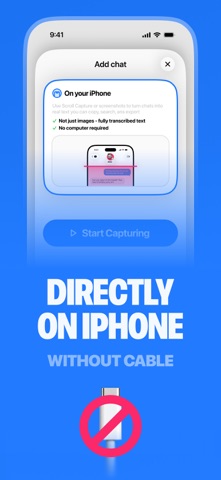
No cable, no Mac, and no Apple backup needed. When you want your complete iMessage history, the companion TextPort desktop app for Mac and Windows exports full conversations from your computer.
HOW IT WORKS
1. Open TextPort and tap Import
2. Choose the Messages conversation you want to export
3. Pick the date range you need, from a few days to the whole history
4. TextPort imports every message with its sender, wording, date, and time, in order. Export to PDF, CSV, or text, then print, save, or share
FOR COURT AND LEGAL EVIDENCE
TextPort produces clean, paginated PDFs with per-message timestamps and sender names. This is the format people file in family law, housing court, and civil disputes. People use it to prepare text messages for court, custody cases, divorce, small claims, HR complaints, and protective orders. No app makes a court-certified export; courts authenticate text messages through testimony that the export came from your own device and was not altered. The original conversation stays on your phone as a verifiable record that the export was not manipulated. TextPort leaves it untouched, so both the source and the export live on the same device, ready for lawyers, mediators, or insurance claims.
THE STATE OF TEXTING AS EVIDENCE 2026
TextPort surveyed 1,081 U.S. adults about how people save, lose, and use text messages in disputes. 81% have screenshotted a text because they might need it as proof. 38% have had texts or DMs used in a legal, workplace, or other formal proceeding they were part of. 78% have deleted or lost messages they later wished they had kept. 32% of those who tried to save a full conversation found it hard or could not do it at all. The full report is free to read and cite on the TextPort website.
WORKS WITH YOUR MESSAGING APPS
TextPort works with messaging apps across your iPhone or iPad, including iMessage, SMS, WhatsApp, Facebook Messenger, Instagram DMs, Telegram, Signal, Viber, Snapchat, WeChat, and LINE.
WhatsApp chats export to PDF with sender names, dates, and times. You never touch WhatsApp's chat-export file, dig through a backup, or email a chat to yourself.
EXPORT FORMATS
• PDF: save an entire text thread as a multi-page, timestamped, print-ready document
• CSV: searchable spreadsheets for Excel, Numbers, or Sheets
• Plain text: transcripts you can paste anywhere
MORE WAYS PEOPLE USE TEXTPORT
• Save text messages on iPhone permanently and archive years of conversations
• Download text messages from iPhone before switching phones or a factory reset
• Save a loved one's messages as a keepsake
• Print WhatsApp chats as relationship evidence for USCIS applications
• Document harassment for HR or the police
• Keep business conversations for compliance and record-keeping
WHY TEXTPORT
• Works directly on your iPhone: most exporters are desktop software, but with TextPort you import, convert, and print text messages from iPhone, no computer needed
• One app to export text messages from iPhone: an iMessage exporter that also handles the other chat apps on your phone
• Desktop app included: extract text messages from iPhone backups and export your full iMessage and SMS history as a text message backup on Mac and Windows
• A person answers your support questions, not a bot
SUBSCRIPTION DETAILS
TextPort is free to download; a subscription is required to export. A subscription unlocks unlimited message exporting, all file formats including PDF export, and premium customer support.
Terms of Use: https://textport.com/terms
Privacy Policy: https://textport.com/privacy
Safety and technology
Found in the app by AppBrain- Price
- Free
- App size
- 76.7 MB
- Content rating
- Everyone
Technologies used by TextPort: Text Message Export
Releases
Updates seen on the App Store- Version
- 3.87
- Launched
- May 2025
No changelog data
Alternatives
Similar apps and more from TSUBASA TECHNOLOGIES LIMITED LIABILITY COMPANYAlternatives to TextPort: Text Message Export





Rankings
App Store top charts- Highest rank
- #43
- Chart
- Top Grossing
- Utilities
- Country
- United States
App Store Rankings for TextPort: Text Message Export
Top rankings
| Rank | Country | Category | List |
|---|---|---|---|
| 43 | United States | Utilities | Top Grossing |
| 48 | Canada | Utilities | Top Grossing |
| 85 | France | Utilities | Top Grossing |
| 43 | Iran | Utilities | Top Grossing |
| 44 | Australia | Utilities | Top Grossing |
Ranking history in United States
About the app and developer
About TextPort: Text Message Export
TextPort: Text Message Export is an utilities app developed by TSUBASA TECHNOLOGIES LIMITED LIABILITY COMPANY.
User Ratings
TextPort: Text Message Export is rated 4.41 out of 5 stars. The rating is based on 1.4 thousand ratings.
App Information
TextPort: Text Message Export is freely available from the App Store. The app size is 76.69 MB. The latest version available is 3.87. The last update was on October 11, 2026.
Technical Requirements
The app has a content rating of Everyone. The app has been available on the App Store since May 2025.
Developer information for TSUBASA TECHNOLOGIES LIMITED LIABILITY COMPANY
Frequently asked questions about TextPort: Text Message Export
Is TextPort: Text Message Export free?
Yes. TextPort: Text Message Export is free on the App Store.
Is TextPort: Text Message Export still available?
Yes. TextPort: Text Message Export is on the App Store, and the last update we saw was on October 11, 2026.
How large is TextPort: Text Message Export?
TextPort: Text Message Export is 76.69 MB.
Is TextPort: Text Message Export suitable for children?
App Store rates the content of TextPort: Text Message Export as suitable for everyone.
How do people rate TextPort: Text Message Export?
TextPort: Text Message Export scores 4.41 out of 5 stars, from 1,443 ratings on the App Store.
Who made TextPort: Text Message Export?
TextPort: Text Message Export was developed by TSUBASA TECHNOLOGIES LIMITED LIABILITY COMPANY. It is listed in the utilities category on the App Store.
What are the best alternatives to TextPort: Text Message Export?
People looking at TextPort: Text Message Export also look at these utilities apps: Messages and Chat Export PDF, SMS Backup+, SMS Backup: Secure Store Files, AI Helper Homework Answer Help, Txt2PDF - TXT File to PDF.