

Thai Simple is made and published by Kam Hung Cheung. AppBrain is an independent app data site and isn't affiliated with Kam Hung Cheung. The app name, icon, screenshots and description belong to Kam Hung Cheung and are shown as published on the App Store.
AppBrain's verdict
- Last updated
- August 23, 2026
Rankings
App Store top chartsApp Store Rankings for Thai Simple
Competitors
Similar apps and more from Kam Hung CheungAlternatives to Thai Simple


More from Kam Hung Cheung


Releases
Updates seen on the App Store- Version
- 1.0.1
- Launched
- August 2026
No changelog data
User feedback
Ratings and reviews on the App StoreComments on Thai Simple for iOS
We don't have enough comments to show example comments. Please check back later.
Technology
Found in the app by AppBrain- Price
- Free
- App size
- 77.2 MB
- Content rating
- Everyone
Technologies used by Thai Simple
About the app and developer
About Thai Simple
Thai Simple is an education app developed by Kam Hung Cheung.
User Ratings
The app has no ratings yet.
App Information
Thai Simple is freely available from the App Store. The app size is 77.20 MB. The latest version available is 1.0.1. The last update was on August 23, 2026.
Technical Requirements
The app has a content rating of Everyone. The app has been available on the App Store since August 2026.
Developer information for Kam Hung Cheung
Address:
Frequently asked questions about Thai Simple
Is Thai Simple free?
Yes. Thai Simple is free on the App Store.
Is Thai Simple still available?
Yes. Thai Simple is on the App Store, and the last update we saw was on August 23, 2026.
How large is Thai Simple?
Thai Simple is 77.20 MB.
Is Thai Simple suitable for children?
App Store rates the content of Thai Simple as suitable for everyone.
Who made Thai Simple?
Thai Simple was developed by Kam Hung Cheung. It is listed in the education category on the App Store.
What are the best alternatives to Thai Simple?
People looking at Thai Simple also look at these education apps: Thai Land: Learn Thai, ThaiLearn, Learn Thai: Speak & Write, Lingora : Language Learning, JAM - Ai Language Flashcard.
Store listing
By Kam Hung Cheung, from the App Store
Description by Kam Hung Cheung Written by the developer, not by AppBrain. Click to read.
Does Thai look difficult? When you see all those letters, vowels, and tones, it can be hard to know where to begin.
Thai isn’t a language you have to learn through memorisation alone. Once you understand how it works, you can break it down step by step.
This app is designed for anyone starting Thai from zero. Begin with Thai letters, vowel positions, and tone rules, and learn how Thai words and syllables are put together. Then build your skills with natural audio, AI pronunciation scoring, listening, writing, and practical Thai exercises — taking you from “I can’t read this” to reading, listening, speaking, and writing with confidence.
Whether you’re planning a trip to Thailand, considering a longer stay, or have always wanted to learn Thai but never knew where to start, you can begin with the fundamentals.
Thai Makes Sense When You Break It Down
You don’t have to memorise every Thai character as a whole.
Learn step by step:
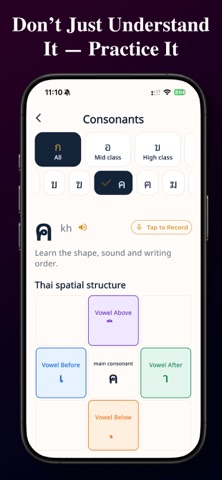
• 44 Thai consonants
• How vowels appear before, after, above, and below consonants
• Thai tone marks
• How consonants, vowels, and tones combine to form a syllable
• How common Thai words are pronounced
Clear visual breakdowns help turn “Thai looks impossible” into “I can see how this is put together.”
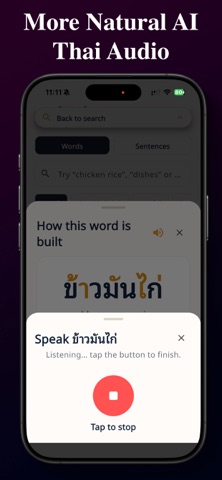
Hear Natural Thai Clearly
Learning pronunciation is about more than knowing how something is written.
High-quality, natural Thai audio helps you clearly hear:
• Consonant pronunciation
• Short and long vowels
• Thai tones
• Common words
• Everyday Thai
Replay the audio as often as you like and train your ear to become familiar with natural Thai pronunciation.
AI Pronunciation Scoring
Not sure whether your pronunciation is right?
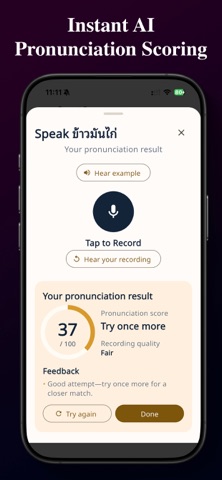
Speak Thai into your phone and the app analyses your recording and gives you a pronunciation score. Instead of simply thinking “that sounded about right,” you can practise with clear feedback.
With each practice session, you can:
• Record your pronunciation
• See your pronunciation score instantly
• Check recording quality
• Listen back to your own voice
• Try again and improve
Go beyond listening to examples — actually speak Thai yourself.
Listening Practice
When you hear Thai, can you tell which letter or word you’re hearing?
Listening exercises ask you to hear the audio and choose the correct answer, training you to connect Thai sounds with Thai script.
Instead of memorising answers visually, you practise actually recognising what you hear.
Thai Writing Practice
Once you can recognise Thai letters, practise writing them yourself.
Follow the character shape and stroke order, practising each Thai letter stroke by stroke. Writing helps reinforce your memory while teaching you how each character is formed.
Go from being able to recognise Thai to being able to write it.
Practical Thai, Ready When You Need It
You don’t need to memorise an entire dictionary before you begin.
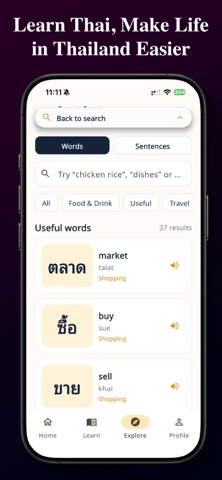
Explore lets you discover Thai you’ll actually encounter in everyday situations, organised by category, including:
• Food
• Restaurants
• Transport
• Shopping
• Travel
• Everyday life
Learn each word together with its Thai script, pronunciation, meaning, and audio, so it’s easier to use what you learn when you’re actually in Thailand.
Scan Thai in the Real World
The hardest Thai you encounter in Thailand may not be in a textbook — it may be right in front of you.
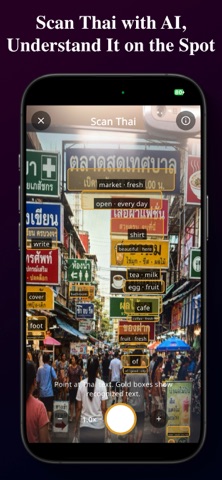
Menus, road signs, shop signs, notices, and product labels.
Use the Thai scanner to recognise real-world Thai and quickly understand the text you see around you.
It also works offline, so you can scan Thai even when you don’t have an internet connection.
Use it while travelling, walking around town, eating out, or anywhere with unreliable mobile data.
More Than Memorising Vocabulary
This app isn’t about memorising a few travel phrases. It’s about understanding how Thai works.