

That Part Again
That Part Again is made and published by Kenichi Ando. AppBrain is an independent app data site and isn't affiliated with Kenichi Ando. The app name, icon, screenshots and description belong to Kenichi Ando and are shown as published on the App Store.
AppBrain's verdict
- Last updated
- September 23, 2026
Rankings
App Store top chartsApp Store Rankings for That Part Again
Competitors
Similar apps and more from Kenichi AndoAlternatives to That Part Again


More from Kenichi Ando


Releases
Updates seen on the App Store- Version
- 2.0.0
- Launched
- February 2026
No changelog data
User feedback
Ratings and reviews on the App StoreComments on That Part Again for iOS
We don't have enough comments to show example comments. Please check back later.
Technology
Found in the app by AppBrain- Price
- Free
- App size
- 31.4 MB
- Content rating
- Everyone
Technologies used by That Part Again
About the app and developer
About That Part Again
That Part Again is an education app developed by Kenichi Ando.
User Ratings
The app has no ratings yet.
App Information
That Part Again is freely available from the App Store. The app size is 31.40 MB. The latest version available is 2.0.0. The last update was on September 23, 2026.
Technical Requirements
The app has a content rating of Everyone. The app has been available on the App Store since February 2026.
Developer information for Kenichi Ando
Address:
Store listing
By Kenichi Ando, from the App Store


Description by Kenichi Ando Written by the developer, not by AppBrain. Click to read.
It is always the same few seconds that trip you up. That one phrase, that one line, that one run.
This app repeats exactly that part, for as long as you need.
WHAT YOU DO
1. Load an audio file
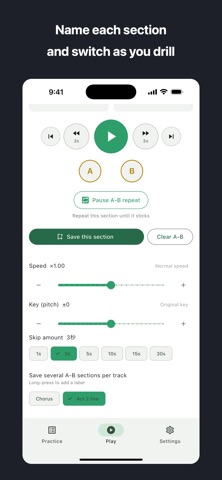
2. Set point A and point B on the waveform
3. Press play. That section loops until you stop it.
A and B can be nudged in 0.1 second steps, so "start a beat earlier" or "end before the breath" is a matter of two buttons, not guesswork.
NOT ONLY FOR MUSIC
Drilling something until it is automatic is not a musician's problem alone.
- Instruments: pull out the bar you keep missing and go around it
- Language: shadow one sentence until you can hear every word
- Singing: the entry into the chorus, until the breath lands right
- Acting: from your cue to your first line, timing included
- Speeches and memorising: until the phrasing arrives on its own
Loaded tracks stay in your practice list. Open one again and you start straight from the section you set.
THE SCREEN STAYS ON
While you are playing or speaking, you are not touching the phone. Auto-lock is held off while a section is repeating, so practice is not interrupted.
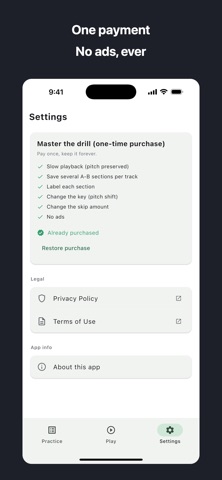
ONE-TIME PURCHASE (pay once, keep it)
- Slow playback with the pitch preserved
- Several A-B sections per track, switched with a tap
- A label on each section, so you know what it was
- Change the key, to suit your voice or instrument
- Choose the skip length, from 1 to 30 seconds
- Removes the ads
Without any purchase you still get: loading audio, setting A and B, endless repeat, one saved section per track, and the practice list. The repeating itself, which is the point of the app, is not behind the purchase.
WHAT YOU CAN LOAD
- mp3, wav, m4a and more from the Files app, including iCloud Drive
- Songs you purchased or synced from a computer
Protected Apple Music streaming tracks cannot be loaded. The app tells you so instead of failing quietly.
NO NETWORK
Everything happens on the device. Nothing is uploaded and there is no account.
Works on iPhone and iPad, in English and Japanese.
This app is the successor to "Easy Pick By Ear". The transcription tools (equalizer, reverb, 2D pad, playlist) live on in "Easy Pick By Ear PRO". An existing Premium purchase carries over.
Terms of Use (EULA)
https://www.apple.com/legal/internet-services/itunes/dev/stdeula/
Privacy Policy
https://tenmais.jp/privacy.php?lang=en
Support
https://tenmais.jp/contact/