

The Artifact Restorer
The Artifact Restorer is made and published by Tianze Guan. AppBrain is an independent app data site and isn't affiliated with Tianze Guan. The app name, icon, screenshots and description belong to Tianze Guan and are shown as published on the App Store.
AppBrain's verdict
- Rating on App Store
- 5.00
- 3 ratings
- Last updated
- March 27, 2026
It doesn't have enough ratings yet to judge what users think.
Rankings
App Store top chartsApp Store Rankings for The Artifact Restorer
Competitors
Similar apps and more from Tianze GuanAlternatives to The Artifact Restorer


More from Tianze Guan


Releases
Updates seen on the App Store- Version
- 1.3
- Launched
- March 2026
No changelog data
User feedback
Ratings and reviews on the App StoreComments on The Artifact Restorer for iOS
We don't have enough comments to show example comments. Please check back later.
Technology
Found in the app by AppBrain- Price
- Free
- App size
- 25.5 MB
- Content rating
- Everyone
Technologies used by The Artifact Restorer
About the app and developer
About The Artifact Restorer
The Artifact Restorer is an education app developed by Tianze Guan.
User Ratings
The Artifact Restorer is rated 5.00 out of 5 stars. The rating is based on 3 ratings.
App Information
The Artifact Restorer is freely available from the App Store. The app size is 25.47 MB. The latest version available is 1.3. The last update was on March 27, 2026.
Technical Requirements
The app has a content rating of Everyone. The app has been available on the App Store since March 2026.
Developer information for Tianze Guan
Address:
Store listing
By Tianze Guan, from the App Store




Description by Tianze Guan Written by the developer, not by AppBrain. Click to read.
A math playground where you rebuild artifacts using curves, parameters, and 3D geometry.
How it works
Create a 2D curve and adjust parameters
Restore the artifact by matching each segment step-by-step
Revolve it into a 3D form to create pottery-like shapes
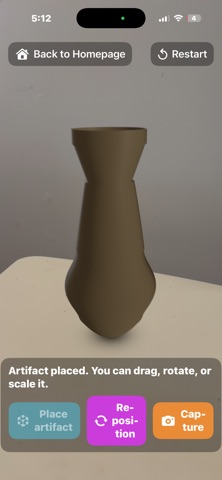
Place your creation in AR and view it from every angle
Modes
Level Mode: Guided restoration missions with target shapes
Free Create: An open studio for your own designs
Designed for iPad
Optimized for touch interaction and immersive exploration. Supports Dark Mode and Light Mode for comfortable viewing.
If you enjoy math, design, and building things with your hands, you’ll feel right at home here.