

The Focus Path: Study Planner
The Focus Path: Study Planner is made and published by SImplilyfe Inc. AppBrain is an independent app data site and isn't affiliated with SImplilyfe Inc. The app name, icon, screenshots and description belong to SImplilyfe Inc. and are shown as published on the App Store.
AppBrain's verdict
- Last updated
- October 10, 2026
Rankings
App Store top chartsApp Store Rankings for The Focus Path: Study Planner
Competitors
Similar apps and more from SImplilyfe Inc.Alternatives to The Focus Path: Study Planner


Releases
Updates seen on the App Store- Version
- 1.2.4
- Launched
- April 2026
No changelog data
User feedback
Ratings and reviews on the App StoreComments on The Focus Path: Study Planner for iOS
We don't have enough comments to show example comments. Please check back later.
Technology
Found in the app by AppBrain- Price
- Free
- App size
- 45.2 MB
- Content rating
- Everyone
Technologies used by The Focus Path: Study Planner
About the app and developer
About The Focus Path: Study Planner
The Focus Path: Study Planner is an education app developed by SImplilyfe Inc.
User Ratings
The app has no ratings yet.
App Information
The Focus Path: Study Planner is freely available from the App Store. The app size is 45.15 MB. The latest version available is 1.2.4. The last update was on October 10, 2026.
Technical Requirements
The app has a content rating of Everyone. The app has been available on the App Store since April 2026.
Developer information for SImplilyfe Inc.
Address:
Store listing
By SImplilyfe Inc., from the App Store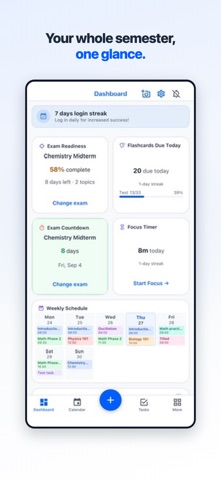


Description by SImplilyfe Inc. Written by the developer, not by AppBrain. Click to read.
Whether you're juggling AP classes in high school, managing a full course load in college, or balancing research in grad school, The Focus Path brings your classes, tasks, and schedule together in one place.
CUSTOMIZABLE DASHBOARD
Your home screen, your way. Choose from 12 widget types — upcoming tasks, class schedules, exam countdowns, weekly progress, and more. Customize colors, fonts, and layouts. Drag and drop to rearrange. On iPad, enjoy a full 4-column grid for a desktop-like experience.
SMART TASK MANAGEMENT
Create assignments, exams, and to-dos with due dates, priorities, and subtasks. Set up recurring tasks for weekly problem sets or reading assignments — each instance tracks completion separately. Use voice input to create tasks hands-free: just speak naturally and The Focus Path extracts the title, due date, and task type automatically.
CLASS SCHEDULING
Add your courses with schedules, locations, instructor info, and color coding. Your classes appear on the calendar and integrate with task management so you always know what's coming up for each course.
VISUAL CALENDAR
See your week at a glance with color-coded class blocks and personal events. Switch between daily, weekly, and monthly views. Pinch to zoom on the time grid. A live time indicator shows exactly where you are in your day. Export your schedule as an iCal feed for use in Apple Calendar, Google Calendar, or any calendar app.
ACADEMIC TERM MANAGEMENT
Organize by semesters, quarters, or trimesters. Track courses per term and customize date ranges. Localize terminology to match your school — choose between "classes" or "courses," "holidays" or "breaks."
WORKS OFFLINE
The Focus Path stores your data locally so you can view and edit tasks, classes, and schedules even without an internet connection. Changes sync automatically when you're back online.
SMART NOTIFICATIONS
Get reminders before classes start, when assignments are due, and days before exams. Set quiet hours so you're not disturbed during study sessions or overnight. Fine-tune timing and notification types in Settings.
PRIVACY FIRST
No ads. No tracking. Your study data stays yours. Export your data anytime as JSON or CSV. Delete your account with a 30-day grace period to change your mind. COPPA-compliant with age verification and parental consent for users under 18.
BUILT FOR ACCESSIBILITY
Full Dark Mode with light, dark, and system-follow options. Three UI density levels (compact, normal, relaxed) so you can optimize for screen space or readability. VoiceOver support, Dynamic Type, and 44pt minimum touch targets throughout.
SECURE BY DESIGN
Sign in with Apple or email. Protect your account with Face ID or Touch ID. All data transmitted over encrypted connections.
SUBSCRIPTIONS
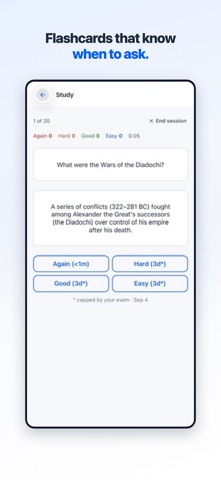
The Focus Path is free to download and use. Optional Pro and Premium subscriptions unlock flashcard studying, AI-generated decks, and monthly schedule scans. Available as monthly or annual auto-renewing plans; prices are shown in the app before you buy.
Payment is charged to your Apple ID at confirmation of purchase. Subscriptions renew automatically unless auto-renew is turned off at least 24 hours before the end of the current period. Manage or cancel anytime in your Apple ID account settings.
Terms of Use (EULA): https://www.apple.com/legal/internet-services/itunes/dev/stdeula/
Terms of Service: https://www.thefocuspath.com/terms
Privacy Policy: https://www.thefocuspath.com/privacy