

The Mella App
The Mella App is made and published by The Mella LLC. AppBrain is an independent app data site and isn't affiliated with The Mella LLC. The app name, icon, screenshots and description belong to The Mella LLC and are shown as published on the App Store.
AppBrain's verdict
Established- Rating on App Store
- 3.00
- 2 ratings
- Last updated
- December 17, 2022
It doesn't have enough ratings yet to judge what users think.
Rankings
App Store top chartsApp Store Rankings for The Mella App
Competitors
Similar apps and more from The Mella LLCAlternatives to The Mella App




Releases
Updates seen on the App Store- Version
- 1.08
- Launched
- December 2019
No changelog data
User feedback
Ratings and reviews on the App StoreComments on The Mella App for iOS
We don't have enough comments to show example comments. Please check back later.
Technology
Found in the app by AppBrain- Price
- Free
- App size
- 12.3 MB
- Content rating
- Everyone
Technologies used by The Mella App
About the app and developer
About The Mella App
The Mella App is a health & fitness app developed by The Mella LLC.
What is the rating of The Mella App?
The Mella App is rated 3.00 out of 5 stars, based on 2 ratings.
Is The Mella App free?
The Mella App is free. The app size is 12.31 MB. The latest version available is 1.08. The last update was on December 17, 2022.
What are the requirements for The Mella App?
The app has a content rating of Everyone. The app has been available on the App Store since December 2019.
Developer information for The Mella LLC
Address:
Store listing
By The Mella LLC, from the App Store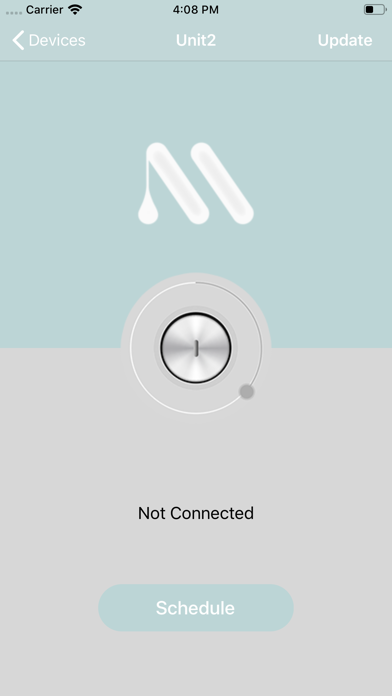
Description by The Mella LLC Written by the developer, not by AppBrain. Click to read.
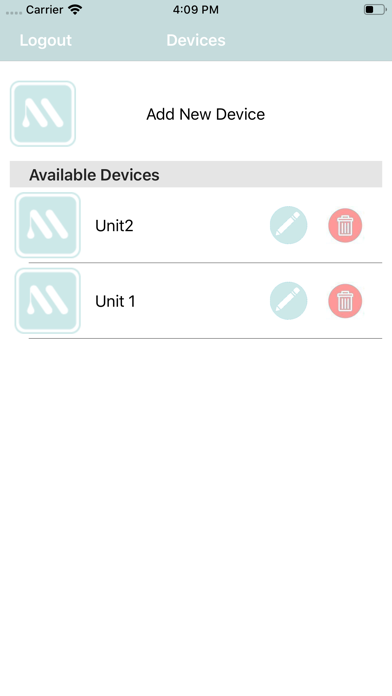
Connect up to 6 devices to one phone. Name the device whatever you want for example "Room 1" or "Julie's Room". Connect each device to WiFi and you're all set for mobile control of each device from one phone. Tap Mella on or off for on the fly control or set Mella to an automatic on/off schedule for hands free piece of mind.
Manual Mode:
Tap the big circle to turn the device ON or OFF. The circle will turn green to indicate the device is on or it will be red to indicate the device is off. Going in for a special client? Tap Mella ON while you travel to the salon. Get home and not sure if you remembered to turn your warmer off? Tap Mella OFF from your couch instead of going back to the salon.
Schedule Mode:
Set each device to turn ON and OFF according to a schedule you set. Set Mella to turn on well before you arrive so your wax or sugar is ready when you get there. With Mella on an automatic schedule you'll never wonder if you remembered to turn off your warmers. Just take a peak on the app from wherever you are to be sure.
Pro Tip: Move the Time Zone slider until it is black
3 simple user friendly steps to connect each device.
Turn Mella OFF for the first 2 steps and make sure it's not too hot to handle while you look at the bottom of the device.
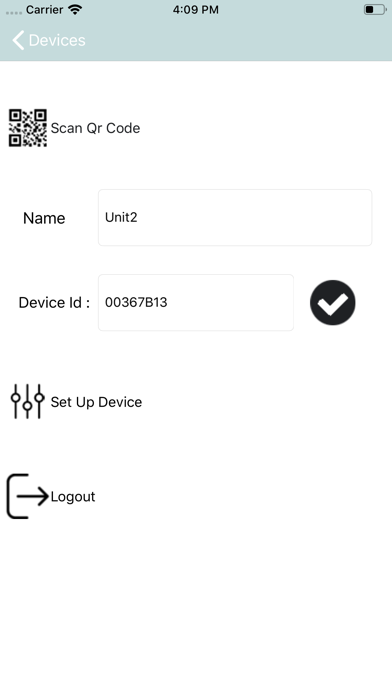
Step 1 - Either Scan the QR code or enter the Device ID located on the bottom of the warmer. When completed tap the check mark.
Step 2 - Name the device whatever floats your boat.
Turn Mella ON for the next step and have your WiFi password handy.
Step 3 - Tap "Set up" to connect the device to your WiFi. The green light will blink while you choose our WiFi and enter your password. The green light will turn off if you are successful. If you mess up or the light isn't blinking anymore don't worry, turn Mella OFF then ON and try again
Pro Tip: Mella must use 4G - go to your phone seetings and make sure you are connected to 4G instead of 5G.
Still having trouble? No problem feel free to email us at info@themella.com
Why doesn't the app change the temperature? Because the app allows you to turn on the device with ample time to heat appropriately there is no longer a need to turn up the temperature to unsafe levels for quick melting. You adjust your temperature throughout the work day, where you leave the temperature at the end of the day is where it should be at the start of your next day.
Terms of Service: https://app.termly.io/document/terms-of-use-for-saas/dffbbf12-9335-489b-b9ab-088fb66067a3