

The OB Wheel Pro 7
The OB Wheel Pro 7 is made and published by Don Miller. AppBrain is an independent app data site and isn't affiliated with Don Miller. The app name, icon, screenshots and description belong to Don Miller and are shown as published on the App Store.
AppBrain's verdict
Established- Best rank
- #27
- Top Paid, Germany
- Rating on App Store
- 4.00
- 5 ratings
- Last updated
- March 30, 2019
It doesn't have enough ratings yet to judge what users think. Its best ranking is #27 in Top Paid, Medical in Germany.
Rankings
App Store top charts- Highest rank
- #27
- Chart
- Top Paid
- Medical
- Country
- Germany
App Store Rankings for The OB Wheel Pro 7
Competitors
Similar apps and more from Don MillerAlternatives to The OB Wheel Pro 7



More from Don Miller




Releases
Updates seen on the App Store- Version
- 2.1
- Launched
- October 2013
No changelog data
User feedback
Ratings and reviews on the App StoreComments on The OB Wheel Pro 7 for iOS
We don't have enough comments to show example comments. Please check back later.
Technology
Found in the app by AppBrain- Price
- $1.99
- App size
- 1.47 MB
- Content rating
- Everyone
Technologies used by The OB Wheel Pro 7
About the app and developer
About The OB Wheel Pro 7
The OB Wheel Pro 7 is a medical app developed by Don Miller.
User Ratings
The OB Wheel Pro 7 is rated 4.00 out of 5 stars. The rating is based on 5 ratings.
App Information
The OB Wheel Pro 7 costs $1.99. The app size is 1.47 MB. The latest version available is 2.1. The last update was on March 30, 2019.
Technical Requirements
The app has a content rating of Everyone. The app has been available on the App Store since October 2013.
Developer information for Don Miller
Address:
Store listing
By Don Miller, from the App Store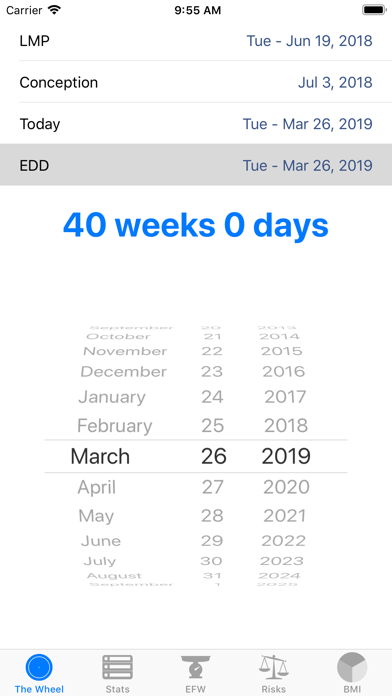



Description by Don Miller Written by the developer, not by AppBrain. Click to read.
The OB Wheel Pro 7 is a state-of-the-art gestational age calculator (also known as an obstetric or pregnancy wheel) that is used every day by doctors, obstetricians, midwives, nurses, and pregnant women. The OB Wheel Pro 7 is a professional tool that replaces the need for multiple apps and it greatly enhances the functionality of those worn-out cardboard wheels without compromise.
The OB Wheel Pro 7 accurately determines the estimated delivery date (EDD), or due date, of a pregnancy based on the first day of a woman's last menstrual period (LMP), or from the date of conception, or from a known gestational age (GA) on a known date, e.g. from an ultrasound measurement, or from fetal biometry like Crown-Rump Length (CRL), Femur Length (FL), and BiParietal Diameter (BPD). Additionally, for appropriate gestational ages, The The OB Wheel Pro 7 estimates fetal weight and displays the number of days completed and remaining.
The OB Wheel Pro 7, besides calculating GA from fetal ultrasound biometrics, enables clinicians to also calculate Estimated Fetal Weight (EFW) from FL, BPD, Head Circumference (HC), and Abdominal Circumference (AC) using the most appropriate published reference formula using the maximum and most appropriate parameters.
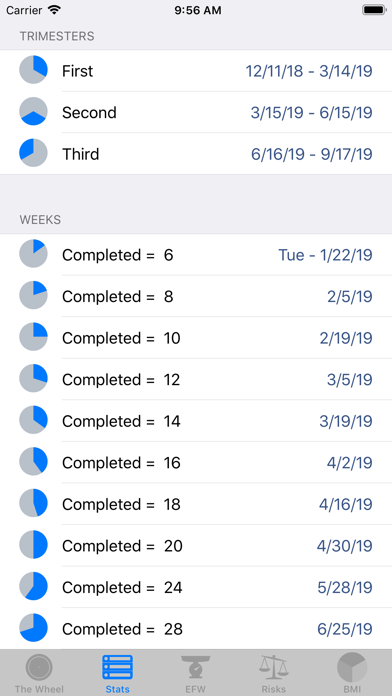
Prenatal care providers know that there are key gestational ages where testing or interventions are needed. The OB Wheel Pro 7 lets providers see at a glance when these items should be scheduled.
FEATURES
• Includes Apple Watch app!
• Gestational Age Calculator from LMP, EDD, Conception Date for any reference date
• Gestational Age calculated from specific date and gestational age (e.g. ultrasound)
• Gestational Age Calculator using fetal biometrics (CRL, FL, BPD)
• Fetal Weight Calculator using HC, AC, FL, BPD
• Body Mass Index (BMI) Calculator
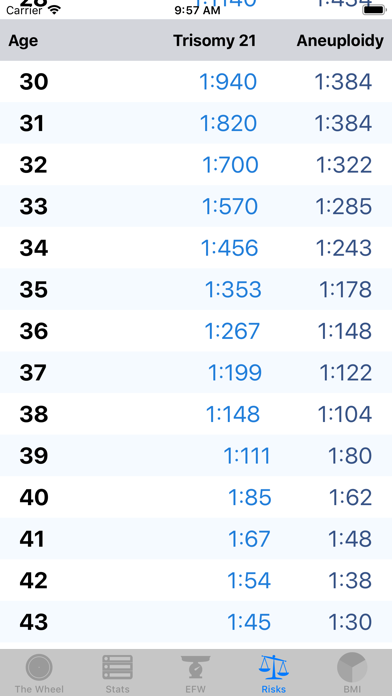
• Age-Adjusted Risk Table for Trisomy 21 and aneuploidy
• List of key completed weeks during pregnancy
• Pregnancy days completed and remaining, and dates for each trimester
• Remembers last-used EDD
PRO TIPS:
• To enter Gestational Age, CRL, FL, or BPD for a specific date (like for an ultrasound exam), tap "Today", enter the desired date, then tap on the button displaying the gestational age to change that button to display options for entering a specific GA, CRL, FL, and BPD.
• When using the GA calculator, double-tap a date to change the value to the current date.
• When using the EFW calculator, double-tap a value to clear the value of the selected parameter.