

ThemeParkGo - for Japan.
ThemeParkGo - for Japan. is made and published by mitsunori oishi. AppBrain is an independent app data site and isn't affiliated with mitsunori oishi. The app name, icon, screenshots and description belong to mitsunori oishi and are shown as published on the App Store.
AppBrain's verdict
- Last updated
- November 19, 2023
Rankings
App Store top chartsApp Store Rankings for ThemeParkGo - for Japan.
Competitors
Similar apps and more from mitsunori oishiAlternatives to ThemeParkGo - for Japan.







More from mitsunori oishi







Releases
Updates seen on the App Store- Version
- 1.3.0
- Launched
- February 2018
No changelog data
User feedback
Ratings and reviews on the App StoreComments on ThemeParkGo - for Japan. for iOS
We don't have enough comments to show example comments. Please check back later.
Technology
Found in the app by AppBrain- Price
- Free
- App size
- 5.73 MB
- Content rating
- Everyone
Technologies used by ThemeParkGo - for Japan.
About the app and developer
About ThemeParkGo - for Japan.
ThemeParkGo - for Japan. is a travel app developed by mitsunori oishi.
What is the rating of ThemeParkGo - for Japan.?
ThemeParkGo - for Japan. has no ratings yet.
Is ThemeParkGo - for Japan. free?
ThemeParkGo - for Japan. is free. The app size is 5.73 MB. The latest version available is 1.3.0. The last update was on November 19, 2023.
What are the requirements for ThemeParkGo - for Japan.?
The app has a content rating of Everyone. The app has been available on the App Store since February 2018.
Developer information for mitsunori oishi
Address:
Store listing
By mitsunori oishi, from the App Store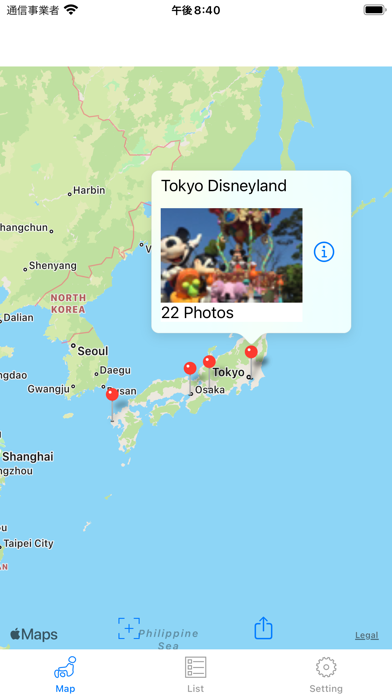

Description by mitsunori oishi Written by the developer, not by AppBrain. Click to read.
This application classifies pictures taken in the theme park by each theme park.
Location information of the photo is used for classification.
The classified photos are displayed by theme park and by date.
■ Search theme park
· LEGOLAND JAPAN
·Tokyo Disneyland
·Tokyo DisneySea
·UNIVERSAL STUDIOS JAPAN
·HUIS TEN BOSCH
※Attention
· Tally only photos that contain location information.
· Pictures that are not in the theme park may be classified due to errors in the position information.
· If you delete a photo displayed on each theme park, photos will not be displayed.
In that case, please do "Search All" in "Setting".
■ Tab Structure
"Map" ... Displays the location of the theme park and search results.
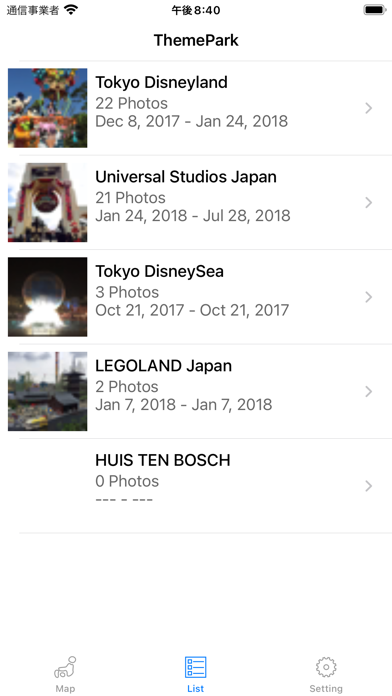
"List" ... Displays the theme park list.
"Setting" ... re-search, search order, execution of trial mode
■ Screen structure
"List" -> "List by date" -> "Photo list" -> "Full screen display"
"Map (pin)" -> "List by date" -> "Photo list" -> "Full screen display"
■ How to use
1. Please allow access to the album at first boot. The search will start.
2. After the search, results are displayed in "Map" "List".
3. Change the display order of photos with "Settings".
4. When next time you start up, if there are new pictures, only that picture will be searched.
5. If you deleted the photo, please do "Search All" again.
6. If there is no target photograph, you can try this application function in "Trial mode" of "Setting".
In trial mode, photos in the album are classified regardless of the theme park.
■ Settings tab
- Last search date
"All Search" ... Discards the current result and conducts a search from the beginning.
"Resume Search" ... Restarts the interrupted search.
- Translucent mode
The color of the range showing the theme park on the map becomes translucent.
- Search for photos
"Ascending order (in ascending order of dates)" ... The photos are displayed in order of oldest.
"Descending order (ascending order of dates)" ... The photos are displayed in order of newest date.
- Trial mode
Regardless of whether or not the position information of the photo is included, the photos in the album are searched by theme park.
After searching, please try the function of the application, such as viewing photos.
While trying, "Trying" is displayed in the title name.
Please try "All Search" after trying.
■ Map tab
- Tap on the pin to display the theme park name, photo, number of shots taken.
Tap "i" to display "List by date".
- "+" Show the whole Japan.
- "(Up arrow)" Share the image of the map.
■ List tab
- Total result is displayed for each theme park.
- Display items
Theme park name
Photo ...Display the first photo set in "Search order of photos" in "Setting".
Shooting date ...Displays from the first shot date to the last shooting date.
Number of sheets...Displays the total number of pictures taken at that theme park.
Tap ">" to display "List by date".
■ List by date
- Display photos taken at the theme park by date.
- Display items
Date and number of pictures taken on that day.
Display several pictures taken on that day.
Tap ">" to display "Photo list".
■ Photo List
- List photos by date.
Tap a photo to display "Full Screen Display".
■ Full screen display
- Display in full screen.
- Swipe left and right to display the next picture.
- "(Up arrow)" Share the photo.