

Thermlapse – Thermal Timelapse
Thermlapse – Thermal Timelapse is made and published by Corey Thomas Slick. AppBrain is an independent app data site and isn't affiliated with Corey Thomas Slick. The app name, icon, screenshots and description belong to Corey Thomas Slick and are shown as published on the App Store.
AppBrain's verdict
- Last updated
- July 17, 2026
- Size
- 89.7 MB
User feedback
Ratings and reviews on the App StoreComments on Thermlapse – Thermal Timelapse for iOS
We don't have enough comments to show example comments. Please check back later.
Store listing
By Corey Thomas Slick, from the App Store



Description by Corey Thomas Slick Written by the developer, not by AppBrain. Click to read.
Thermlapse turns your FLIR ONE camera into a professional thermal monitoring station. Set an interval, press record, and walk away — the app captures a full radiometric image automatically at every tick, preserving complete temperature data for every frame.
NO OTHER iOS APP DOES THIS.
The FLIR ONE app's time-lapse is buried and non-configurable. Vernier Thermal Analysis no longer supports FLIR ONE Edge or USB-C cameras. Thermlapse is purpose-built for the professional who needs unattended, long-duration thermal capture.
WHAT YOU CAN DO
▸ BUILDING DIAGNOSTICS
Track heat loss patterns through a wall section over an 8-hour workday. Set a 5-minute interval, mount your phone, go do other work. Return to a complete radiometric sequence showing exactly when and where the thermal envelope failed.
▸ HVAC SYSTEM VERIFICATION
Document heating and cooling cycles at 30-second intervals to confirm a system is cycling properly. Every frame contains real temperature data — not just a pretty image — so you can measure exact duct temperatures in post-analysis with FLIR Tools.
▸ EQUIPMENT WARM-UP PROFILES
Capture machinery from cold start to operating temperature. A 10-second interval over 30 minutes gives you 180 radiometric frames that tell the complete thermal story of a motor, transformer, or mechanical assembly.
▸ SOLAR AND ENVIRONMENTAL STUDIES
Track solar heating of a roof, facade, or material sample throughout the day. Configurable intervals from 1 minute to 1 hour let you compress an entire day into a compact sequence.
KEY FEATURES
◆ RADIOMETRIC CAPTURE
Every image saves full 14-bit radiometric temperature data as a standard JPEG. Open any frame later in FLIR Tools, ResearchIR, or FLIR Ignite and measure temperatures at any pixel — hours or days after the capture session.
◆ CONFIGURABLE INTERVALS
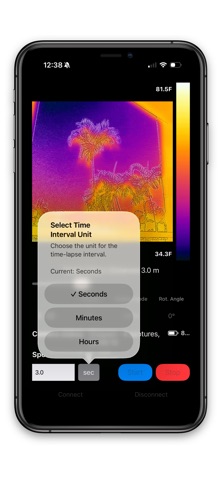
Set intervals in seconds, minutes, or hours — from 0.15 seconds to 12 hours per frame. No other FLIR ONE companion app offers this range.
◆ ALL FLIR ONE CAMERAS SUPPORTED
• FLIR ONE Classic (Lightning)
• FLIR ONE with USB-C
• FLIR ONE Edge (Bluetooth/wireless)
• FLIR ONE Edge Pro (Bluetooth/wireless, extended range to 400°C)
◆ AUTO-RECONNECTION
If a wireless camera drops connection mid-session, Thermlapse retries up to 5 times automatically. Your session keeps going.
◆ LIVE THERMAL VIEW
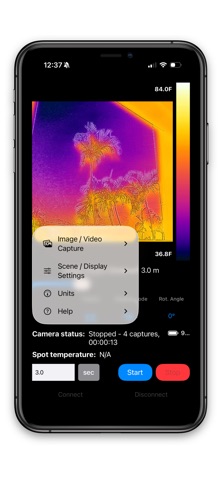
See a real-time thermal stream with your choice of 12 color palettes: Iron, Rainbow, Arctic, Lava, Gray, Wheel, Double Rainbow, Blackhot, and more.
◆ 5 FUSION MODES
IR Only, MSX (thermal with edge enhancement), Visual Only, Alpha Blend, and Thermal Fusion (temperature-threshold blending).
◆ TEMPERATURE MEASUREMENT
Drag a cursor anywhere on the live image to see exact temperature. Min and max temperatures update in real time across the whole scene.
◆ VIDEO EXPORT
Convert any captured sequence directly to MP4 at 15, 30, or 60 FPS. One tap to share the final timelapse video.
◆ SESSION MANAGEMENT
Named photo albums (FLIR_001, FLIR_002…) organize every session automatically. Session statistics show total frames, duration, and storage used.
◆ SCREEN MANAGEMENT
Display auto-dims during recording to preserve your phone's battery during long unattended sessions.
PRIVACY
All data is stored locally on your device. No cloud upload, no analytics, no user tracking of any kind.
REQUIRES
A physical FLIR ONE camera (Classic, Edge, or Edge Pro). This app does not work with the iOS Simulator or without a connected FLIR ONE device. Compatible with iPhone and iPad running iOS 15.0 or later.
Safety and technology
Found in the app by AppBrain- Price
- $9.99
- App size
- 89.7 MB
- Content rating
- Everyone
Technologies used by Thermlapse – Thermal Timelapse
Releases
Updates seen on the App Store- Version
- 1.1.0
- Launched
- April 2026
No changelog data
Alternatives
Similar apps and more from Corey Thomas SlickMore from Corey Thomas Slick


Rankings
App Store top chartsApp Store Rankings for Thermlapse – Thermal Timelapse
About the app and developer
About Thermlapse – Thermal Timelapse
Thermlapse – Thermal Timelapse is a photo & video app developed by Corey Thomas Slick.
What is the rating of Thermlapse – Thermal Timelapse?
Thermlapse – Thermal Timelapse has no ratings yet.
Is Thermlapse – Thermal Timelapse free?
Thermlapse – Thermal Timelapse costs $9.99. The app size is 89.66 MB. The latest version available is 1.1.0. The last update was on July 17, 2026.
What are the requirements for Thermlapse – Thermal Timelapse?
The app has a content rating of Everyone. The app has been available on the App Store since April 2026.
Developer information for Corey Thomas Slick
Address:
Frequently asked questions about Thermlapse – Thermal Timelapse
Is Thermlapse – Thermal Timelapse free?
No. Thermlapse – Thermal Timelapse costs $9.99 on the App Store.
Is Thermlapse – Thermal Timelapse still available?
Yes. Thermlapse – Thermal Timelapse is on the App Store, and the last update we saw was on July 17, 2026.
How large is Thermlapse – Thermal Timelapse?
Thermlapse – Thermal Timelapse is 89.66 MB.
Is Thermlapse – Thermal Timelapse suitable for children?
App Store rates the content of Thermlapse – Thermal Timelapse as suitable for everyone.
Who made Thermlapse – Thermal Timelapse?
Thermlapse – Thermal Timelapse was developed by Corey Thomas Slick. It is listed in the photo & video category on the App Store.