

Tide: Energy Tracker
Tide: Energy Tracker is made and published by Ana Escorcio. AppBrain is an independent app data site and isn't affiliated with Ana Escorcio. The app name, icon, screenshots and description belong to Ana Escorcio and are shown as published on the App Store.
AppBrain's verdict
- Last updated
- July 9, 2026
Rankings
App Store top chartsApp Store Rankings for Tide: Energy Tracker
Competitors
Similar apps and more from Ana EscorcioAlternatives to Tide: Energy Tracker


More from Ana Escorcio


Releases
Updates seen on the App Store- Version
- 1.1
- Launched
- June 2026
No changelog data
User feedback
Ratings and reviews on the App StoreComments on Tide: Energy Tracker for iOS
We don't have enough comments to show example comments. Please check back later.
Technology
Found in the app by AppBrain- Price
- Free
- App size
- 12.4 MB
- Content rating
- Everyone
Technologies used by Tide: Energy Tracker
About the app and developer
About Tide: Energy Tracker
Tide: Energy Tracker is a health & fitness app developed by Ana Escorcio.
What is the rating of Tide: Energy Tracker?
Tide: Energy Tracker has no ratings yet.
Is Tide: Energy Tracker free?
Tide: Energy Tracker is free. The app size is 12.36 MB. The latest version available is 1.1. The last update was on July 9, 2026.
What are the requirements for Tide: Energy Tracker?
The app has a content rating of Everyone. The app has been available on the App Store since June 2026.
Developer information for Ana Escorcio
Address:
Frequently asked questions about Tide: Energy Tracker
Is Tide: Energy Tracker free?
Yes. Tide: Energy Tracker is free on the App Store.
Is Tide: Energy Tracker still available?
Yes. Tide: Energy Tracker is on the App Store, and the last update we saw was on July 9, 2026.
How large is Tide: Energy Tracker?
Tide: Energy Tracker is 12.36 MB.
Is Tide: Energy Tracker suitable for children?
App Store rates the content of Tide: Energy Tracker as suitable for everyone.
Who made Tide: Energy Tracker?
Tide: Energy Tracker was developed by Ana Escorcio. It is listed in the health & fitness category on the App Store.
What are the best alternatives to Tide: Energy Tracker?
People looking at Tide: Energy Tracker also look at these health & fitness apps: VitalTide Wellness Tracker, Traily: Mood & Energy Tracker, Energy Tracker: Rise Guide, Drift Off - White Noise, The Retreat Programs.
Store listing
By Ana Escorcio, from the App Store

Description by Ana Escorcio Written by the developer, not by AppBrain. Click to read.
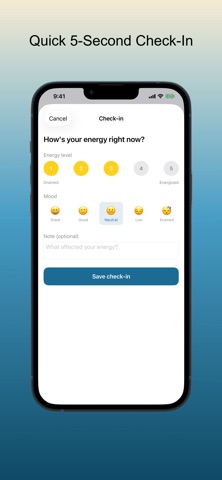
Log how you feel in seconds throughout the day and discover what lifts you up or drains you. Tide turns quick check-ins into clear weekly patterns, mood trends, and sleep correlations — all stored privately on your device.
KEY FEATURES:
• 5-second check-ins: Energy level (1–5) plus mood and optional note
• Daily timeline: Morning, afternoon, and evening at a glance
• Streak tracking: Build a consistent self-awareness habit
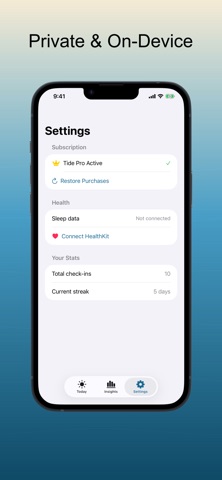
• Sleep correlation: Connect Apple Health to see how rest affects your energy
• Mood distribution: Spot patterns across days and weeks
• Total privacy: No account, no cloud — your data stays on your iPhone
WHY TIDE:
• Faster than a full journal — log in under five seconds
• Designed for burnout awareness and fatigue tracking, not clinical diagnosis
• Calm, distraction-free interface with light and dark mode
• Works on iPhone and iPad with a consistent experience
TIDE PRO:
• Unlimited check-ins (free tier: 2 per day)
• Full history beyond 14 days
• Advanced insights and mood distribution charts
• Weekly averages and best-day patterns
• Sleep and energy analysis via HealthKit
PERFECT FOR:
• Professionals tracking burnout and afternoon energy crashes
• Students noticing how sleep affects focus and mood
• Anyone building a daily wellness habit without complexity
• People who want private, on-device health journaling
Start tracking your energy today and see what your week reveals.
ACCESSIBILITY: VoiceOver labels on main actions; Dynamic Type support for readable check-ins.
Terms of Use (EULA): https://www.apple.com/legal/internet-services/itunes/dev/stdeula/