


AppBrain's verdict
- Rating on App Store
- 5.00
- 6 ratings
- Last updated
- April 18, 2026
- Size
- 25.1 MB
It doesn't have enough ratings yet to judge what users think.
User feedback
Ratings and reviews on the App StoreComments on TiltSync for iOS
We don't have enough comments to show example comments. Please check back later.
Store listing
By Daniel Smith, from the App StoreDescription by Daniel Smith Written by the developer, not by AppBrain. Click to read.
TiltSync transforms your iPhone into a precision alignment tool for solar panels. Perfect for DIYers, first-time installers, and anyone who wants professional results without the learning curve. Whether you're a homeowner installing rooftop panels, an RV enthusiast with a portable setup, or setting up your first off-grid system, TiltSync helps you maximize energy production with zero guesswork.
**How it works:**
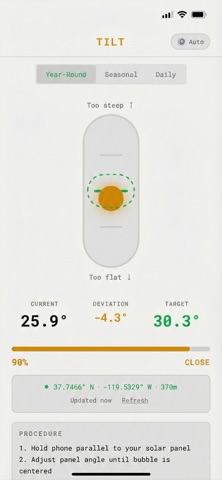
Place your phone flat on your solar panel. TiltSync uses your device's accelerometer to measure tilt, the magnetometer for compass heading, and GPS for your exact location. The app calculates the optimal angle and direction, then guides you to perfect alignment with haptic feedback that intensifies as you dial it in.
**Precision interface:**
The main display shows a rotating compass card with your heading, a tilt indicator showing panel angle, and real-time digital readouts. It's not just functional, it's beautiful to use.
**Three alignment views:**
• Combined Dashboard — See tilt and compass alignment together on one screen
• Tilt Mode — Classic bubble level for dialing in your angle
• Compass Mode — Dedicated view for azimuth alignment with sun position marker
**Three optimization modes:**
• Year-Round — Set it and forget it. Best fixed angle for maximum annual production.
• Seasonal — For adjustable mounts. Optimized angles for summer and winter.
• Daily — Real-time sun tracking that updates every minute. Perfect for portable panels, camping, and off-grid setups where every watt counts.
**Features:**
• Precision interface — Compass, tilt indicator, and real-time readouts
• Dark, light, and auto themes — Adapts to your preference or system setting
• Color-coded feedback — Green when perfect, yellow when close, red when off
• Progressive haptic guidance — Feel your way to alignment without watching the screen
• Instant startup — Cached GPS location means no waiting on subsequent launches
• Works fully offline — All calculations happen on-device
• No account needed — Just open and align
**Built for everyone:**
No solar experience required. The intuitive interface guides you step-by-step, and haptic feedback tells you when you've nailed it — even if you've never aligned a panel before. High-contrast display works in direct sunlight. Dark mode for indoor prep, light mode for outdoor use. Whether you're on a roof, in a field, or at a campsite, TiltSync works where you work.
Stop guessing. Start generating.
Safety and technology
Found in the app by AppBrain- Price
- Free
- App size
- 25.1 MB
- Content rating
- Everyone
Technologies used by TiltSync
Releases
Updates seen on the App Store- Version
- 1.1.2
- Launched
- January 2026
No changelog data
Alternatives
Similar apps and more from Daniel SmithMore from Daniel Smith

Rankings
App Store top chartsApp Store Rankings for TiltSync
About the app and developer
About TiltSync
TiltSync is an utilities app developed by Daniel Smith.
User Ratings
TiltSync is rated 5.00 out of 5 stars. The rating is based on 6 ratings.
App Information
TiltSync is freely available from the App Store. The app size is 25.11 MB. The latest version available is 1.1.2. The last update was on April 18, 2026.
Technical Requirements
The app has a content rating of Everyone. The app has been available on the App Store since January 2026.
TiltSync is made and published by Daniel Smith. AppBrain is an independent app data site and isn't affiliated with Daniel Smith. The app name, icon, screenshots and description belong to Daniel Smith and are shown as published on the App Store.
Developer information for Daniel Smith
Address: