

Time Alarm Clock.
Time Alarm Clock. is made and published by WAILI LIMITED. AppBrain is an independent app data site and isn't affiliated with WAILI LIMITED. The app name, icon, screenshots and description belong to WAILI LIMITED and are shown as published on the App Store.
AppBrain's verdict
- Last updated
- March 26, 2026
- Size
- 4.13 MB
User feedback
Ratings and reviews on the App StoreComments on Time Alarm Clock. for iOS
We don't have enough comments to show example comments. Please check back later.
Store listing
By WAILI LIMITED, from the App Store
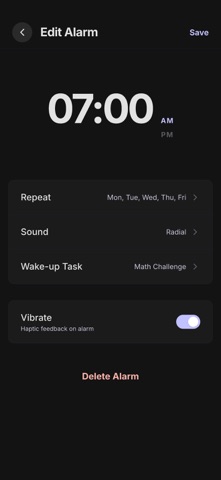

Description by WAILI LIMITED Written by the developer, not by AppBrain. Click to read.
Core Features:
● Precision Alarms
Customize alarm names, ringtones, and repeat schedules. Rings even in Focus mode, ensuring you never miss an important moment.
● Wake-Up Challenges
Choose from math challenges, pattern matching, memory grids, and more to help you wake up quickly and stay alert after your alarm goes off.
● White Noise & Ambient Sounds
50+ hi-fi ambient soundscapes including ocean waves, mountain wind, rainstorm, campfire, and other natural sounds to create an immersive sleep environment.
● Sleep Rituals
Guided sequences, breathing exercises, and meditation sessions to help you relax before bed and gradually enter deep sleep.
● Nap Mode
Set custom nap durations with automatic reminders when time is up. Ideal for lunch breaks or quick rest sessions.
● Sleep Insights
Automatically track your sleep data with daily insights and weekly overviews. Analyze sleep quality, consistency, and wake-up speed with personalized improvement suggestions.
● Dream Journal
Record and manage your dreams, adding a complete log to your sleep experience.
● Apple Watch Support
Sync alarms and sleep rituals to your wrist. Silent haptic vibration wake-up for situations where you prefer not to disturb others.
● Themes & Personalization
Multiple visual theme packs with customizable interface layouts and styles.
---
Subscription Information:
Time Alarm Clock offers the following auto-renewable subscription plans:
- Weekly: $4.99/week (includes 3-day free trial)
- Yearly: $39.99/year
· Payment will be charged to your Apple ID account upon confirmation of purchase.
· Your subscription will automatically renew and your account will be charged within 24 hours prior to the end of the current period, unless you turn off auto-renewal at least 24 hours before the current period expires.
· You can manage or cancel your subscription at any time in iPhone Settings > Apple ID > Subscriptions.
· No charge will occur during the free trial period if canceled. If not canceled, you will be automatically charged at the end of the trial period based on your selected plan.
EULA: https://www.apple.com/legal/internet-services/itunes/dev/stdeula/
Privacy Policy: https://ryangyelw.xyz/shiguangnaozhong/privacy.html
Safety and technology
Found in the app by AppBrain- Price
- Free
- App size
- 4.13 MB
- Content rating
- Everyone
Technologies used by Time Alarm Clock.
Releases
Updates seen on the App Store- Version
- 1.0.0
- Launched
- March 2026
No changelog data
Alternatives
Similar apps and more from WAILI LIMITEDAlternatives to Time Alarm Clock.





More from WAILI LIMITED


Rankings
App Store top chartsApp Store Rankings for Time Alarm Clock.
About the app and developer
About Time Alarm Clock.
Time Alarm Clock. is a health & fitness app developed by WAILI LIMITED.
What is the rating of Time Alarm Clock.?
Time Alarm Clock. has no ratings yet.
Is Time Alarm Clock. free?
Time Alarm Clock. is free. The app size is 4.13 MB. The latest version available is 1.0.0. The last update was on March 26, 2026.
What are the requirements for Time Alarm Clock.?
The app has a content rating of Everyone. The app has been available on the App Store since March 2026.
Developer information for WAILI LIMITED
Address:
Frequently asked questions about Time Alarm Clock.
Is Time Alarm Clock. free?
Yes. Time Alarm Clock. is free on the App Store.
Is Time Alarm Clock. still available?
Yes. Time Alarm Clock. is on the App Store, and the last update we saw was on March 26, 2026.
How large is Time Alarm Clock.?
Time Alarm Clock. is 4.13 MB.
Is Time Alarm Clock. suitable for children?
App Store rates the content of Time Alarm Clock. as suitable for everyone.
Who made Time Alarm Clock.?
Time Alarm Clock. was developed by WAILI LIMITED. It is listed in the health & fitness category on the App Store.
What are the best alternatives to Time Alarm Clock.?
People looking at Time Alarm Clock. also look at these health & fitness apps: On Time-Loud Alarm Clock,Sleep, Soothly:Sleep and Meditation, Sleep Calculator - SleepCal, PillChime - Pill Reminder, Impact 24/7.