

Time Atelier: Focus Timer
Time Atelier: Focus Timer is made and published by クリサク株式会社. AppBrain is an independent app data site and isn't affiliated with クリサク株式会社. The app name, icon, screenshots and description belong to クリサク株式会社 and are shown as published on the App Store.
AppBrain's verdict
- Last updated
- August 31, 2026
- Size
- 187.0 MB
User feedback
Ratings and reviews on the App StoreComments on Time Atelier: Focus Timer for iOS
We don't have enough comments to show example comments. Please check back later.
Store listing
By クリサク株式会社, from the App Store



Description by クリサク株式会社 Written by the developer, not by AppBrain. Click to read.
"I keep telling myself to study, but somehow I end up on my phone again."
"Apps that just track study time with numbers and graphs never held my attention."
"It's sad when all that effort leaves nothing behind."
Time Atelier is a focus timer made for you.
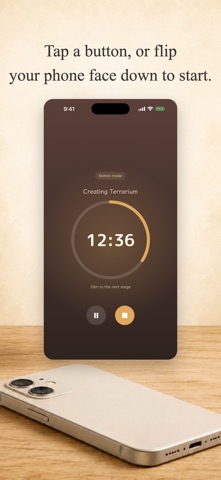
Two ways to start: tap a button, or turn your phone face down. With Face-Down Start, the timer keeps running while your phone stays face down, and pauses automatically the moment you pick it up. Leaving your phone alone helps you stay focused. Of course, you can also stick to the simple button-only mode instead (switch anytime in settings).
And the time you focus never disappears. The artwork you choose—such as a terrarium or town festival—gradually takes shape as your focused time adds up. You'll see the first change after just 15 minutes.
◆ Key Features
•Two ways to start: choose "Start with Button" or "Start Face-Down"
•Face-Down Start: timing continues while your phone is face down, pauses automatically when you lift it, and resumes when you flip it back
•Watch your art take shape: your artwork evolves step by step as focused time builds up, and finished pieces join your collection. New artwork is on the way, too
•Complete two artworks for free: the short "Terrarium" and the longer "Town Festival" can both be enjoyed in full for free
•Focus history: check your focus time today, this week, and this month, plus a chart of the last 7 days, for free
•Widget: see your focus time today and your artwork's progress right on your home screen, no need to open the app
•Completion cards: save and share your finished artwork as an image
•Daily reminders: get a notification at a set time to help build the habit
◆ Who It's For
•Middle school, high school, and college students building study time for tests and exams
•Working adults preparing for certifications
•Anyone who wants to protect real time for reading or creative work
•Remote workers who tend to drift into distractions
•Anyone who feels a bit too attached to their phone and wants some distance
◆ Your Records Stay on Your Device
No account required. Your focus history is stored only on your device.
◆ More Artwork & Features (In-App Purchases)
•Additional artwork: each piece is a one-time purchase. Once bought, you can restart and rebuild it from scratch as many times as you like. New artwork is always on the way
•Logbook: one-time purchase. View past weeks and months, monthly charts and comparisons, and a calendar view let you look back on your progress in depth
•Premium Membership (monthly, auto-renewing): unlimited access to all paid artwork and the Logbook, including any new artwork added in the future at no extra cost
Premium Membership is an auto-renewing subscription. Payment is charged to your Apple Account when you confirm the purchase. It renews automatically unless canceled at least 24 hours before the end of the current period. You can cancel anytime after purchase from Settings > Subscriptions on your iPhone, and you'll keep access until the end of the current period.
Terms of Use: https://sites.google.com/view/timeatelier-term/term
Privacy Policy: https://kurisaku.com/privacypolicy
Ready to turn today's focus into a piece of art? Your atelier is waiting for you.
Safety and technology
Found in the app by AppBrain- Price
- Free
- App size
- 187.0 MB
- Content rating
- Everyone
Technologies used by Time Atelier: Focus Timer
Releases
Updates seen on the App Store- Version
- 1.1.0
- Launched
- August 2026
No changelog data
Alternatives
Similar apps and more from クリサク株式会社Alternatives to Time Atelier: Focus Timer


More from クリサク株式会社


Rankings
App Store top chartsApp Store Rankings for Time Atelier: Focus Timer
About the app and developer
About Time Atelier: Focus Timer
Time Atelier: Focus Timer is an education app developed by クリサク株式会社.
User Ratings
The app has no ratings yet.
App Information
Time Atelier: Focus Timer is freely available from the App Store. The app size is 186.99 MB. The latest version available is 1.1.0. The last update was on August 31, 2026.
Technical Requirements
The app has a content rating of Everyone. The app has been available on the App Store since August 2026.
Developer information for クリサク株式会社
Address: