

Time Checklist is made and published by 英纬 高. AppBrain is an independent app data site and isn't affiliated with 英纬 高. The app name, icon, screenshots and description belong to 英纬 高 and are shown as published on the App Store.
AppBrain's verdict
- Last updated
- December 1, 2025
Rankings
App Store top chartsApp Store Rankings for Time Checklist
Competitors
Similar apps and more from 英纬 高Alternatives to Time Checklist





Releases
Updates seen on the App Store- Version
- 1.0
- Launched
- December 2025
No changelog data
User feedback
Ratings and reviews on the App StoreComments on Time Checklist for iOS
We don't have enough comments to show example comments. Please check back later.
Technology
Found in the app by AppBrain- Price
- Free
- App size
- 12.8 MB
- Content rating
- Everyone
Technologies used by Time Checklist
About the app and developer
About Time Checklist
Time Checklist is a productivity app developed by 英纬 高.
User Ratings
The app has no ratings yet.
App Information
Time Checklist is freely available from the App Store. The app size is 12.76 MB. The latest version available is 1.0. The last update was on December 1, 2025.
Technical Requirements
The app has a content rating of Everyone. The app has been available on the App Store since December 2025.
Developer information for 英纬 高
Address:
Frequently asked questions about Time Checklist
Is Time Checklist free?
Yes. Time Checklist is free on the App Store.
Is Time Checklist still available?
Yes. Time Checklist is on the App Store, and the last update we saw was on December 1, 2025.
How large is Time Checklist?
Time Checklist is 12.76 MB.
Is Time Checklist suitable for children?
App Store rates the content of Time Checklist as suitable for everyone.
Who made Time Checklist?
Time Checklist was developed by 英纬 高. It is listed in the productivity category on the App Store.
What are the best alternatives to Time Checklist?
People looking at Time Checklist also look at these productivity apps: 时迹·记录时间痕迹, PurrrrrFocus: Pomodoro Timer, 好运打卡-生活好事打卡记录与回忆, Zafer, PuppyFocus-ADHD Pomodoro Timer.
Store listing
By 英纬 高, from the App Store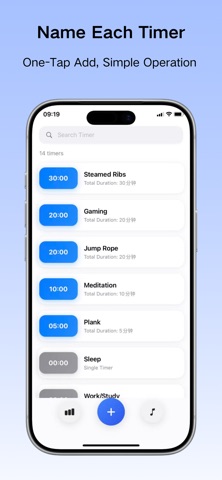
Description by 英纬 高 Written by the developer, not by AppBrain. Click to read.
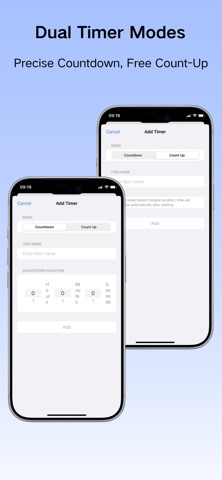
1. Dual-Mode Timing for Different Scenarios
Countdown Mode - Control task duration
- Perfect for fixed-time tasks: cooking, gaming, exercise, meditation
- Set duration with automatic alerts
- Control time and avoid overtime
Count-up Mode - Record actual time spent
- Ideal for variable activities: work, study, sleep, commute, fitness, reading
- Auto-accumulates time, records actual usage
- Understand time expenditure and discover time sinks
2. Custom Naming for Personalized Management
- Customize timer names: "Steamed Ribs", "Plank", "Work Focus", "Reading Time"
- Support Chinese naming
- One-tap addition, quickly create dedicated timers
- Named timers clearly displayed in statistics
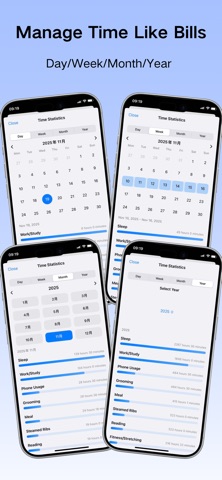
3. Bill-Style Time Statistics, Multi-Dimensional Analysis
Day/Week/Month/Year Dimensions
- Daily: View single-day time allocation
- Weekly: Analyze time distribution patterns
- Monthly: Review monthly time bills
- Yearly: Annual time summary
Visual Time Distribution
- Clear time proportion charts
- Sorted by duration, identify major time consumers
- Tap to view detailed data
Manual Statistics Adjustment
- Manually adjust statistics if you forgot to time
- Adjust by day/week/month/year separately
- Make statistics more accurate
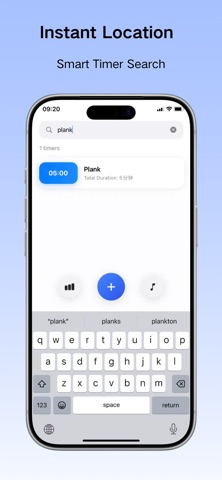
4. Smart Search
- Chinese search support, quickly find timers
- Real-time filtering as you type
5. Personalized Alerts
- Multiple system sounds to choose from
- Automatic alerts when countdown completes
6. Clean Design
- Clean interface without unnecessary elements
- Intuitive operation, ready to use
- Focused on time management essentials
Privacy Policy: https://twisty-yarn-caa.notion.site/Privacy-Policy-Time-Checklist-2b10ccd28fe38074b6c1c37d35146ddb?source=copy_link
Terms of Use: https://twisty-yarn-caa.notion.site/Terms-of-Use-Time-Checklist-2b10ccd28fe380368839c802937eb799?source=copy_link