

Time Stamp is made and published by Jiulong Zhao. AppBrain is an independent app data site and isn't affiliated with Jiulong Zhao. The app name, icon, screenshots and description belong to Jiulong Zhao and are shown as published on the App Store.
AppBrain's verdict
- Last updated
- April 6, 2026
Rankings
App Store top chartsApp Store Rankings for Time Stamp
This app is not ranked
Competitors
Similar apps and more from Jiulong ZhaoMore from Jiulong Zhao








Releases
Updates seen on the App Store- Version
- v2.65
- Launched
- June 2019
No changelog data
User feedback
Ratings and reviews on the App StoreComments on Time Stamp for iOS
We don't have enough comments to show example comments. Please check back later.
Technology
Found in the app by AppBrain- Price
- $9.99
- App size
- 2.50 MB
- Content rating
- Everyone
Technologies used by Time Stamp
About the app and developer
About Time Stamp
Time Stamp is a business app developed by Jiulong Zhao.
What is the rating of Time Stamp?
Time Stamp has no ratings yet.
Is Time Stamp free?
Time Stamp costs $9.99. The app size is 2.50 MB. The latest version available is v2.65. The last update was on April 6, 2026.
What are the requirements for Time Stamp?
The app has a content rating of Everyone. The app has been available on the App Store since June 2019.
Developer information for Jiulong Zhao
Address:
Store listing
By Jiulong Zhao, from the App Store

Screenshots by Jiulong Zhao, from the the App Store listing
Description by Jiulong Zhao Written by the developer, not by AppBrain. Click to read.
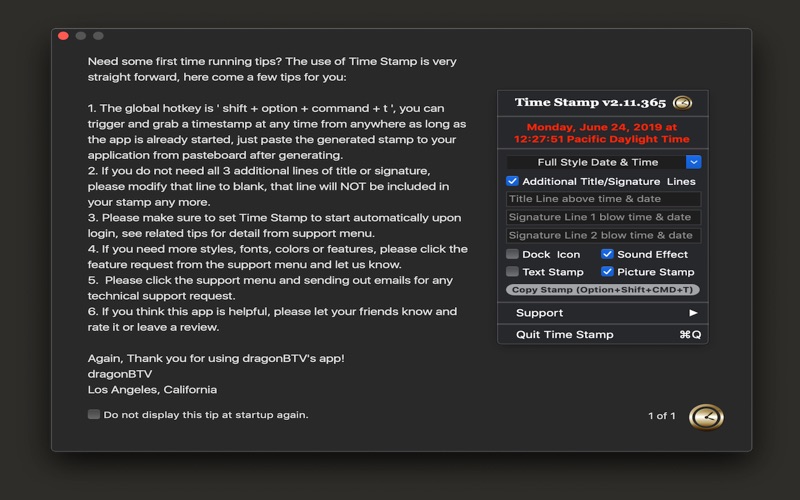
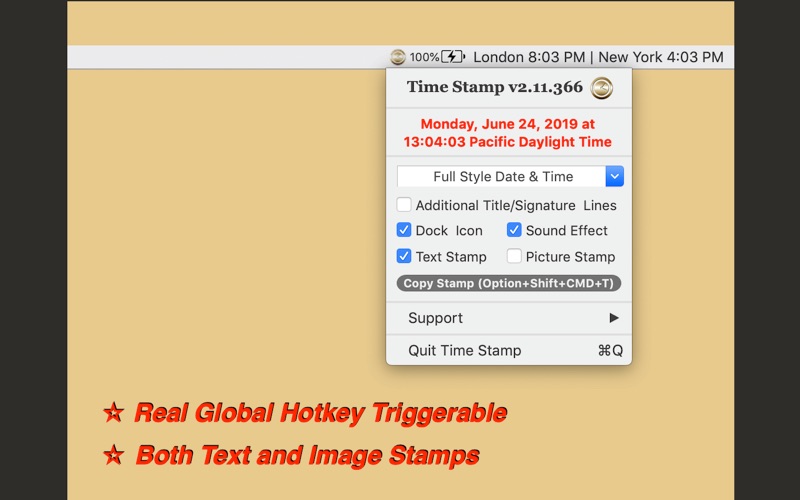
Generate text or image timestamps in any situation with a global hotkey!
All functions and settings can be reached from the status menu, too.
features v2.11:
- Real Global Hotkey triggerable, so you can get your time/date stamp without leaving the current application
- supports not only text stamps but also image-based stamps with transparent backgrounds
- Additional titles & signatures can be applied easily and are fully customizable
- 30 presets for date/time formats including ISO8601 UTC & GMT
- toggleable sound effect
- Dock icon can be made invisible
- The global hotkey makes it a handy tool that you can keep on and forget about until needed
v2.20
- Performance enhanced for macOS 10.15 Catalina
- New styles of "day of the week & time" and "time & day of week & date" added
v2.20 -> v2.25
- Any Mac (Apple Silicon, Intel) version for macOS Big Sur
- Fully Customizable Global Hotkey added (preset to command + option + shift + t)
- Support menu and some alerts added or modified
- Interface fine-tuning for dark mode
- All deprecated functions rewritten
v2.25 -> v2.50
- Option added via user request: font color of picture stamp can be customized
- Support menu modified
v2.50 -> v2.60
- Feature added via user request: fully customizable user format supported
v2.60 -> v2.62
- Customizable Format Setting interface modified
- All deprecated functions rewritten for the latest macOS
All functions and settings can be reached from the status menu, too.
features v2.11:
- Real Global Hotkey triggerable, so you can get your time/date stamp without leaving the current application
- supports not only text stamps but also image-based stamps with transparent backgrounds
- Additional titles & signatures can be applied easily and are fully customizable
- 30 presets for date/time formats including ISO8601 UTC & GMT
- toggleable sound effect
- Dock icon can be made invisible
- The global hotkey makes it a handy tool that you can keep on and forget about until needed
v2.20
- Performance enhanced for macOS 10.15 Catalina
- New styles of "day of the week & time" and "time & day of week & date" added
v2.20 -> v2.25
- Any Mac (Apple Silicon, Intel) version for macOS Big Sur
- Fully Customizable Global Hotkey added (preset to command + option + shift + t)
- Support menu and some alerts added or modified
- Interface fine-tuning for dark mode
- All deprecated functions rewritten
v2.25 -> v2.50
- Option added via user request: font color of picture stamp can be customized
- Support menu modified
v2.50 -> v2.60
- Feature added via user request: fully customizable user format supported
v2.60 -> v2.62
- Customizable Format Setting interface modified
- All deprecated functions rewritten for the latest macOS