

Time Tracker - Geofy
Time Tracker - Geofy is made and published by Michael Banholzer. AppBrain is an independent app data site and isn't affiliated with Michael Banholzer. The app name, icon, screenshots and description belong to Michael Banholzer and are shown as published on the App Store.
AppBrain's verdict
Established- Rating on App Store
- 4.33
- 15 ratings
- Last updated
- October 24, 2026
It doesn't have enough ratings yet to judge what users think.
Rankings
App Store top chartsApp Store Rankings for Time Tracker - Geofy
Competitors
Similar apps and more from Michael BanholzerAlternatives to Time Tracker - Geofy


More from Michael Banholzer


Releases
Updates seen on the App Store- Version
- 2.1.4
- Launched
- July 2014
No changelog data
User feedback
Ratings and reviews on the App StoreComments on Time Tracker - Geofy for iOS
We don't have enough comments to show example comments. Please check back later.
Technology
Found in the app by AppBrain- Price
- Free
- App size
- 7.66 MB
- Content rating
- Everyone
Technologies used by Time Tracker - Geofy
About the app and developer
About Time Tracker - Geofy
Time Tracker - Geofy is a productivity app developed by Michael Banholzer.
User Ratings
Time Tracker - Geofy is rated 4.33 out of 5 stars. The rating is based on 15 ratings.
App Information
Time Tracker - Geofy is freely available from the App Store. The app size is 7.66 MB. The latest version available is 2.1.4. The last update was on October 24, 2026.
Technical Requirements
The app has a content rating of Everyone. The app has been available on the App Store since July 2014.
Developer information for Michael Banholzer
Address:
Frequently asked questions about Time Tracker - Geofy
Is Time Tracker - Geofy free?
Yes. Time Tracker - Geofy is free on the App Store.
Is Time Tracker - Geofy still available?
Yes. Time Tracker - Geofy is on the App Store, and the last update we saw was on October 24, 2026.
How large is Time Tracker - Geofy?
Time Tracker - Geofy is 7.66 MB.
Is Time Tracker - Geofy suitable for children?
App Store rates the content of Time Tracker - Geofy as suitable for everyone.
How do people rate Time Tracker - Geofy?
Time Tracker - Geofy scores 4.33 out of 5 stars, from 15 ratings on the App Store.
Who made Time Tracker - Geofy?
Time Tracker - Geofy was developed by Michael Banholzer. It is listed in the productivity category on the App Store.
What are the best alternatives to Time Tracker - Geofy?
People looking at Time Tracker - Geofy also look at these productivity apps: WorkingHours • Time Tracker, Time Guard - your time tracker, Rewind - Timetracking, Field Companion App, Tyme | Time Tracking.
Store listing
By Michael Banholzer, from the App Store


Description by Michael Banholzer Written by the developer, not by AppBrain. Click to read.
Define regions on a map and Geofy records every visit the moment you arrive and leave. Or just create a project, give it a name, and start the timer by hand — no region required. Perfect for work hours, commute time, gym visits, projects, or any location that matters to you.
Automatic Time Tracking
Set up geofence regions or iBeacons, and Geofy logs your sessions automatically in the background.
Manual Time Tracking
No fixed location? No problem. Create a project without a region and start the timer with a tap — perfect for tasks that aren't tied to a place. Manually started sessions keep running until you stop them yourself. Pause, resume, or stop any session anytime — running timers follow you through the app in a floating bar.
Detailed Statistics
See your time broken down by day, week, month, or year. View average arrival times, session durations, longest and shortest visits, and spot trends with the built-in sparkline chart.
Flexible Configuration
Adjust tracked time with per-session bonuses or daily pause deductions. Round entry and exit times to 15, 30, or 60 minutes. Set minimum session thresholds to filter out short stops.
Notifications & Webhooks
Get notified on entry and exit. Set up time reminders — daily, weekly, or monthly. Connect Geofy to your own services via HTTP webhooks with token or basic authentication.
Timeline View
See your presence across all regions on a scrollable timeline. Colored bars show exactly when and how long you were at each place — perfect for spotting patterns at a glance.
Calendar View
Get a monthly overview of how many hours you spent in each region, day by day. Set a daily target per weekday for each region and see a progress ring on every day — so you can tell at a glance where you hit your goal and where you fell short. Swipe through the months, filter which regions appear, and tap any day for a full breakdown.
Home Screen Widget
Add a widget to your home screen to see today's tracked time at a glance. View active sessions with a live timer, paused sessions, and your most recent regions — without opening the app.
Export & Overview
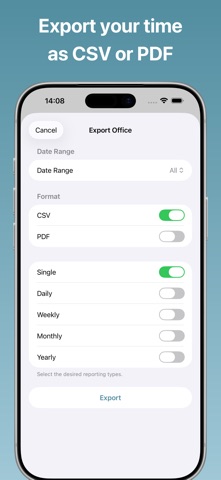
Export your data as CSV in any aggregation level. See all your regions at a glance on the map view.
Privacy First
All data stays on your device. No account required, no cloud, no tracking.
Geofy Pro (optional subscription)
Basic time tracking with up to 3 regions is free. The following features require a Geofy Pro subscription:
• Timeline View
• Calendar View
• Advanced Statistics
• CSV Export
• Webhooks
• Time Adjustments
• Up to 20 Regions
Subscriptions are billed monthly or yearly and renew automatically unless cancelled at least 24 hours before the end of the current period.
Terms of Use: https://www.getgeofy.com/terms
Privacy Policy: https://www.getgeofy.com/privacy