

Time-X is made and published by Doftwerks. AppBrain is an independent app data site and isn't affiliated with Doftwerks. The app name, icon, screenshots and description belong to Doftwerks and are shown as published on the App Store.
AppBrain's verdict
- Last updated
- October 13, 2026
Rankings
App Store top chartsApp Store Rankings for Time-X
Competitors
Similar apps and more from DoftwerksAlternatives to Time-X


Releases
Updates seen on the App Store- Version
- 2.0.0
- Launched
- July 2025
No changelog data
User feedback
Ratings and reviews on the App StoreComments on Time-X for iOS
We don't have enough comments to show example comments. Please check back later.
Technology
Found in the app by AppBrain- Price
- Free
- App size
- 5.54 MB
- Content rating
- High
Technologies used by Time-X
About the app and developer
About Time-X
Time-X is a business app developed by Doftwerks.
User Ratings
The app has no ratings yet.
App Information
Time-X is freely available from the App Store. The app size is 5.54 MB. The latest version available is 2.0.0. The last update was on October 13, 2026.
Technical Requirements
The app has a content rating of High Maturity. The app has been available on the App Store since July 2025.
Developer information for Doftwerks
Address:
Store listing
By Doftwerks, from the App Store


Description by Doftwerks Written by the developer, not by AppBrain. Click to read.
You'll need a TimeXP account from your employer to sign in.
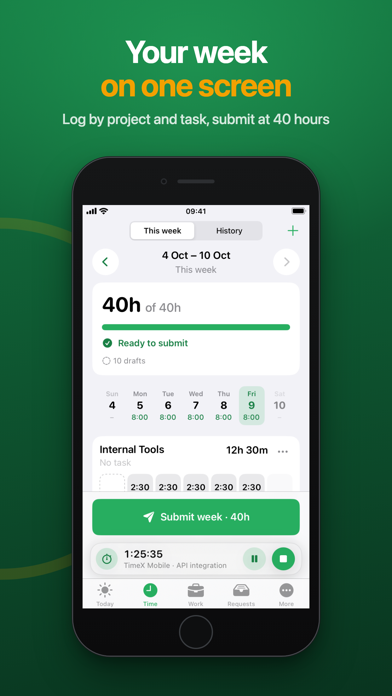
YOUR WEEK ON ONE SCREEN
• See your week by project and task, day by day
• Entries save as drafts while you work
• Repeat an entry on other weekdays in one tap
• Submit once you reach 40 hours
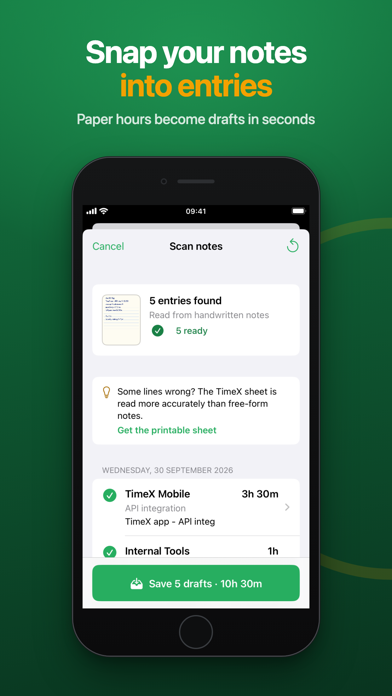
SNAP YOUR NOTES
• Wrote your hours on paper? Take a photo and TimeXP turns it into draft entries
• Print the TimeXP sheet for the best results
• Your page is read on your iPhone
TIME IT AS YOU GO
• Start a timer on a task, or start now and pick the task later
• Pause or stop from the Lock Screen and Dynamic Island
• Time is logged to the minute
CLOCK IN FAST
• Scan your workplace QR code to clock in and out
• Home Screen and Lock Screen widgets, plus Control Center buttons
• Reminders to clock in, clock out and submit your timesheet
LEAVE AND EXPENSES
• Check your leave balance and request time off
• Claim expenses with receipt photos
• Follow each request through to approval
FOR MANAGERS
• Approve or reject timesheets, leave and expenses from one list
• Find anyone on your team
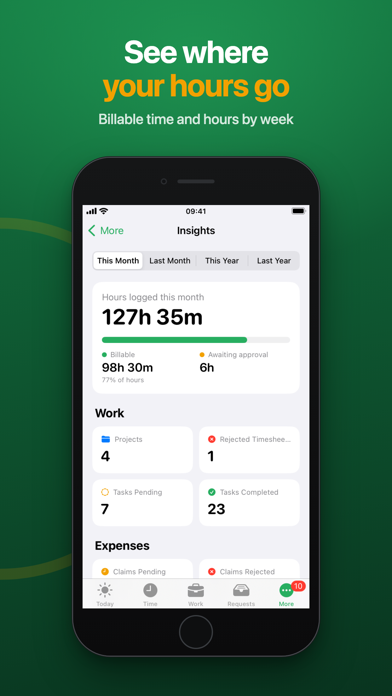
SEE WHERE YOUR TIME GOES
• Your attendance calendar and hours by week
• Billable hours and time waiting for approval