AppBrain
AppBrain
  • Apps
  • Apps being viewed right now Trending apps today Most popular apps All-time most installed apps Top rated apps iPhone and iPad apps
  • Intelligence ▾
    Intelligence overview → Track any Android app or your whole market
    Track & analyze
    Keyword Tracker & OptimizerTrack & improve Play rankings App Performance ReportOne-off PDF for any app StatisticsFree Android & Play market stats
    Promote your app
    Featured Apps App Links
  • Intelligence
  • Pricing
  • Dashboard
  • Sign up
  • Log in
App Store Apps > Productivity > TimeGuide - Daily Planner
TimeGuide - Daily Planner icon

TimeGuide - Daily Planner

by Daniel Grant · Productivity · Free
On the App Store since October 2025 · Data updated 2026-10-31

TimeGuide - Daily Planner is made and published by Daniel Grant. AppBrain is an independent app data site and isn't affiliated with Daniel Grant. The app name, icon, screenshots and description belong to Daniel Grant and are shown as published on the App Store.

AppBrain's verdict

Rating on App Store
5.00
5 ratings
Last updated
July 23, 2026
Size
7.47 MB

It doesn't have enough ratings yet to judge what users think.

Official page on the App Store

User feedback

Ratings and reviews on the App Store

Comments on TimeGuide - Daily Planner for iOS

We don't have enough comments to show example comments. Please check back later.

Store listing

By Daniel Grant, from the App Store
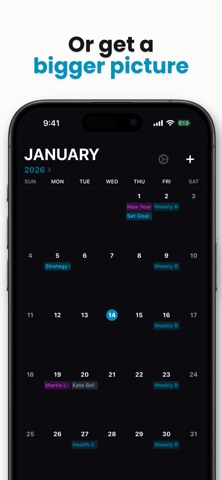
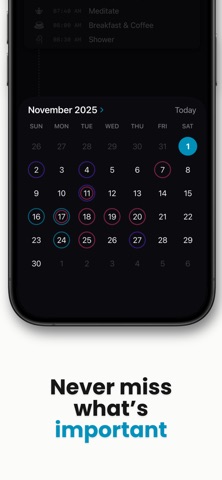
TimeGuide - Daily Planner Screenshot 1 of 9
TimeGuide - Daily Planner Screenshot 2 of 9
TimeGuide - Daily Planner Screenshot 3 of 9
TimeGuide - Daily Planner Screenshot 4 of 9
TimeGuide - Daily Planner Screenshot 5 of 9
TimeGuide - Daily Planner Screenshot 6 of 9
TimeGuide - Daily Planner Screenshot 7 of 9
TimeGuide - Daily Planner Screenshot 8 of 9
TimeGuide - Daily Planner Screenshot 9 of 9
Screenshots by Daniel Grant, from the the App Store listing
Description by Daniel Grant Written by the developer, not by AppBrain. Click to read.
TimeGuide is a simpler way to see your tasks, events, and routines. Part planner, part calendar, and part task manager, adding to and editing your schedule with TimeGuide is fast and intuitive. Featuring a clean design, repeating tasks and two-way calendar sync on a dynamically scaling timeline.

TimeGuide Features:
• Repeating Tasks & Events - Your daily routines can coexist with important events giving you a big picture view of your time
• Visual Priority - Highlighted tasks and calendar events are given visual significance so they aren’t drowned out by simple tasks or routines
• Intuitive Add-Task Flow - Add new tasks & events in seconds
• Mark Complete - Mark finished items complete to hide them from the timeline (even calendar events)
• Calendar Month View - Get a bigger picture of your time
• Subtasks - Auto-nested items make adding subtasks effortless. Add subtasks even to calendar events, or un-nest them in settings to see everything laid out
• Calendar Sync - Add and edit events from your other calendars like Apple, Google, and Outlook
• Cross-Device Sync - Tasks sync across your iPhone, iPad, and Mac via iCloud sync
• Per-Calendar Notifications - Silence notifications on an individual basis in Calendar Setup
• Dynamic Timeline - Expanding and contracting layout keeps your day visible, while still letting you visualize your free time
• Multiple Layouts - Minimal Mode and List Mode to fit your style
• Customizable Colors - Light and Dark modes, with total freedom for accent colors
• Widgets - Stylish up-to-date widgets with smooth progress bars and countdown timers to keep you on pace and on-track
• Distraction Free - Made to live in the background of your life, so you can actually be productive

Try all of TimeGuide free for 7 days then keep using it in read-only mode forever, or unlock Full Access for a single affordable lifetime purchase.

Use of this app is subject to Apple’s Standard End User License Agreement:
https://www.apple.com/legal/internet-services/itunes/dev/stdeula/
Official page on the App Store

Safety and technology

Found in the app by AppBrain
Price
Free
App size
7.47 MB
Content rating
Everyone

Technologies used by TimeGuide - Daily Planner

Releases

Updates seen on the App Store
Version
1.4.2
Launched
October 2025

No changelog data

Alternatives

Similar apps and more from Daniel Grant

Alternatives to TimeGuide - Daily Planner

ToDo & Planner icon ToDo & Planner
GT TRADE SIA
0.0
Free
GLI: Goals & Focus Tracker icon GLI: Goals & Focus Tracker
People Who Code LLC
4.8
Free
6 ratings
SnappyTasks icon SnappyTasks
Shabaz Shaik
0.0
Free
Remindly - All-in-One Reminder icon Remindly - All-in-One Reminder
Saif Ullah Sajid
4.6
Free
5 ratings
Deep Work : Stay Focused icon Deep Work : Stay Focused
Krishna Sangeeth KS
5.0
Free
1 ratings
To Do List - Minimal Planner icon To Do List - Minimal Planner
Mohamed Abdelmagid
4.0
Free
2 ratings
To To-Do: Task & Planner icon To To-Do: Task & Planner
Zenta AB
5.0
Free
1 ratings
Prio.Space icon Prio.Space
Anoy Roy Chowdhury
5.0
Free
2 ratings

Rankings

App Store top charts

App Store Rankings for TimeGuide - Daily Planner

This app is not ranked

About the app and developer

About TimeGuide - Daily Planner

TimeGuide - Daily Planner is a productivity app developed by Daniel Grant.

What is the rating of TimeGuide - Daily Planner?

TimeGuide - Daily Planner is rated 5.00 out of 5 stars, based on 5 ratings.

Is TimeGuide - Daily Planner free?

TimeGuide - Daily Planner is free. The app size is 7.47 MB. The latest version available is 1.4.2. The last update was on July 23, 2026.

What are the requirements for TimeGuide - Daily Planner?

The app has a content rating of Everyone. The app has been available on the App Store since October 2025.

Developer information for Daniel Grant

Daniel Grant

Address:

Share TimeGuide - Daily Planner

Today's trending apps Price drops on Google Play Apps other people are watching Top new apps Popular Productivity Apps
ToDo & Planner icon ToDo & Planner
GLI: Goals & Focus Tracker icon GLI: Goals & Focus Tracker
SnappyTasks icon SnappyTasks
Remindly - All-in-One Reminder icon Remindly - All-in-One Reminder
Deep Work : Stay Focused icon Deep Work : Stay Focused
To Do List - Minimal Planner icon To Do List - Minimal Planner
To To-Do: Task & Planner icon To To-Do: Task & Planner
Prio.Space icon Prio.Space
AppBrain Intelligence premium content

Subscribe now to get full and unlimited access to AppBrain Intelligence. You'll have access to:

  • App Intelligence dashboard (performance timeline, competitor comparison, country rankings, insight cards)
  • Detailed ranking data per app
  • Full timeline per developer
  • Device market shares data per country
  • Unlimited keyword tracking
1 Month

$75/mo
(billed every month)

SAVE 0%
Subscribe
3 Months

$65/mo
($195 billed every 3 months)

SAVE 13%
Subscribe
1 Year

$57.50/mo
($690 billed every year)

SAVE 23%
Subscribe
Each subscription will automatically renew 3 days before the expiration date for the same time period. Subscriptions can be cancelled at any time before the renewal.

AppBrain is an app data site, we track rankings, ratings, installs for all apps and games on Google Play and the App Store. AppBrain doesn't host app files or APKs, all install links go directly to the official store. All trademarks are owned by their respective owners.

More apps

  • Top Android apps being viewed
  • Pixel Loom: AI Image Generator
  • Artorys: AI Photo Art
  • Smart Home - Life Control for Android

App statistics

  • Android statistics
  • Google Play Developer stats
  • Trending Android Apps
  • Trending iOS apps
  • Top popular Apps
  • Buy the best Android phone
  • Buy & sell app businesses

About AppBrain

  • Contact
  • Privacy
  • Documentation
  • DMCA takedowns
  • Blog
  • Free webpage for your Android app
© 2010-2026 - AppBrain