AppBrain
AppBrain
  • Apps
  • Apps being viewed right now Trending apps today Most popular apps All-time most downloaded apps Top rated apps iPhone and iPad apps
  • Intelligence ▾
    Intelligence overview → Track any Android app or your whole market
    Track & analyze
    Keyword Tracker & OptimizerTrack & improve Play rankings App Performance ReportOne-off PDF for any app StatisticsFree Android & Play market stats
    Promote your app
    Featured Apps App Links
  • Intelligence
  • Pricing
  • Dashboard
  • Sign up
  • Log in
Last updated on: 2026-10-01
App Store Apps > Health & Fitness > Timeline - Interval Timer
App profile · Health & Fitness · Data updated 2026-10-01
Timeline - Interval Timer icon

Timeline - Interval Timer

by Fly Your Vision B.V. · Free · Version 1.4
Availability On the App Store since May 2017
Rating on App Store
4.56/5
9 ratings
Rating
4.56
9 reviews
Best rank
–
not in the top lists
Last updated
July 22, 2022
1.4
AppBrain's verdict Established

It doesn't have enough ratings yet to judge what users think.

Timeline - Interval Timer is made and published by Fly Your Vision B.V.. AppBrain is an independent app data site and isn't affiliated with Fly Your Vision B.V.. The app name, icon, screenshots and description belong to Fly Your Vision B.V. and are shown as published on the App Store.

About Timeline - Interval Timer

Timeline - Interval Timer is a health & fitness app developed by Fly Your Vision B.V..

User Ratings

Timeline - Interval Timer is rated 4.56 out of 5 stars. The rating is based on 9 ratings.

App Information

Timeline - Interval Timer is freely available from the App Store. The app size is 9.27 MB. The latest version available is 1.4. The last update was on July 22, 2022.

Technical Requirements

The app has a content rating of Everyone. The app has been available on the App Store since May 2017.

Description by Fly Your Vision B.V. (from the App Store)
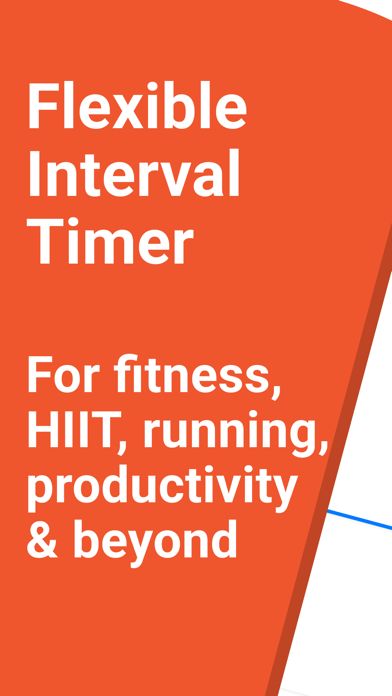
Timeline is the most flexible interval timer. Ideal for fitness, running, exercise, productivity and more. It gives you intuitive, powerful and practical controls to run timer sequences or to create your own routines.

• FLEXIBLE BY DESIGN
Whether it is for sports such as fitness, running, cycling, high-intensity training, tabata, circuit training, yoga and more. Or if you want to time your daily routines, stay productive, stay focused or need to clock your tasks. Timeline has got you covered.

• CREATE TIMERS USING INTUITIVE GESTURES
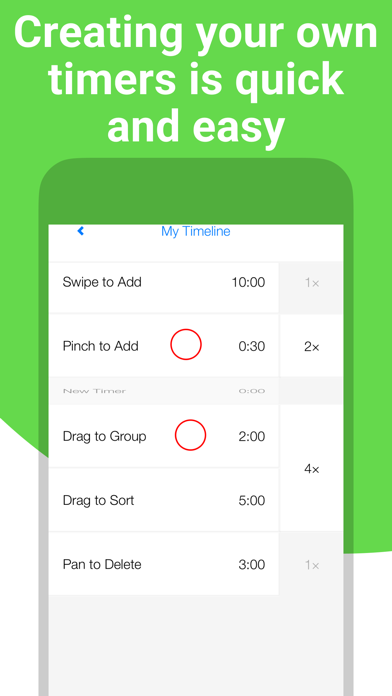
You can create your own sequences of timers quickly using intuitive gestures. There are no difficult menus and options to go through. Just swipe, pinch, pan, tap and group to build any sequence you can imagine. What you see is what you get. You can always edit your timers, even after you have started playing them.

• READY-TO-USE SCHEMES AND TEMPLATES
Start right away with ready-made schemes and templates. Get into running with 56 weeks worth of training schemes to run from 0 to 5 km up to a full marathon. Use or create your own templates as the starting point for your custom timers. You can import ready-made timers, build your own on your computer or open them directly from websites.

• MANAGE AND ARRANGE YOUR WAY
Whether you want to arrange your timers per category, or want to separate your clients from your personal timers. Timeline gives you the freedom to manage and arrange your timers the way you want. Creating, moving or copying timers and folders are all only a few taps away.

• SHARE WITH FRIENDS OR CLIENTS
Share any number of timers and folders at once with your friends or clients. You can also publish them on your website so your audience can directly open them in the Timeline app.

• SPOKEN TIMERS AND MOTIVATION IN YOUR LANGUAGE
Have your timers and countdown spoken out loud in your own language. You don't have to look at your screen and can keep your device locked or in your pocket. Spoken motivational messages support you through your extensive workouts and sessions.

• CONTINUOUS ALARM OPTION TO NEVER MISS A MOMENT
Sometimes it is critical to know the end of your timers. You don't need to stay with your device all the time. Just turn on the continuous alarm. It works like your alarm clock and will pause your timer until you have confirmed the alarm.

• PRACTICAL FEATURES YOU WILL LOVE
Timeline is a premium-quality interval timer app. You can play your own music through Timeline or via your preferred music app. Timeline works fully in the background and can alert you with sounds, vibrations and speech. Run it in the foreground and it will keep your screen turned on if you want. Resume timers where you previously left off. Choose from different color themes. Get personal assistance from the developer. Plus more practical features to ensure you'll enjoy using Timeline.

• UPGRADE TO TIMELINE PRO
You can use all main features of Timeline completely free. However, to create more than 5 timelines or to share your timers, please upgrade to Timeline Pro with a one-time purchase. You thereby also support an individual developer.

Timeline is designed to be your flexible interval training timer. Download Timeline now and start achieving your personal goals.
Show more Show less
Price Free
Rating 4.56 based on 9 ratings
Ranking Not ranked
Version 1.4
App size 9.27 MB
Suitable for Everyone

Screenshots

Timeline - Interval Timer Screenshot 1 of 6
Timeline - Interval Timer Screenshot 2 of 6
Timeline - Interval Timer Screenshot 3 of 6
Timeline - Interval Timer Screenshot 4 of 6
Timeline - Interval Timer Screenshot 5 of 6
Timeline - Interval Timer Screenshot 6 of 6
Screenshots by Fly Your Vision B.V., from the the App Store listing
4.56 · 9 reviews
Official page on the App Store

Alternatives to Timeline - Interval Timer

QBrush icon QBrush
Quigless Innovations
0.0
Free
Interval Exercise Timer ™ icon Interval Exercise Timer ™
Andy Sutanto
4.7
Free
23 ratings
GymBrain icon GymBrain
Ross Tulloch
5.0
Free
3 ratings
Rest Timer - WaitWaitGo! icon Rest Timer - WaitWaitGo!
Srdan Stanic
4.9
Free
18 ratings
Interval Routines icon Interval Routines
Sindre Aarnes Aubert
0.0
Free
Ultimate tabata workout timer icon Ultimate tabata workout timer
Alexandr Peancovschi
5.0
Free
2 ratings
Workout Time Keeper icon Workout Time Keeper
Sergii Chevkota
5.0
Free
2 ratings
Energy Wake - AI alarm clock icon Energy Wake - AI alarm clock
MediaPlan Corporation
0.0
Free

More from Fly Your Vision B.V.

Mental Math Games & Practice icon Mental Math Games & Practice
Fly Your Vision B.V.
4.7
Free
1.7K ratings
Math Games & Learning icon Math Games & Learning
Fly Your Vision B.V.
4.8
Free
56 ratings
Timeline Pro - Interval Timer icon Timeline Pro - Interval Timer
Fly Your Vision B.V.
5.0
$4.99
2 ratings
My Productivity Time Tracker icon My Productivity Time Tracker
Fly Your Vision B.V.
0.0
Free

Changelog of Timeline - Interval Timer

No changelog data

Developer information for Fly Your Vision B.V.

Fly Your Vision B.V.

Address:

Share Timeline - Interval Timer

Comments on Timeline - Interval Timer for iOS

We don't have enough comments to show example comments. Please check back later.

App Store Rankings for Timeline - Interval Timer

This app is not ranked

Technologies used by Timeline - Interval Timer

Frequently asked questions about Timeline - Interval Timer

Is Timeline - Interval Timer free?

Yes. Timeline - Interval Timer is free on the App Store.

Is Timeline - Interval Timer still available?

Yes. Timeline - Interval Timer is on the App Store, and the last update we saw was on July 22, 2022.

How large is the Timeline - Interval Timer download?

Timeline - Interval Timer is 9.27 MB to download.

Is Timeline - Interval Timer suitable for children?

App Store rates the content of Timeline - Interval Timer as suitable for everyone.

How do people rate Timeline - Interval Timer?

Timeline - Interval Timer scores 4.56 out of 5 stars, from 9 ratings on the App Store.

Who made Timeline - Interval Timer?

Timeline - Interval Timer was developed by Fly Your Vision B.V.. It is listed in the health & fitness category on the App Store.

What are the best alternatives to Timeline - Interval Timer?

People looking at Timeline - Interval Timer also look at these health & fitness apps: QBrush, Interval Exercise Timer ™, GymBrain, Rest Timer - WaitWaitGo!, Interval Routines.

Apps other people are watching Top new apps Today's trending apps Price drops on Google Play Popular Health & Fitness Apps
QBrush icon QBrush
Interval Exercise Timer ™ icon Interval Exercise Timer ™
GymBrain icon GymBrain
Rest Timer - WaitWaitGo! icon Rest Timer - WaitWaitGo!
Interval Routines icon Interval Routines
Ultimate tabata workout timer icon Ultimate tabata workout timer
Workout Time Keeper icon Workout Time Keeper
Energy Wake - AI alarm clock icon Energy Wake - AI alarm clock
Overview Alternatives Reviews Rankings Technology
AppBrain Intelligence premium content

Subscribe now to get full and unlimited access to AppBrain Intelligence. You'll have access to:

  • App Intelligence dashboard (performance timeline, competitor comparison, country rankings, insight cards)
  • Detailed ranking data per app
  • Full timeline per developer
  • Device market shares data per country
  • Unlimited keyword tracking
1 Month

$75/mo
(billed every month)

SAVE 0%
Subscribe
3 Months

$65/mo
($195 billed every 3 months)

SAVE 13%
Subscribe
1 Year

$57.50/mo
($690 billed every year)

SAVE 23%
Subscribe
Each subscription will automatically renew 3 days before the expiration date for the same time period. Subscriptions can be cancelled at any time before the renewal.

AppBrain is an app data site, we track rankings, ratings, installs for all apps and games on Google Play and the App Store. AppBrain doesn't host app files or APKs, all install links go directly to the official store. All trademarks are owned by their respective owners.

More apps

  • Top Android apps being viewed
  • Geek - Smarter Shopping Android App
  • AI Cleaner: Storage Optimize
  • Lenovo Thinkplus LP5 Guide

App statistics

  • Android statistics
  • Google Play Developer stats
  • Trending Android Apps
  • Trending iOS apps
  • Top popular Apps
  • Buy the best Android phone
  • Buy & sell app businesses

About AppBrain

  • Contact
  • Privacy
  • Documentation
  • DMCA takedowns
  • Articles
  • Blog
  • Monetization tips: Understanding your eCPM
© 2010-2026 - AppBrain