Timer on Me is an overall app developed by Weiren Hsiao.
How many times has Timer on Me been downloaded?
What is the rating of Timer on Me?
Timer on Me is rated 4.33 out of 5 stars, based on 6 ratings.
Is Timer on Me free?
Timer on Me is free to download. The APK download size is 6.45 MB. The latest version available is 3.3. The last update was on April 20, 2026.
What are the requirements for Timer on Me?
The app has a content rating of Low Maturity. The app has been available on Google Play June 2025.
Description
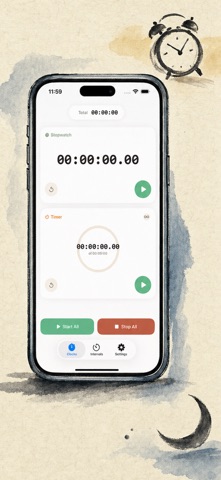
Timer on Me is the reliable multi-timer and stopwatch for iPhone, iPad, and Apple Watch. Run up to 50 independent timers at once, time interval workouts with precision, and trust that your alerts will fire — even if your phone is locked or the app is closed.
WORKOUTS & INTERVALS • Built-in Tabata, EMOM, and 30/30 presets — start training in two taps • Custom interval editor with flexible minute/second pickers for work, rest, and rounds • Full-screen workout mode with phase color cues and optional sound mute • Pause, skip, and resume mid-workout without losing your place
APPLE WATCH • Full native watchOS app — not a companion shell • Multiple concurrent stopwatches and timers on your wrist • Centisecond stopwatch precision • Dedicated watch complications for one-tap access • Works independently when your iPhone is out of reach
50 TIMERS AT ONCE • Run up to 50 independent timers and stopwatches in a single session • Start, stop, and reset individually or in synced groups • Auto-repeat for looping rounds • Timers continue past zero to track overtime • Visual progress bars with color cues at 50% (yellow) and 10% (red) • Drag-and-drop reordering and custom names
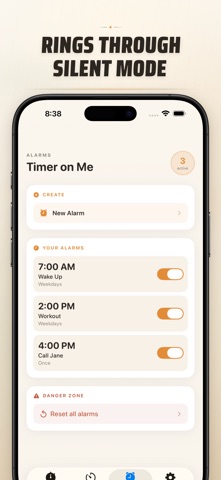
RELIABLE ALERTS • AlarmKit: alarms ring even if iPhone is locked or Timer on Me is closed • Dynamic Island and Live Activity for glanceable progress • Home Screen widgets in Small, Medium, and Large sizes • Built-in ringtones including bells, birds, and vintage tones • Tap to preview ringtones instantly before selecting • "Keep Screen On" mode prevents dimming during long sessions
CUSTOMIZE & SHARE • Toggle decimals, totals, and percentages per your workflow • Save and overwrite sessions for instant reuse • Export sessions as CSV, JSON, or Plain Text • Share timer setups with teammates, students, or clients
BUILT FOR iPhone, iPad & APPLE WATCH • Adaptive layouts for all screen sizes • iPad Split View support • Available in 34 languages
PERFECT FOR • HIIT, Tabata, CrossFit, and circuit training • Boxing rounds and martial arts sparring • Studying with Pomodoro and focus blocks • Cooking, baking, and multi-dish meal prep • Classroom activities and group timing • Yoga, meditation, and breathwork • Music practice and public speaking • Board games and party events
Download Timer on Me and take full control of your time — at the gym, at work, or at home.
Privacy Policy: https://masawata.net/privacy-policy.html Terms Of Service: https://www.apple.com/legal/internet-services/itunes/dev/stdeula/
Each subscription will automatically renew 3 days before the expiration date for
the same time period. Subscriptions can be cancelled at any time before the renewal.