



AppBrain's verdict
- Rating on App Store
- 5.00
- 3 ratings
- Last updated
- November 8, 2026
- Size
- 32.5 MB
It doesn't have enough ratings yet to judge what users think.
User feedback
Ratings and reviews on the App StoreComments on TimeZone Vanguard: World Clock for iOS
We don't have enough comments to show example comments. Please check back later.
Store listing
By Gustavo Venzon, from the App StoreDescription by Gustavo Venzon Written by the developer, not by AppBrain. Click to read.
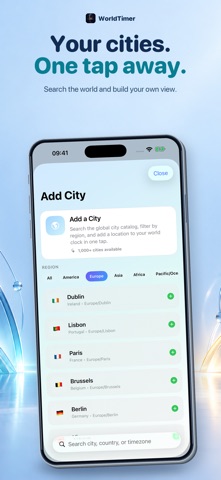
WorldTimer is the premium global time workspace for distributed teams, remote professionals, travelers, traders, and international operators. Follow live clocks, understand weather and daylight, compare cities, find fair meeting windows, monitor market sessions, and act without doing time-zone math.
LIVE WORLD CLOCKS, REIMAGINED
• Follow local time across 500+ cities worldwide
• See weather, daylight, day changes, UTC offsets, and analog clocks at a glance
• Favorite and reorder cities around the way you work
• Keep large clock collections clear with a spacious, readable layout
COMPARE THE WORLD IN ONE MOMENT
Move time forward or backward from a selected base city and instantly see the matching time everywhere else. Understand working hours, day changes, and practical overlap before you call, travel, or schedule.
PLAN BETTER GLOBAL MEETINGS
• Select participants across multiple cities
• Detect business-hour overlap automatically
• Use fairness guidance to avoid repeatedly penalizing the same team
• Preview time shifts before committing
• Save useful city combinations as reusable workflows
• Add important moments to Apple Calendar
MARKET HOURS THAT KEEP YOU AHEAD
Follow the global trading day from Sydney and Tokyo through London and New York.
• Track Forex, metals, futures, and stock-market sessions
• View official venue hours in local time and UTC
• See what is open now and what opens next
• Follow live opening and closing countdowns
• Understand session overlaps and global liquidity windows
• Monitor selected markets from widgets
HOLIDAY INTELLIGENCE FOR GLOBAL MARKETS
Market timing changes around holidays. WorldTimer surfaces holiday crossings across major financial centers so you can identify closures, reduced participation, and schedule conflicts before they disrupt your plan.
WEATHER-AWARE TIME PLANNING
See current conditions beside each clock and enable severe-weather alerts city by city. Weather information remains useful without taking over your home screen.
BUILT FOR THE APPLE ECOSYSTEM
Use WorldTimer across iPhone and iPad, with support for Apple Watch, Home Screen widgets, Live Activities, Dynamic Island, Siri, and Apple Calendar.
EXPORT, SHARE, AND RESTORE
Export schedules and workspace information as ICS, CSV, PDF, or images. Create backups and restore your global workspace when you need it.
DESIGNED FOR CLARITY
Choose System, Light, or Dark mode, select your accent, use 12- or 24-hour time, and rely on support for Dynamic Type, VoiceOver, Reduce Motion, and accessible contrast.
WorldTimer does not track you.
Made with precision by Vanguard Studio.
Safety and technology
Found in the app by AppBrain- Price
- Free
- App size
- 32.5 MB
- Content rating
- Everyone
Technologies used by TimeZone Vanguard: World Clock
Releases
Updates seen on the App Store- Version
- 2.8.1
- Launched
- February 2026
No changelog data
Alternatives
Similar apps and more from Gustavo VenzonAlternatives to TimeZone Vanguard: World Clock




 Focus Grove - Pomodoro Timer
More from Gustavo Venzon


Rankings
App Store top chartsApp Store Rankings for TimeZone Vanguard: World Clock
About the app and developer
About TimeZone Vanguard: World Clock
TimeZone Vanguard: World Clock is a productivity app developed by Gustavo Venzon.
User Ratings
TimeZone Vanguard: World Clock is rated 5.00 out of 5 stars. The rating is based on 3 ratings.
App Information
TimeZone Vanguard: World Clock is freely available from the App Store. The app size is 32.54 MB. The latest version available is 2.8.1. The last update was on November 8, 2026.
Technical Requirements
The app has a content rating of Everyone. The app has been available on the App Store since February 2026.
TimeZone Vanguard: World Clock is made and published by Gustavo Venzon. AppBrain is an independent app data site and isn't affiliated with Gustavo Venzon. The app name, icon, screenshots and description belong to Gustavo Venzon and are shown as published on the App Store.
Developer information for Gustavo Venzon
Address:
Frequently asked questions about TimeZone Vanguard: World Clock
Is TimeZone Vanguard: World Clock free?
Yes. TimeZone Vanguard: World Clock is free on the App Store.
Is TimeZone Vanguard: World Clock still available?
Yes. TimeZone Vanguard: World Clock is on the App Store, and the last update we saw was on November 8, 2026.
How large is TimeZone Vanguard: World Clock?
TimeZone Vanguard: World Clock is 32.54 MB.
Is TimeZone Vanguard: World Clock suitable for children?
App Store rates the content of TimeZone Vanguard: World Clock as suitable for everyone.
How do people rate TimeZone Vanguard: World Clock?
TimeZone Vanguard: World Clock scores 5.00 out of 5 stars, from 3 ratings on the App Store.
Who made TimeZone Vanguard: World Clock?
TimeZone Vanguard: World Clock was developed by Gustavo Venzon. It is listed in the productivity category on the App Store.
What are the best alternatives to TimeZone Vanguard: World Clock?
People looking at TimeZone Vanguard: World Clock also look at these productivity apps: Stacked - Card Wallet, Snippets: Quick Markdown Notes, TensorChat: Private AI, Solemnace, Note Taker AI - 100% local.