

0.00
0 reviews
Free


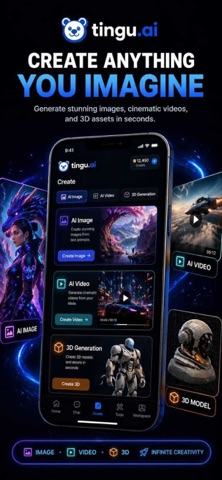


Screenshots by eFlair, from the the App Store listing
AppBrain's verdict
- Last updated
- June 13, 2026
- Size
- 43.4 MB
User feedback
Ratings and reviews on the App StoreComments on Tingu AI for iOS
We don't have enough comments to show example comments. Please check back later.
Store listing
By eFlair, from the App StoreDescription by eFlair Written by the developer, not by AppBrain. Click to read.
Tingu AI - AI Models and Creative Tools in One App
Tingu AI brings AI chat, image generation, video generation, editing tools, and productivity features together in one app.
The app is designed to help users create content, explore ideas, edit visuals, and complete everyday AI-assisted tasks from a single workspace.
AI Tools in One App
Tingu AI provides access to a wide range of AI-powered tools across chat, image, video, and editing categories.
Users can explore different AI capabilities for writing, design, visual creation, video generation, productivity, and creative workflows.
Tool availability may vary based on supported features and app updates.
What You Can Do
AI Chat
Use AI chat for:
Writing
Coding
Research
Brainstorming
Learning
Business tasks
Content planning
General assistance
AI Image Generator
Create images for different use cases, including:
AI art
Logos
Product visuals
Portraits
Anime-style images
Social media visuals
Concept images
Creative designs
AI Video Generator
Generate videos such as:
Cinematic clips
Short videos
Ad creatives
Social media content
Animations
Visual concepts
AI Editing Tools
Tingu AI includes creative and editing tools such as:
Background remover
Image upscaler
Chat-based image editing
AI photo enhancement
AI video editing
Object remover
Text to image
Image to image
Team Workspaces
Tingu AI supports team workspaces for users who want to collaborate, manage access, and work with shared resources in one place.
App Features
Access multiple AI tools from one app
Use AI chat, image, video, and editing features
Manage different creative and productivity workflows
Work individually or with a team
Use one wallet across supported tools
Explore AI tools for different tasks
Create, edit, and manage AI-generated content
Who Can Use Tingu AI
Tingu AI can be used by:
Creators
Students
Designers
Marketers
Developers
Teams
Businesses
Content writers
Social media managers
Entrepreneurs
About Tingu AI
Tingu AI is built for users who want to access different AI tools through a single app experience. Whether you are writing content, generating images, creating videos, editing media, or working with a team, Tingu AI helps organize these AI workflows in one place.
Download Tingu AI and start using AI chat, image generation, video generation, and editing tools from one app.
Tingu AI brings AI chat, image generation, video generation, editing tools, and productivity features together in one app.
The app is designed to help users create content, explore ideas, edit visuals, and complete everyday AI-assisted tasks from a single workspace.
AI Tools in One App
Tingu AI provides access to a wide range of AI-powered tools across chat, image, video, and editing categories.
Users can explore different AI capabilities for writing, design, visual creation, video generation, productivity, and creative workflows.
Tool availability may vary based on supported features and app updates.
What You Can Do
AI Chat
Use AI chat for:
Writing
Coding
Research
Brainstorming
Learning
Business tasks
Content planning
General assistance
AI Image Generator
Create images for different use cases, including:
AI art
Logos
Product visuals
Portraits
Anime-style images
Social media visuals
Concept images
Creative designs
AI Video Generator
Generate videos such as:
Cinematic clips
Short videos
Ad creatives
Social media content
Animations
Visual concepts
AI Editing Tools
Tingu AI includes creative and editing tools such as:
Background remover
Image upscaler
Chat-based image editing
AI photo enhancement
AI video editing
Object remover
Text to image
Image to image
Team Workspaces
Tingu AI supports team workspaces for users who want to collaborate, manage access, and work with shared resources in one place.
App Features
Access multiple AI tools from one app
Use AI chat, image, video, and editing features
Manage different creative and productivity workflows
Work individually or with a team
Use one wallet across supported tools
Explore AI tools for different tasks
Create, edit, and manage AI-generated content
Who Can Use Tingu AI
Tingu AI can be used by:
Creators
Students
Designers
Marketers
Developers
Teams
Businesses
Content writers
Social media managers
Entrepreneurs
About Tingu AI
Tingu AI is built for users who want to access different AI tools through a single app experience. Whether you are writing content, generating images, creating videos, editing media, or working with a team, Tingu AI helps organize these AI workflows in one place.
Download Tingu AI and start using AI chat, image generation, video generation, and editing tools from one app.
Safety and technology
Found in the app by AppBrain- Price
- Free
- App size
- 43.4 MB
- Content rating
- High
Technologies used by Tingu AI
Releases
Updates seen on the App Store- Version
- 1.2.0
- Launched
- May 2026
No changelog data
Alternatives
Similar apps and more from eFlair


Rankings
App Store top chartsApp Store Rankings for Tingu AI
This app is not ranked
About the app and developer
About Tingu AI
Tingu AI is a productivity app developed by eFlair.
User Ratings
The app has no ratings yet.
App Information
Tingu AI is freely available from the App Store. The app size is 43.37 MB. The latest version available is 1.2.0. The last update was on June 13, 2026.
Technical Requirements
The app has a content rating of High Maturity. The app has been available on the App Store since May 2026.
Tingu AI is made and published by eFlair. AppBrain is an independent app data site and isn't affiliated with eFlair. The app name, icon, screenshots and description belong to eFlair and are shown as published on the App Store.
Developer information for eFlair
Address: