It doesn't have enough ratings yet to judge what users think.
Tiny Cast is made and published by
Yasin TURKOGLU.
AppBrain is an independent app data site and isn't affiliated with Yasin TURKOGLU.
The app name, icon, screenshots and description belong to Yasin TURKOGLU and are shown as
published on the App Store.
About Tiny Cast
Tiny Cast is an utilities app developed by Yasin TURKOGLU.
What is the rating of Tiny Cast?
Tiny Cast is rated 4.26 out of 5 stars, based on 72 ratings.
Is Tiny Cast free?
Tiny Cast is free. The app size is 32.03 MB. The latest version available is 2.2. The last update was on July 5, 2022.
What are the requirements for Tiny Cast?
The app has a content rating of High Maturity. The app has been available on the App Store since July 2018.
Description by Yasin TURKOGLU(from the App Store)
It is now easy to transfer your favorite music and videos to your TV. With Tiny Cast you can transfer media files which embedded in many websites to your TV via Chromecast™.
◉ Using Tiny Cast Briefly, you can use this application as a web browser to detect media files where embedded in many websites. Detected media files can be transferred to your TV to play via Chromecast™.
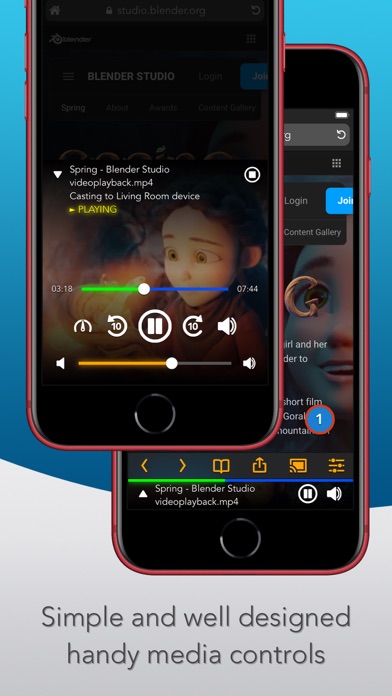
You can access the website where the media is embedded by typing the site address directly into the search bar or through the search results that will be provided with the selected search engine and suggestion support. Tiny Cast detects the media links on the page, if any, and notifies you in the lower right corner of your screen. Whenever you touch this notification, information about the detected media will be listed with a media preview image if possible. You can cast the media you want to play from this list to your TV via Chromecast™. When the media being cast, you can use the media control interface, which appears below the screen for playback, pause, forward / rewind, volume on / off operations and subtitle selection (if media has subtitles). During playback, you can send the application to the background and lock your device. You can also play, pause, fast forward / rewind, and turn on / off the sound without unlock your device, using controls that appear on the lock screen while the media cast.
◉ Supported media formats • Live and playback HLS video streams are supported for cast. • Many media files such as mp4, m3u8, mkv, mpg, mp3, wav, ogg are supported for cast.
◉ Supported cast devices • Chromecast™, Chromecast2™, Chromecast Ultra™, Chromecast Audio™ • Smart TVs which has built in Chromecast™. (Vizio, Sharp, Sony, Toshiba, Philips, Polaroid, Skyworth, Soniq etc.) To check all Chromecast™ built in Smart TVs You can visit the: https://www.google.com/chromecast/built-in/tv/
◉ Chromecast™ Restrictions • Chromecast™ and its variants support only mp4, m3u8, mpd, webm
◉ General features • Built-in ad blocker. • Built-in pop-up blocker. • Media History. • Web History. • Favorites page. • Customizable home page. • Desktop site request option. • Dark and transparent theme option.
◉ Important points • Detected media could be programmed to run for a certain period of time by the publisher and this types of links could be expired and may not work as expected. To overcome this issue and detecting the working media link, it may be necessary to renew the web page where the media placed. • If Tiny Cast was not detect any Chromecast™ device even though in your local network, it may be necessary to restart your phone / tablet or router modem to overcome this problem. • Please make sure the Wi-Fi signal is strong enough. • Make sure that the media you want to cast is supported by your Chromecast™. Unsupported formats may cause problems. Please refer to the Chromecast™ specifications.
◉ Application Restrictions • This app does not support YouTube because of its terms of service. • This application does not reflect the device screen.
◉ Support • For any question or advice, please contact us from support@e-bilge.com
Each subscription will automatically renew 3 days before the expiration date for
the same time period. Subscriptions can be cancelled at any time before the renewal.