AppBrain
AppBrain
  • Apps
  • Apps being viewed right now Trending apps today Most popular apps All-time most installed apps Top rated apps iPhone and iPad apps
  • Intelligence ▾
    Intelligence overview → Track any Android app or your whole market
    Track & analyze
    Keyword Tracker & OptimizerTrack & improve Play rankings App Performance ReportOne-off PDF for any app StatisticsFree Android & Play market stats
    Promote your app
    Featured Apps App Links
  • Intelligence
  • Pricing
  • Dashboard
  • Sign up
  • Log in
App Store Apps > Productivity > Tiny Docs: PDF Editor
Tiny Docs: PDF Editor icon

Tiny Docs: PDF Editor

by James Dassoulas · Productivity · Free
On the App Store since April 2026 · Data updated 2026-10-08
App Store

Tiny Docs: PDF Editor is made and published by James Dassoulas. AppBrain is an independent app data site and isn't affiliated with James Dassoulas. The app name, icon, screenshots and description belong to James Dassoulas and are shown as published on the App Store.

AppBrain's verdict

Last updated
September 29, 2026

Rankings

App Store top charts

App Store Rankings for Tiny Docs: PDF Editor

This app is not ranked

Competitors

Similar apps and more from James Dassoulas

Alternatives to Tiny Docs: PDF Editor

Mp3 Editor - Music Editor icon Mp3 Editor - Music Editor
Ramkumar Velmurugan
0.0
Free
PDF Scanner & Converter icon PDF Scanner & Converter
Followal Infotech LLP
3.0
Free
2 ratings
Deep Search & Chat-AI ManyChat icon Deep Search & Chat-AI ManyChat
春霞 梁
0.0
Free
PDF Compressor : Compress Size icon PDF Compressor : Compress Size
Soufiane Bouziane
0.0
Free
MyNotes - Notes with Lock icon MyNotes - Notes with Lock
Heyou Co., Ltd.
4.7
Free
47 ratings
Opal PRO, Social Media Blocker icon Opal PRO, Social Media Blocker
IT ForYou
4.6
Free
38 ratings
File Manager Document Explorer icon File Manager Document Explorer
颖欣 李
4.7
Free
33 ratings
SpeechX-Natural Voices icon SpeechX-Natural Voices
ErxiangHeyi Information
0.0
Free

More from James Dassoulas

Readio icon Readio
James Dassoulas
0.0
Free

Releases

Updates seen on the App Store
Version
2.2
Launched
April 2026

No changelog data

User feedback

Ratings and reviews on the App Store

Comments on Tiny Docs: PDF Editor for iOS

We don't have enough comments to show example comments. Please check back later.

Technology

Found in the app by AppBrain
Price
Free
App size
59.4 MB
Content rating
Everyone

Technologies used by Tiny Docs: PDF Editor

About the app and developer

About Tiny Docs: PDF Editor

Tiny Docs: PDF Editor is a productivity app developed by James Dassoulas.

What is the rating of Tiny Docs: PDF Editor?

Tiny Docs: PDF Editor has no ratings yet.

Is Tiny Docs: PDF Editor free?

Tiny Docs: PDF Editor is free. The app size is 59.36 MB. The latest version available is 2.2. The last update was on September 29, 2026.

What are the requirements for Tiny Docs: PDF Editor?

The app has a content rating of Everyone. The app has been available on the App Store since April 2026.

Developer information for James Dassoulas

James Dassoulas

Address:

Frequently asked questions about Tiny Docs: PDF Editor

Is Tiny Docs: PDF Editor free?

Yes. Tiny Docs: PDF Editor is free on the App Store.

Is Tiny Docs: PDF Editor still available?

Yes. Tiny Docs: PDF Editor is on the App Store, and the last update we saw was on September 29, 2026.

How large is Tiny Docs: PDF Editor?

Tiny Docs: PDF Editor is 59.36 MB.

Is Tiny Docs: PDF Editor suitable for children?

App Store rates the content of Tiny Docs: PDF Editor as suitable for everyone.

Who made Tiny Docs: PDF Editor?

Tiny Docs: PDF Editor was developed by James Dassoulas. It is listed in the productivity category on the App Store.

What are the best alternatives to Tiny Docs: PDF Editor?

People looking at Tiny Docs: PDF Editor also look at these productivity apps: Mp3 Editor - Music Editor, PDF Scanner & Converter, Deep Search & Chat-AI ManyChat, PDF Compressor : Compress Size, MyNotes - Notes with Lock.

Share Tiny Docs: PDF Editor

Store listing

By James Dassoulas, from the App Store
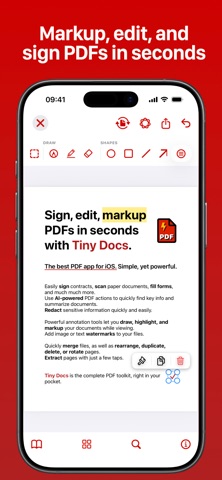
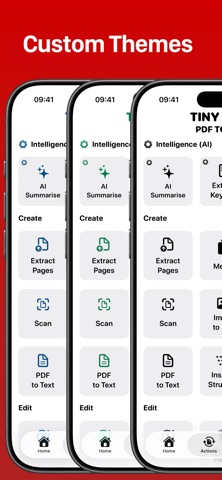
Tiny Docs: PDF Editor Screenshot 1 of 10
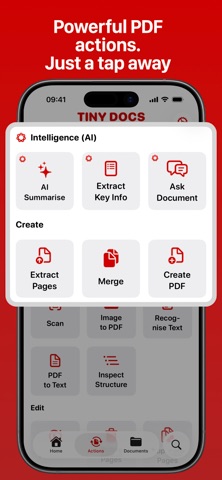
Tiny Docs: PDF Editor Screenshot 2 of 10
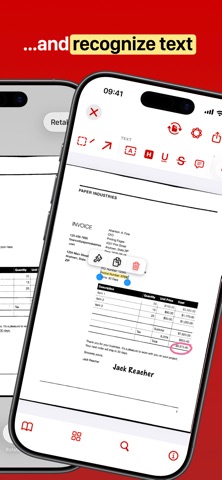
Tiny Docs: PDF Editor Screenshot 3 of 10
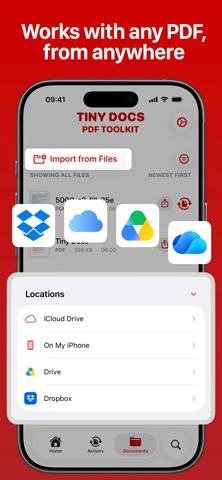
Tiny Docs: PDF Editor Screenshot 4 of 10
Tiny Docs: PDF Editor Screenshot 5 of 10
Tiny Docs: PDF Editor Screenshot 6 of 10
Tiny Docs: PDF Editor Screenshot 7 of 10
Tiny Docs: PDF Editor Screenshot 8 of 10
Tiny Docs: PDF Editor Screenshot 9 of 10
Tiny Docs: PDF Editor Screenshot 10 of 10
Screenshots by James Dassoulas, from the the App Store listing
Description by James Dassoulas Written by the developer, not by AppBrain. Click to read.
Tiny Docs is a fast, well-designed PDF editor built for everyday work. View, annotate, sign, merge, split, and compress your documents in just a couple of taps.
Thoughtfully designed to be the best PDF viewer for iOS and iPad OS.

Mark up documents with a full set of annotation tools: highlight, underline, add notes, draw, and sign directly on the page. Combine multiple files into one, split a document into parts, or shrink file sizes for easy sharing.

Tiny Docs also brings AI into your workflow when you need it. AI Summarise gives you an instant overview of any document. Ask Document lets you ask a question and get an answer pulled straight from the file, without scrolling through pages to find it. Extract Key Info automatically surfaces the names, dates, and numbers that matter most.

Whether you're reviewing contracts, marking up lecture notes, or clearing out a backlog of scanned paperwork, Tiny Docs keeps things simple and gets you through your documents faster.

Tiny Docs is the best PDF toolkit in your pocket.

INTELLIGENCE (AI)

• Summarise — Summarise a PDF with AI
• Extract Key Info — Pull out dates, names, and key facts from a document using AI
• Ask Document — Ask questions about a PDF and get answers powered by AI

CREATE

• Scan — Scan a document with your camera and save it as a PDF instantly.
• Recognise Text (OCR) — Extract searchable text from a scanned PDF using optical character recognition.
• Image to PDF — Convert one or more photos into a single PDF document.
• Create PDF — Build a PDF from scratch by adding blank pages. Plain | Lined | Isometric | Graph
• Merge — Combine multiple PDFs into one seamless document.
• Extract Pages — Pull specific pages out of a PDF and save them as a new file, or as individual files.
• PDF to Text — Export the text content of a PDF as a plain .txt file.
• Inspect Structure — View the raw PDF document structure tree.

EDIT

• Watermark — Add images or text as watermarks to your documents.
• Page Numbers — Add custom page numbers to a PDF.
• Delete Pages — Remove unwanted pages from a PDF.
• Duplicate Pages — Copy pages within a PDF.
• Rearrange Pages — Drag and drop to reorder the pages of a PDF.
• Rotate Pages — Rotate one or more pages to the correct orientation.
• Reverse Pages — Flip the entire page order of a PDF in one tap.
• Compress — Reduce the file size of a PDF while preserving quality.
• Flatten — Burn annotations and form fields permanently into the PDF.
• Edit Metadata — Edit the title, author, and subject of a PDF document.
• Add Blank Pages — Insert blank pages anywhere in a PDF.
• Resize Pages — Scale pages to a different standard paper size.

SECURITY

• Sign Document — Add your signature or initials to a PDF as a moveable annotation.
• Lock Document — Password-protect a PDF to restrict access.
• Remove Password — Remove an existing password from a PDF.

IMAGE

• PDF to Image — Export PDF pages as high-quality image files. (JPG, PNG)


EULA: https://www.apple.com/legal/internet-services/itunes/dev/stdeula/
Official page on the App Store
Apps other people are watching Popular Productivity Apps Today's trending apps Price drops on Google Play Top new apps
Mp3 Editor - Music Editor icon Mp3 Editor - Music Editor
PDF Scanner & Converter icon PDF Scanner & Converter
Deep Search & Chat-AI ManyChat icon Deep Search & Chat-AI ManyChat
PDF Compressor : Compress Size icon PDF Compressor : Compress Size
MyNotes - Notes with Lock icon MyNotes - Notes with Lock
Opal PRO, Social Media Blocker icon Opal PRO, Social Media Blocker
File Manager Document Explorer icon File Manager Document Explorer
SpeechX-Natural Voices icon SpeechX-Natural Voices
Overview Alternatives Reviews Rankings Technology
AppBrain Intelligence premium content

Subscribe now to get full and unlimited access to AppBrain Intelligence. You'll have access to:

  • App Intelligence dashboard (performance timeline, competitor comparison, country rankings, insight cards)
  • Detailed ranking data per app
  • Full timeline per developer
  • Device market shares data per country
  • Unlimited keyword tracking
1 Month

$75/mo
(billed every month)

SAVE 0%
Subscribe
3 Months

$65/mo
($195 billed every 3 months)

SAVE 13%
Subscribe
1 Year

$57.50/mo
($690 billed every year)

SAVE 23%
Subscribe
Each subscription will automatically renew 3 days before the expiration date for the same time period. Subscriptions can be cancelled at any time before the renewal.

AppBrain is an app data site, we track rankings, ratings, installs for all apps and games on Google Play and the App Store. AppBrain doesn't host app files or APKs, all install links go directly to the official store. All trademarks are owned by their respective owners.

More apps

  • Top Android apps being viewed
  • Accupedo Pedometer
  • FunCall - Voice Changer Calls
  • The Operator

App statistics

  • Android statistics
  • Google Play Developer stats
  • Trending Android Apps
  • Trending iOS apps
  • Top popular Apps
  • Buy the best Android phone
  • Buy & sell app businesses

About AppBrain

  • Contact
  • Privacy
  • Documentation
  • DMCA takedowns
  • Articles
  • Blog
  • Monetization tips: Understanding your eCPM
© 2010-2026 - AppBrain