

Tiny Intercom
Tiny Intercom is made and published by Eugene Gershnik. AppBrain is an independent app data site and isn't affiliated with Eugene Gershnik. The app name, icon, screenshots and description belong to Eugene Gershnik and are shown as published on the App Store.
AppBrain's verdict
- Rating on App Store
- 5.00
- 1 ratings
- Last updated
- June 19, 2026
It doesn't have enough ratings yet to judge what users think.
Rankings
App Store top chartsApp Store Rankings for Tiny Intercom
Competitors
Similar apps and more from Eugene GershnikAlternatives to Tiny Intercom


Releases
Updates seen on the App Store- Version
- 1.23
- Launched
- November 2025
No changelog data
User feedback
Ratings and reviews on the App StoreComments on Tiny Intercom for iOS
We don't have enough comments to show example comments. Please check back later.
Technology
Found in the app by AppBrain- Price
- Free
- App size
- 2.64 MB
- Content rating
- Everyone
Technologies used by Tiny Intercom
About the app and developer
About Tiny Intercom
Tiny Intercom is an utilities app developed by Eugene Gershnik.
User Ratings
Tiny Intercom is rated 5.00 out of 5 stars. The rating is based on one rating ratings.
App Information
Tiny Intercom is freely available from the App Store. The app size is 2.64 MB. The latest version available is 1.23. The last update was on June 19, 2026.
Technical Requirements
The app has a content rating of Everyone. The app has been available on the App Store since November 2025.
Developer information for Eugene Gershnik
Address:
Frequently asked questions about Tiny Intercom
Is Tiny Intercom free?
Yes. Tiny Intercom is free on the App Store.
Is Tiny Intercom still available?
Yes. Tiny Intercom is on the App Store, and the last update we saw was on June 19, 2026.
How large is Tiny Intercom?
Tiny Intercom is 2.64 MB.
Is Tiny Intercom suitable for children?
App Store rates the content of Tiny Intercom as suitable for everyone.
How do people rate Tiny Intercom?
Tiny Intercom has one rating of 5.00 stars on the App Store.
Who made Tiny Intercom?
Tiny Intercom was developed by Eugene Gershnik. It is listed in the utilities category on the App Store.
What are the best alternatives to Tiny Intercom?
People looking at Tiny Intercom also look at these utilities apps: Signal (intercom), CloudView Player, Pawlerts: Pet Recall Alerts, Better Life-Remote control car, Helm Link.
Store listing
By Eugene Gershnik, from the App Store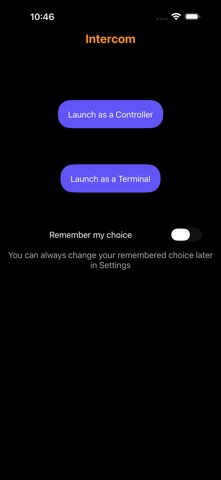


Description by Eugene Gershnik Written by the developer, not by AppBrain. Click to read.
The app can run in two modes: terminal and controller.
The terminal is what you put in the remote room. In this mode, the app runs continuously (turning the screen off is OK), transmitting audio in both directions.
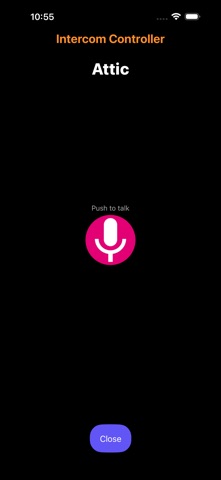
The controller mode is for your everyday phone, tablet or Mac. In this mode, you can connect to terminals to listen and talk through them.
The app works entirely on your local network, with no accounts, servers or cloud services involved. Connecting to a terminal requires pairing using an access code that is visible only on the terminal. All communications between controllers and terminals are encrypted.
You can have as many terminals and controllers as you wish. Multiple controllers can connect to the same terminal at the same time (and speak together), and a controller can connect to multiple terminals (but not at the same time).
If desired for privacy or other reasons, it is possible to set a terminal to an "announcement only" mode where you can speak via the terminal but not listen to it. Toggle "Mute microphone in terminal" in the iOS app settings to activate this mode.
TIP: You can use Apple Configurator to lock your terminal device into a “single app mode” (aka kiosk mode) to make it run just the intercom terminal app and not allow switching out of it.
Features and requirements:
• Audio only. This app does not support video.
• All devices must be on the same local Wi-Fi network to communicate.
• In order to connect to a terminal, a controller must first be paired with it. The pairing code is displayed on the terminal (press the "key" button) and can be scanned as a QR code or entered manually in the controller app.
• The app can also run in either controller or terminal mode on Apple Silicon Macs.
• A companion Apple Watch app lets you connect to terminals from your wrist. See below for watch app functionality and limitations.
• There are no in-app purchases or ads of any kind.
• Versions of this app are available for other platforms in case you have a mix of iOS and other devices. See the developer site for details.
Apple Watch support:
The companion watch app can be used as a controller to connect to terminals, but not as a terminal.
Please note:
• The paired phone must be on, nearby and connected to the local network where your terminals are.
• New terminals must be paired from the phone first. The watch app itself is unable to pair.
• Updates to terminal names or availability may take a moment to appear on the watch. They are not as instantaneous as on the phone.
• The UI when connected to a terminal is the standard Apple Watch "in-call" UI rather than a custom one as on the phone. Just like on the phone, you can either listen or talk, but not at the same time. Tap the "mute" button to switch between listening and talking.
• The watch app is not available in countries/territories that prohibit use of the Apple CallKit framework. If you start the watch app in such a country/territory, you will receive a "This app is not available in your country or region" error message.