

TinyCelsius is made and published by Dion Software, LLC. AppBrain is an independent app data site and isn't affiliated with Dion Software, LLC. The app name, icon, screenshots and description belong to Dion Software, LLC and are shown as published on the App Store.
AppBrain's verdict
- Rating on App Store
- 5.00
- 1 ratings
- Last updated
- July 17, 2026
It doesn't have enough ratings yet to judge what users think.
Rankings
App Store top chartsApp Store Rankings for TinyCelsius
Competitors
Similar apps and more from Dion Software, LLCAlternatives to TinyCelsius


More from Dion Software, LLC

Releases
Updates seen on the App Store- Version
- 1.0
- Launched
- July 2026
No changelog data
User feedback
Ratings and reviews on the App StoreComments on TinyCelsius for iOS
We don't have enough comments to show example comments. Please check back later.
Technology
Found in the app by AppBrain- Price
- Free
- App size
- 3.70 MB
- Content rating
- Everyone
Technologies used by TinyCelsius
About the app and developer
About TinyCelsius
TinyCelsius is a weather app developed by Dion Software, LLC.
User Ratings
TinyCelsius is rated 5.00 out of 5 stars. The rating is based on one rating ratings.
App Information
TinyCelsius is freely available from the App Store. The app size is 3.70 MB. The latest version available is 1.0. The last update was on July 17, 2026.
Technical Requirements
The app has a content rating of Everyone. The app has been available on the App Store since July 2026.
Developer information for Dion Software, LLC
Address:
Store listing
By Dion Software, LLC, from the App Store


Description by Dion Software, LLC Written by the developer, not by AppBrain. Click to read.
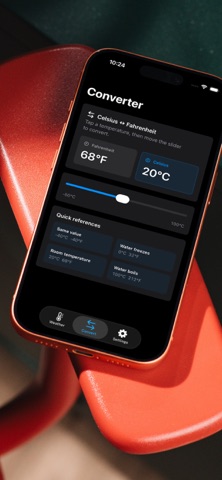
See Celsius and Fahrenheit together without mental conversion. On Mac, TinyCelsius lives in the menu bar near the clock. On iPhone, it gives you a simple weather view and widgets for the Home Screen and Lock Screen.
Use your current location or set a city. TinyCelsius loads live weather, shows the current condition, and lets you choose whether Celsius or Fahrenheit appears first. On Mac, you can keep the menu bar item compact, show or hide the condition icon, and refresh from the panel. On iOS, widgets can show the latest temperature pair and optional refresh time.
Features:
* Celsius and Fahrenheit side by side
* Current location or pinned city
* Mac menu bar weather item
* iPhone Home Screen and Lock Screen widgets
* Weather condition symbol and update time
* Unit order, decimal, and compact menu bar controls
* Local weather powered by WeatherKit
TinyCelsius is intentionally focused: current conditions, quick reading, and no account to manage. All data is on device and using Apple Weather for realtime weather information – we don't have access to your location at any time.