TinyRiff is an overall app developed by KEISUKE TONE.
Download Statistics
User Ratings
The app has no ratings yet.
App Information
TinyRiff is FREE to download. The APK download size is 6.06 MB. The latest version available is 1.502. The last update was on June 14, 2026.
Technical Requirements
The app has a content rating of Everyone. The app has been available on Google Play 5 weeks ago.
Description
TinyRiff is a performance pad app for triggering chords, backing patterns, and layered sampler performances from a single pad—ideal for practice, songwriting, and live performance. (The app has been renamed from TinyTone to TinyRiff as of version 1.5)
Use TinyRIff as a MIDI pad for GarageBand, synthesizers, electric pianos, samplers, and other MIDI gear. With the built-in “TinyTone” sound engine, you can also play instantly without any external devices or MIDI connections. TinyTone can also be used as a chord input pad within Mac DAW environments.
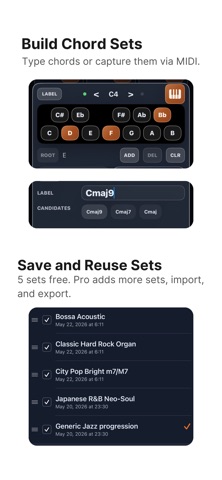
Chords can be entered not only from external MIDI input, but also directly on the app screen. Up to four key transpose settings (key shift / octave shift) can be stored within a single pad set, allowing you to switch chord arrangements for intros, verses, choruses, outros, and other musical sections from the same pad layout.
TinyRIff can also load sound data created with the separate “TinyTone” app, allowing you to use original sounds directly inside TinyRIff.
With TinyRIff Yearly (annual subscription), you can save, share, and import up to 100 pad layout sets. The free version supports saving up to 5 sets.
[Added in version 1.5] New “Riff-Pattern” and “Step Sequencer” modes have been added. • Riff Pattern: Freely assign notes across 16 steps, including upper, middle, and lower notes within a chord. TIE input is also supported. • Step Sequencer: Create 16-step patterns with support for ties and rests. • Each mode includes 4 slots that can be switched during performance. • Supports real-time performance together with slider control and transpose. • Created patterns can be imported and exported together with pad presets, and shared via AirDrop.
Improved MIDI connectivity with GarageBand and AUM. • To use GarageBand or AUM, select "VIRTUAL MIDI" as the MIDI output. • "VIRTUAL MIDI" sends MIDI data to all connected host apps. When using GarageBand and AUM simultaneously, disable TinyRiff MIDI input on the host you do not want to control.
Each subscription will automatically renew 3 days before the expiration date for
the same time period. Subscriptions can be cancelled at any time before the renewal.