Tockall is a productivity app developed by JAEYOUNG LEE.
What is the rating of Tockall?
Tockall has no ratings yet.
Is Tockall free?
Tockall is free. The app size is 12.80 MB. The latest version available is 1.2.0. The last update was on November 1, 2026.
What are the requirements for Tockall?
The app has a content rating of Everyone. The app has been available on the App Store since September 2026.
Tockall is made and published by
JAEYOUNG LEE.
AppBrain is an independent app data site and isn't affiliated with JAEYOUNG LEE.
The app name, icon, screenshots and description belong to JAEYOUNG LEE and are shown as published on the App Store.
Description by JAEYOUNG LEE(from the App Store)
Nobody picks up unknown numbers anymore. Between robocalls, spam labels, and call screening, a phone ringing from a number nobody recognizes simply rings out.
Tockall changes the order of operations. Send a short heads-up text first — "Hi Sarah, I'll be calling from this number in about ten minutes" — then place the call. Your name arrives before your number does, and the call gets answered.
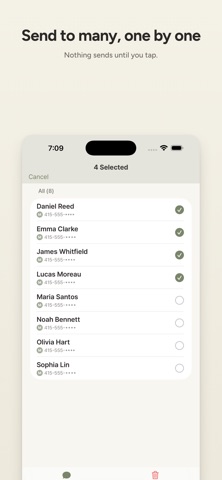
HOW IT WORKS 1. Pick one person, or a whole list. 2. Choose a saved message. The recipient's name fills in automatically. 3. Review, send, and dial. One continuous flow, no copying and pasting between apps.
MADE FOR PEOPLE WHO CALL FOR A LIVING • Contractors, technicians, and drivers confirming an arrival window • Real estate and insurance agents reaching new leads • Front desks at clinics, salons, studios, and tutoring centers • Anyone whose first call to a stranger is the hardest one to land
SAVED MESSAGES Write it once, use it for years. Keep as many message templates as you like — on my way, running late, confirming tomorrow, returning your inquiry. Each one fills in the recipient's name and your own, so nothing reads like a blast.
BRING YOUR LIST IN • Spreadsheet and CSV files • Paste a list straight from the clipboard • Photograph a business card or a sign-in sheet • Pull from the contacts already on your iPhone Match the columns, check the preview, and fix anything before it saves.
WORK THROUGH A LIST Line up several people and move through them back to back — send, call, next. Useful for a morning of appointment confirmations or a round of callbacks.
DATA STORAGE AND ICLOUD SYNC Your contacts, message templates and settings are stored on your device. When iCloud is available, contacts, templates and some settings sync through your Apple account so you can use them on another iPhone. If iCloud is unavailable, your data stays on this device. No Tockall account or sign-up is required. We do not receive your contact list.
NO ADS None today, none later.
WHAT IT COSTS For free, you can send a bulk-message sequence to up to 5 recipients and save up to 30 message templates. A one-time purchase removes both limits. Individual messaging and calling, contact import and contact storage remain free with no app-imposed limit. No subscription, no monthly fee, no credits to top up.
Choose manual sending in the iOS message composer or automatic bulk sending with Shortcuts. Calls use the iPhone dialer. Standard carrier messaging rates apply.
Each subscription will automatically renew 3 days before the expiration date for
the same time period. Subscriptions can be cancelled at any time before the renewal.