

Todoist: To Do List & Calendar
Todoist: To Do List & Calendar is made and published by Todoist Inc. AppBrain is an independent app data site and isn't affiliated with Todoist Inc. The app name, icon, screenshots and description belong to Todoist Inc. and are shown as published on the App Store.
AppBrain's verdict
EstablishedLoved by users- Best rank
- #18
- Top Grossing, Russia
- Rating on App Store
- 4.80
- 130,354 ratings
- Last updated
- October 26, 2026
Users love it: 4.8 stars from 130,354 ratings. Its best ranking is #18 in Top Grossing, Productivity in Russia.
Rankings
App Store top charts- Highest rank
- #18
- Chart
- Top Grossing
- Productivity
- Country
- Russia
App Store Rankings for Todoist: To Do List & Calendar
Top rankings
| Rank | Country | Category | List |
|---|---|---|---|
| 18 | Russia | Productivity | Top Grossing |
| 20 | Finland | Productivity | Top Grossing |
| 50 | Germany | Productivity | Top Grossing |
| 88 | United States | Productivity | Top Grossing |
| 74 | France | Productivity | Top Grossing |
| 39 | Poland | Productivity | Top Grossing |
| 82 | Canada | Productivity | Top Grossing |
| 45 | Austria | Productivity | Top Grossing |
| 94 | Japan | Productivity | Top Grossing |
| 49 | Sweden | Productivity | Top Grossing |
Ranking history in Russia
Competitors
Similar apps and more from Todoist Inc.Alternatives to Todoist: To Do List & Calendar


More from Todoist Inc.


Releases
Updates seen on the App Store- Version
- 26.10.27
- Launched
- November 2012
No changelog data
User feedback
Ratings and reviews on the App StoreComments on Todoist: To Do List & Calendar for iOS
We don't have enough comments to show example comments. Please check back later.
Technology
Found in the app by AppBrain- Price
- Free
- App size
- 374.3 MB
- Content rating
- Everyone
Technologies used by Todoist: To Do List & Calendar
About the app and developer
About Todoist: To Do List & Calendar
Todoist: To Do List & Calendar is a productivity app developed by Todoist Inc.
User Ratings
Todoist: To Do List & Calendar is rated 4.80 out of 5 stars. The rating is based on 130 thousand ratings.
App Information
Todoist: To Do List & Calendar is freely available from the App Store. The app size is 374.34 MB. The latest version available is 26.10.27. The last update was on October 26, 2026.
Technical Requirements
The app has a content rating of Everyone. The app has been available on the App Store since November 2012.
Developer information for Todoist Inc.
Address:
Frequently asked questions about Todoist: To Do List & Calendar
Is Todoist: To Do List & Calendar free?
Yes. Todoist: To Do List & Calendar is free on the App Store.
Is Todoist: To Do List & Calendar still available?
Yes. Todoist: To Do List & Calendar is on the App Store, and the last update we saw was on October 26, 2026.
How large is Todoist: To Do List & Calendar?
Todoist: To Do List & Calendar is 374.34 MB.
Is Todoist: To Do List & Calendar suitable for children?
App Store rates the content of Todoist: To Do List & Calendar as suitable for everyone.
How do people rate Todoist: To Do List & Calendar?
Todoist: To Do List & Calendar scores 4.80 out of 5 stars, from 130,354 ratings on the App Store.
Who made Todoist: To Do List & Calendar?
Todoist: To Do List & Calendar was developed by Todoist Inc. It is listed in the productivity category on the App Store.
What are the best alternatives to Todoist: To Do List & Calendar?
People looking at Todoist: To Do List & Calendar also look at these productivity apps: TickTick:To-Do List & Calendar, Do! – Simple To Do List, To Do List MinimaList & Widget, Timepage: Calendar Planner, Fantastical Calendar.
Store listing
By Todoist Inc., from the App Store



Description by Todoist Inc. Written by the developer, not by AppBrain. Click to read.
Join 50 million+ people and teams who trust Todoist as their second brain to organize work, life, and everything in between.
→ Turn chaos into clarity.
Clarity doesn’t come from bloated software with a bunch of bells and whistles; it comes from getting everything out of your head and into a tool that’s easy to set up and easy to use. Todoist helps you organize what matters so you can focus on doing, not configuring.
→ Capture naturally.
Your brain is for having ideas, not holding them.
› Ramble to record: Don’t type, talk! Describe your task in natural language, and watch Todoist instantly structure it in the right projects with the right due dates.
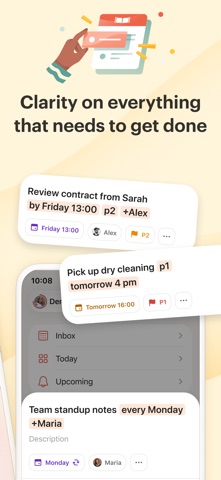
› Quick Add: The fastest way to add a new task, complete with dates, labels, reminders, and more. Just type "Submit report every Friday at 4pm #Work" and Todoist handles the rest.
→ Professional power, no overhead.
Get the professional tools you need without the "enterprise" learning curve.
▪ Flexible views: View any project as a list for quick scanning, as a board for visual workflow, or as a calendar to plan your week. Switch between views instantly to match how you think and work.
▪ Recurring tasks: Build powerful habits. From "Pay rent on the 1st" to "Team Sync every Monday," never let a commitment slip.
▪ Project clarity: Organize anything from a home renovation to a product launch with sub-tasks and sections. Use labels to filter across projects, and set priorities to focus on what matters.
→ Lightweight teamwork.
Most project tools require an education to use. Todoist is intuitive from day one.
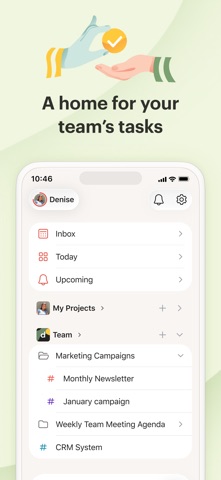
+ Delegate with Ease: Share projects with anyone, assign tasks, and set deadlines. Everyone sees what to do and when.
+ Stay in Sync: Real-time comments and file uploads keep communication all in one place, not scattered across emails, text messages, docs, and DMs.
→ Built For iOS.
Add tasks via Siri, check your tasks from your home screen, save links as you browse, and capture ideas from your Apple Watch. Location-based reminders make sure nothing slips through the cracks.
→ Works Where You Work.
Todoist syncs instantly across iPhone, iPad, Apple Watch, Mac, and every other device, browser or email add-on you use. Capture ideas on your phone, plan on your tablet, and execute on your desktop with everything always in sync.
–
Questions? Visit our extensive help center at todoist.com/help