

Tomato Calendar-Daily Schedule
Tomato Calendar-Daily Schedule is made and published by JingKui. AppBrain is an independent app data site and isn't affiliated with JingKui. The app name, icon, screenshots and description belong to JingKui and are shown as published on the App Store.
AppBrain's verdict
- Rating on App Store
- 5.00
- 1 ratings
- Last updated
- August 19, 2025
It doesn't have enough ratings yet to judge what users think.
Rankings
App Store top chartsApp Store Rankings for Tomato Calendar-Daily Schedule
Competitors
Similar apps and more from JingKuiAlternatives to Tomato Calendar-Daily Schedule








More from JingKui



Releases
Updates seen on the App Store- Version
- 2.3.2
- Launched
- March 2023
No changelog data
User feedback
Ratings and reviews on the App StoreComments on Tomato Calendar-Daily Schedule for iOS
We don't have enough comments to show example comments. Please check back later.
Technology
Found in the app by AppBrain- Price
- Free
- App size
- 58.8 MB
- Content rating
- Everyone
Technologies used by Tomato Calendar-Daily Schedule
About the app and developer
About Tomato Calendar-Daily Schedule
Tomato Calendar-Daily Schedule is an utilities app developed by JingKui.
User Ratings
Tomato Calendar-Daily Schedule is rated 5.00 out of 5 stars. The rating is based on one rating ratings.
App Information
Tomato Calendar-Daily Schedule is freely available from the App Store. The app size is 58.80 MB. The latest version available is 2.3.2. The last update was on August 19, 2025.
Technical Requirements
The app has a content rating of Everyone. The app has been available on the App Store since March 2023.
Developer information for JingKui
Address:
Frequently asked questions about Tomato Calendar-Daily Schedule
Is Tomato Calendar-Daily Schedule free?
Yes. Tomato Calendar-Daily Schedule is free on the App Store.
Is Tomato Calendar-Daily Schedule still available?
Yes. Tomato Calendar-Daily Schedule is on the App Store, and the last update we saw was on August 19, 2025.
How large is Tomato Calendar-Daily Schedule?
Tomato Calendar-Daily Schedule is 58.80 MB.
Is Tomato Calendar-Daily Schedule suitable for children?
App Store rates the content of Tomato Calendar-Daily Schedule as suitable for everyone.
How do people rate Tomato Calendar-Daily Schedule?
Tomato Calendar-Daily Schedule has one rating of 5.00 stars on the App Store.
Who made Tomato Calendar-Daily Schedule?
Tomato Calendar-Daily Schedule was developed by JingKui. It is listed in the utilities category on the App Store.
What are the best alternatives to Tomato Calendar-Daily Schedule?
People looking at Tomato Calendar-Daily Schedule also look at these utilities apps: Lotte Calculator, 刷刷题-拍高数&题库错题本制作工具, 七麦数据 - 中国专业的移动推广数据分析平台ASO100, Easy Radio - Live AM FM App, 企名片-查企业、查机构.
Store listing
By JingKui, from the App Store



Description by JingKui Written by the developer, not by AppBrain. Click to read.
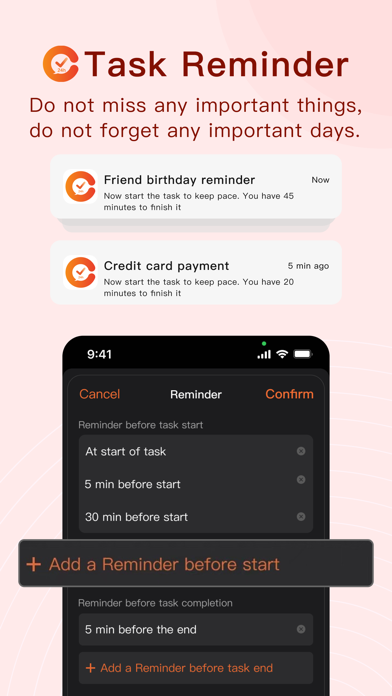
1.Reminder
You can add one or more task reminders to a task. For example, the due date of your credit card; the date to prepare gifts for a friend’s birthday; the alarm to wake you up in the morning; You can also create a reminder to drink eight glasses of water per day or go to bed early every day to keep you healthy. There are many other examples, such as plant watering; pet feeding; refrigerator restocking, and so on.
2.Timeline display
2.1 Display the daily tasks through the timeline
2.2 For the time span that is too large, Tomato Calendar will add "unallocated time" to let you clearly see the large time block. When a friend or team makes an appointment for you, you can clearly see that you have free time.
2.3 For time conflicts, there will be prompts on the time axis to facilitate you to better allocate your time.
3.Create tasks with voice intelligence
Sometimes it is inconvenient for you to type to create tasks, or you feel that typing to create tasks is too time-consuming, using the voice creation function can help you create tasks intelligently. For example: Call Mr. Wang at 15:00 tomorrow. Tomato Calendar will automatically remind you to call Mr. Wang at 15:00 tomorrow.
4.Custom task importance
Use your favorite task color to mark the importance of tasks
5.Actual compliance rate
When a task is completed, you can set it yourself and the actual completion rate, which will be displayed in red, green and yellow. Green indicates that the expected goal was achieved, and red indicates that the expected goal was not achieved.
6.Future
You can put some tasks that you haven't figured out when to start into the future collection box. When you are ready to start, just assign the start time and date. The future inbox is displayed through the four quadrants of time management. Tasks are divided into important and urgent, important but not urgent, not important but urgent, and not important but not urgent.
7.Subtasks
Sometimes a task takes a lot of time or has a lot of chores. At this time, you can split it into several subtasks
8.Location
8.1 offline location
You can add location information so that you can quickly view it when you start the task
8.2 online location
Sometimes you will have an online interview or online meeting. At this time, you can choose some meeting platforms, such as telephone, zoom, Google Meet, Microsoft Teams, video interviews directly hired by boss, Tencent meetings, DingTalk, Feishu etc.
9.Pomodoro
Use the Pomodoro method to make good use of 25 minutes. Of course, you can also set the time you need to focus on yourself, our recommendation is 25 minutes
10.Categorize
You can distinguish different types of tasks through different categories, such as work tasks, study tasks, family tasks, life tasks, and health tasks. Everything is defined by yourself. You can also view all or select a different category.
Download Tomato Calendar today and enjoy features including:
1. Daily Schedule
2. Future Plan
3. Custom more reminders that suit your habits *
4. More repeating task settings *
5. Create Task by Voice *
6. Multi Calendars, separate work,study and life *
7. Cloud Synchronization *
8. Remarks add Pictures *
9. Upgrade APP ICON *
Tomato Calendar is free to download, and features marked with a star (*) require Pro Tomato Calendar — an optional subscription.
https://tomato.cc/about/terms
Privacy Policy:https://tomato.cc/about/privacy
Terms of Use:https://tomato.cc/about/tos